



The month of June saw SEOs scrambling to keep up with a number of updates rolled out by Google, namely core, page experience, and spam updates. These updates also had the SEOs scratching their heads, trying to figure out the exact cause of the change in rankings.
While the rolling out of the core update finished on the 12th of June, Google started rolling out the page experience update right on its heels, on the 15th of June. This roll-out is expected to go on right until the end of August. Also, Google went on to roll out a two-part spam update – part one of the update began on the 23rd of June, and part two began on the 28th of June.
What These Updates Signify
The page experience update has a lot to do with HTTPS and metrics such as the speed, responsiveness, and core web vitals. If you wish to see how this update may affect your site, the updated layout is live in all the testing tools and Google Search Console. However, you need to bear in mind that the Search Console data is delayed, as it is based on the CrUX (Chrome UX Report) data aggregated over the past 28 days.
As this roll-out is going to last months, chances are you may not see any drastic shift in a site’s visibility. This should give you the time to work on your site’s metrics so that its performance meets your expectations.
Unlike core and page experience updates, spam updates begin and end on the same day, which means your website rankings may be impacted almost immediately. Hence, if a website saw any changes in rankings on the days when this two-part update rolled out, you know what may have caused it.
That said, none of our websites experienced any major shift in rankings.
Final Takeaway
Although there is a great deal of talk around these updates, it is still too early to know exactly how they will affect site rankings. As for the spam updates, the SEOs do not seem to be too impressed and feel that too many spam sites are still being ranked.
When it comes to core updates, here’s a look at all a site owner should know about Google’s core updates. Also, if you would like some more information on the page experience update that is still rolling out, keep an eye out for the updates posted on the Page Experience Blog and the Core Web Vitals & Page Experience FAQs.

Last month Google Search Central announced via Twitter “a new experience” called Search Console Insights “to help you better understand which content of yours resonates with your audiences.”
“This experience joins data from both Search Console and Google Analytics with a goal of making it easy to understand your content’s performance. Whether you are a web content creator, blogger, or a website owner, and independent of your technical expertise, it can provide you with an overview and helpful insights on how your content is performing.”

This experience will help you answer certain sample questions listed by Google.
- What are your best-performing pieces of content, and which ones are trending?
- How do people discover your content across the web?
- What do people search for on Google before they visit your content?
- Which article refers users to your website and content?
At present, you can access Search Console Insights in a couple of ways:
- Select Search Console Insights from the top of Search Console’s Overview page.
- Access it directly and save a bookmark.
- You will “soon” be able to access it in the iOS Google App by selecting Search Console Insights in the account menu. Google went on to say that they are “working to also add Android Google App support.”

What Actions To Take
Search Console and Google Analytics give a great amount of information, but if you do not have the time to regularly go through everything, it can be a bit too much. Search Console Insights filter this information, giving you a brief overview of the updates related to your site.
When it comes to SEO agencies, Search Console Insights will come in handy to help less savvy site owners see how your work is benefiting their site. This also means that you can use Search Console Insights even if you do not use Google Analytics.
To get complete insights about your content, Google suggests linking your Google Analytics property with your relevant Search Console property.
Queries, if any, can be directed to one of Google’s support channels and also at @WebCreators on Twitter or @GoogleWebCreators on Instagram.

Have a business that serves a specific location? It is important to develop an SEO strategy that can help you target local customers and rank higher in Google search. While all businesses can benefit from search engine optimization, certain industries, like Professional Service Industry (banks, accountants, attorneys, financial planners, and many others), Home Repair & Renovation Service Industry, Medical Industry, Restaurant and Food Service Industry, etc., can benefit more.
Let’s take a look at some important benefits that Local SEO offers for small as well as large businesses.
- SEO puts you up higher on Google’s search result pages and helps you get more traffic to your site.
- Other local businesses can find you easily to create a coordinated marketing campaign that can benefit both.
- SEO helps you get positive reviews, rank higher, and earn more trust.
- You can save on advertising costs if your business is sufficiently high in the rankings.
- Your business can appear in local business directories.
- Voice searchers can find your business easily.
The above-mentioned benefits give a clear answer to your question ‘why my business needs SEO?’. Let’s now understand how to create a local SEO strategy for any business.
Follow the steps given below:
- Prepare a list of keywords related to your business. For example, if you run a restaurant, your keywords can be Mexican Food, Chinese Food, etc.
- Perform an SEO audit on your site to identify any existing technical issues. If you are already aware of any issues, address them first.
- Conduct a competitive analysis using SEO tools to find out what keywords your competitors are ranking for. This analysis will help you determine which keywords are a perfect fit for your site.
- Add your location to the keywords and perform an SEO analysis to find out the search volume and keyword variations of Geo-specific Keywords (example: Mexican Food Seattle, best Mexican Food Seattle, etc.).
- Follow on-page SEO best practices to optimize your site for local search. On-page optimization would include –
- Keyword mapping of individual site pages
- Unique & relevant title and description for each page
- Informative content about your products & services
- Relevant internal links on your site pages
- Images that are appropriate & compressed
- Short & targeted URL structure
- Localized landing pages can help you get more organic searches. To create perfect landing pages, you must optimize your page headings, include keywords in page content, etc.
- Create your GMB account, and be sure to add the correct business address, contact number, images, and other details.
- List your business with other online directories to gain more customers.
- Create a Link Building Strategy to increase the ranking of your site.
- Try to generate positive reviews across the directories your business is listed in. Also, respond to negative reviews in a professional & kind manner.
Are you getting the best return out of your digital marketing?
Need an extra pair of eyes to review your online game plan? Let our experts take a look at your current state and do a comprehensive digital marketing analysis at no cost to you. Please call us at (800) 379-2829 or contact us today and we will get to work right away.




Google has always placed a great deal of importance on User Experience (UX). In fact, every Google algorithm update has been about ensuring the users can gain access to user-friendly, relevant results quickly.
Now, with the introduction of Core Web Vitals, UX will play a vital role in increasing organic traffic. Hence, it is important that we understand all that we can about these Core Web Vitals.
What Exactly are Core Web Vitals
For the past few years, Google has been pushing website owners to go mobile-first. Building a mobile-friendly website is now crucial to SEO success.
Taking it a step further, Google is now ready to focus on mobile performance, also known as Core Web Vitals.
This summer, we will see algorithm updates that will focus on a new ranking factor, which happens to be page experience. Google will be measuring page experience using Web Vitals metrics. Largest Contentful Paint (LCP), First Input Delay (FID) and Cumulative Layout Shift (CLS) are the core metrics within Web Vitals.
How Will the Core Web Vitals Impact SEOs
Search engine algorithms work on helping users find the information they need while collecting data that throws light on user behaviour, which then helps them provide more relevant results.
Websites that meet searchers’ needs naturally rank higher in the search engine results and enjoy increased organic traffic. With Google focusing on improving UX, paying mind to Core Web Vitals will mean the difference between SEO success or failure.
By optimizing for the new ranking factor, one can see a drastic rise in their organic traffic. The Core Vitals report in Google Search Console will tell you exactly which pages on your website need improvements in terms of UX.
What’s Important
While it may all seem very technical, it is important to understand what exactly is being measured by the Core Web Vitals. To put it simply, Core Web Vitals focus on three aspects of a good UX:
- Loading Performance
- Responsiveness
- Visual Stability
These aspects are measured based on the user data from Chrome’s user experience report. You can check out the data for your website using the Google Data Studio report. This report offers detailed data on the important aspects of Core Web Vitals, along with information about usage on different devices.
The Three Main Elements of Core Web Vitals
- Largest Contentful Paint (LCP)
LCP is a metric used to measure how long it takes for the largest element of a webpage to load. This metric applies to the loading of the above-the-fold content; anything beyond a user’s screen is not taken into consideration.
Overall, LCP measures images, video poster images, block-level text elements, as well as elements that come with a background image. You can measure your website’s LCP with the help of lab scoring tools like PageSpeed Insights and Lighthouse.
Ways to Optimize for LCP
Google suggests that the LCP should happen within 2.5 seconds of page loading. Anything that takes beyond 2.5 seconds to load needs improvement.
Ideally, you should be able to reduce the LCP time by doing the following:
- Optimize the images – Ensure you choose the right format, incorporate width and height attributes and use compressed images whenever necessary.
- Optimize your server – You may want to look into upgrading the hosting plan and using a CDN to improve the server performance.
- Add caching – Make sure you use URLs consistently and that caches store images.
- Fix render-blocking CSS and JavaScript – See if you can implement Critical CSS, deliver smaller payloads and compress the code file.
- First Input Delay (FID)
FID is a metric used to measure a user’s first interaction, meaning the delay between the time when a person clicks on something and the time it takes for the site to respond to the action and process it. However, it only measures finite user interactions, like clicks, taps and key presses, and not continuous interactions like scrolling and zooming.
Ways to Optimize for FID
Monitoring and optimizing your site’s UX is the only way you can do well with this metric. Ideally, your site’s FID score should be no more than 100 ms. If it goes beyond that, your site’s UX needs improvement.
Try the following to improve your site’s FID score:
- Optimize the JavaScript code – Try breaking up long tasks, minimizing unnecessary polyfills and deferring or a-syncing unused JavaScript.
- Optimize the CSS code – See if you can remove the unused CSS code and try compressing your files.
- Cumulative Layout Shift (CLS)
CLS is a metric used to measure the visual stability of your site. It checks whether there is any unexpected shifting of any of your page elements and how often it occurs.
Ways to Optimize for CLS
Generally, you should be able to avoid the unexpected items shifting by doing the following:
- Opt for transform animations with context and continuity.
- Avoid inserting any content above your existing content.
- Incorporate size attributes, such as width and height, on your image and video elements.
To understand which elements on your site are keeping you from getting a good CLS score, check out the Layout Shift GIF Generator tool.
Final Takeaway
It is a known fact that users now expect and tolerate nothing less than a seamless web experience. In order to ensure that your site delivers just that, it is essential to invest in LCP, FID and CLS improvements. After all, an improved user experience is key to higher rankings and increased organic traffic.
For help with Core Web Vitals, do get in touch with our expert team for assistance.
To understand how a user will perceive the experience of a specific web page, Google will evaluate a set of signals. This includes existing Google Search signals such as mobile-friendliness, safe-browsing, HTTPS, and intrusive interstitial guidelines. It also includes metrics in Google’s Web Vitals to do with a site’s loading speed, interactivity, and visual stability.
How to prepare for the Page Experience update?
For site owners and others, understanding these signals and making the necessary changes should be a priority. Among the steps to take are optimizing for mobile, improving page speeds, CTAs, and alt text for images.
You can start preparing now for user experience to become a ranking factor now. The Core Web Vitals report in Google Search Console is an excellent place to start getting a sense of how your site is performing in these areas. Alternatively, you can also make use of the PageSpeed Insights tool by Google (which is a part of our SEO Audit) to understand how your site stacks up.
How are we helping our clients with the Page Experience update?
To cope up with the update, we are already doing the below things for our clients:
- Implement search-friendly alt texts for images while doing on-page optimization of your website.
- Implement relevant schema tags on the website.
We have also updated our SEO Audit Reports to bring back the Mobile and Desktop Page Speed Insights sections which are a critical part in improving the Page Speed experience for users. In addition, our Audit also shows the Website HTTPS (secure website) status which is a critical ranking factor in relation to this update.
By showing this to your clients, it presents a lucrative opportunity for you to upsell add-on services like “mobile friendly optimization”, “improving page load speed”, “making website secure”, “CTA optimization”, “landing page optimization”, etc. If you’re interested, our team can discuss this further how to best provide these services to your clients at a minimal cost.
For more information, do get in touch with our reps.
Google’s “Page Experience” algorithm update is expected this month, June 2021. But what you need to know is that you shouldn’t expect a major fluctuation in the rankings, as of now!
We believe that Google will be rolling out the update carefully, as suddenly shaking up the ranking scene will draw unwanted attention to their powerful monopoly on search. Keeping this in mind, you can expect them to implement gradual changes over time. For now, relevancy will rule the ranking game!
Here are a few important tips on how to respond to the Core Web Vitals ranking signal going LIVE.
Reduce JavaScript (JS) Execution – If your report shows a poor FID score, consider reducing and optimizing your JS execution. As per Google, one of the ways to reduce the execution is by deferring unused JS. Start by cutting down unused JS, which can be done using code splitting.
Implement Lazy Loading – Implementing lazy loading is essential if you display images on your site. With lazy loading, your site’s UX and core web vitals score will remain unharmed. For sites with heavy elements, such as images, animations or videos, lazy loading is considered a must. It allows the loading of images at the exact same time when users scroll down through the page, without compromising on the overall website loading speed. Lazy loading offers a bunch of other benefits.
- Improves site performance
- Limits bandwidth usage
- Improves your site’s SEO
- Reduces bounce rate by keeping visitors on the page
Optimize & Compress Images – For some websites, the largest element is images. Optimizing images will make your page significantly lighter, thus improving several factors.
- Loading speed
- LCP score
- UX
- Search engine rankings
There are a lot of free tools available, using which you can compress your images. If you think that compression will affect the quality of the images, well, it isn’t true. Always ensure to save landscape images in .jpg format and the graphics in .png format.
Provide Proper Dimensions For Images & Embeds – CLS score below 0.1 is considered to be poor. To improve your CLS score, you need to have your dimensions in place. Setting proper width and height helps the browser allocate the correct amount of space on the page while the element is loading.
Also, make sure to set proper dimensions for embeds, like when inserting videos from YouTube into your site. At times, the video might look proper on the backend, but it may end up looking way too big or messy on the front end. See to it that the video you insert goes well with the interface of your site.
Improve Your Server Response Time – Google says, “The longer it takes a browser to receive content from the server, the longer it takes to render anything on the screen. A faster server response time directly improves every single page-load metric, including LCP.”
Most importantly, a long server response time can negatively affect your SEO and UX. Google suggests your server response time to be lower than 600 milliseconds. To measure server response time, use Time to First Byte (TTFB). But before you begin, note down the details on your server’s current performance so you can compare the results later on.
- First, check how fast is your web hosting.
- Use CDN (Content Delivery Network) for your site.
- Then, review your plugins.
To Summarize It All
What you really need to do is pay very close attention to your competitors. You do not necessarily have to meet or exceed Google’s Core Web Vitals guideline scores, but rather meet or exceed your competitors’ scores. Next, you should focus on the content quality of your site and its relevance in terms of the search terms that you’re looking to rank for.
Are you getting the best return out of your digital marketing?
Need an extra pair of eyes to review your online game plan?
Let our experts take a look at your current state and do a comprehensive digital marketing analysis at no cost to you.
Please call us at (800) 379-2829 or contact us today and we will get to work right away.




A new Google My Business (GMB) performance report feature has been introduced, using which you can easily check how people find your business.
It enables you to even track what device and platform people are using to access your local listing. Under the header, you’ll see how many people viewed your business using a desktop and how many viewed it using mobile. You will also be able to see whether they used Google Search or Google Maps to find you.
As per the updated help document:
“A user can be counted a limited number of times if they visit your Business Profile on multiple devices and platforms such as desktop or mobile and Google Maps or Google Search. Per breakdown device and platform, a user can only be counted once a day. Multiple daily visits aren’t counted.”
Google went on to say that this metric indicates the number of users, which can be lower than the number of views you see on GMB and email notifications.
Google warns that, since the metric focuses on views of the business profile, and not the overall views of the business on Google, it may also be lower than the number of views you see on GMB and email notifications.
What You Can Do
Go through the relevant support documents to find out more details about the performance report feature:
Analyze your site?
A recent study came up with a report comparing “four distinct markets that have different sites that dominate their categories”.
The four markets are:
- Finance
- Business to Business (B2B)
- Educational
- Retail
The graphic below will explain to you the effect that Google’s upcoming Page Experience update will have on rankings for each of the markets as a whole.

The report suggests that around a quarter of the top finance sites are prepared to receive a boost. While about 13% of the B2B sites would benefit, less than 5% of the Educational sites and almost none of the Retail sites would enjoy a boost in rankings if Google flipped the switch.
It is found that the differences between the industries’ expected results were primarily due to the nature of the typical website features normally found on the sites within each market. Like, the finance sector features sites that are often informational and are competitive in terms of search engine optimization. While on the other hand, education and retail sites are more media and image-orientated – features that are more challenging to optimize for speed, thereby reducing Core Web Vitals performance.
Here are the key findings:
- The Mobile Experience is critical for all categories.
- Image compression seems to be a leading challenge for the best of brands.
- Pages doing well for CWV tend to be informational in nature.
- Retail, in particular, could see significant disruption if second-tier retailers receive a boost.
The report concludes that you should focus on:
- Reducing your Largest Contentful Paint (LCP) reduces user bounce rates. Reducing First Contentful Paint can improve conversions by as much as 15%. Your audience has other things they want to do; respect their time.
- Improving Cumulative Layout Shift (CLS) provides your audience a visually stable and engaging experience. Layout shift disrupts the user experience and annoys your audience. Annoyed users don’t convert well.
- Improving First Input Delay (FID) helps a website respond quickly to the actions your audience takes. The quicker your site responds to a user’s actions, the crisper their experience is. Users are less likely to return to a website they feel is poorly designed or broken.
See How You Can Improve Your Site!
Do you have an e-commerce site? This article is a must-read for you! The tips listed here are designed to help you get more traffic on your site. Let’s get to the point quickly without wasting much time.
How does Google list your products on its search page?
- Google aims to help the users make the right decisions, and it does so by using special formatting for products. For example, Google shows product details like Ratings, Reviews, Prices, etc.
- Google also displays product images with additional details like ‘in stock’.
- The tools in Google Shopping Tab help the users filter products, depending on the price range, brand, etc.
- If you have provided the location of your inventory, Google Maps can also display your products when a user enters a specific location.
Importance of providing product data to Google:
- Product data is more accurate and precise than the data fetched from web pages.
- When the data you provide is accurate, Google can confidently filter your products according to the user requirements.
- As we all know, structured data is preferred by Google to better understand your product details. One of the common ways to encode structured data on a page is using JSON-LD-encoded content.
- From 2020, participating in Google Shopping Tab is free. Also, product data from Google Merchant Center can be displayed in organic search results. So, here is your chance to submit your data to Google Merchant Center and drive more customers.
Three strategies to get your product data into Google Merchant Center:
- Google’s Web Crawling
- You can set up and configure Google Merchant Center and let Google crawl product data from your website. Also, make appropriate approvals in your Google Merchant Center account to get listed in Google’s Shopping Tab.
- You can also use supplemental feeds to add additional fields to the primary data. Additional feeds include stock level, pricing, etc. Google combines your primary data with the supplemental fields to form a final view or table of your product. Supplemental feeds can be updated more frequently. Different ways to provide supplemental fields are – Google sheets, scheduled uploads, and on-demand uploads.
2. Periodic Feeds
- In this strategy, you submit your entire catalog file to Google. Google then compares your feed data to original data and checks for data consistency. If your data is highly inconsistent, your product can be removed.
- To keep Google Merchant Center updated with your current web page data, enable automatic item updates in your account.
3. Content API
- It is tedious to replace a complete set of data related to your products. To make it easier, you can use API to insert, remove, or update specific products. The best part here is you can make changes to a single product as well as a small group of products.
Get Started!
- Use structured data to improve accuracy.
- Make a proper plan to send your product data to Google (for ex: API, Google sheets, etc.).
- Add attractive or engaging content, especially images, descriptions, etc. related to your products.
Let Us See How Your GMB is Ranking!
Whether you are uploading videos related to education, sports, or any other field, it is important that Google finds your videos and displays them to the users. In this article, we will give you some basic details on how Google Indexes Videos and also the best practices to optimize your videos.
How Google identifies a video
- Google checks for various signals to identify videos. These signals are Video HTML tags, structured data markup, video sitemaps, and many others.
- After identifying a video, Google tries to understand its content so that relevant videos are displayed to the users.
- To understand the content of a video, Google looks for the available text on the video page. Various texts like page title, heading, captions, referral links (if mentioned), etc. are considered. Google also fetches structured data markup to analyze the audio & video content.
Locations where your videos can appear if optimized correctly
- First, Google’s main search result page
- Second, Google’s Video Search Tab
- Third, Google’s Image Search Tab
- And, Google Discover suggestions
Importantly, best practices to follow
- Make your videos available publicly. Do not block your page by using robots.txt.
- Use appropriate HTML tags to organize your content properly & make it easy for Google to understand.
- Use specific & unique title or description for each video.
- Each video must have a single, unique, and stable URL.
- Use VideoObject markup to include details of your videos like duration, thumbnail, descriptions, etc.
- Videos must include a high-quality thumbnail. Either you provide one or let Google generate a thumbnail for you. For more information about supported formats for images, click here.
- For live streaming videos, display the ‘LIVE’ badge on your video. Use BroadcastEvent structured data and the Indexing API to make the badge visible.
- Google suggests using Video Sitemaps. To test your sitemap, use Search Console Sitemaps tool or Search Console API.
- Videos should start in minimum steps. Complex user actions make it difficult for Google to find your videos.
- Even if the videos that are embedded on your page use platforms like YouTube, Vimeo, or Facebook, you must provide structured data & make sure that these hosts permit Google to access your video file.
- You can also restrict your video based on the users’ location. If you use VideoObject structured data, then follow these steps.
Lastly, benefits of allowing Google to fetch your files
- Google selects a preview of your video to make it more engaging. To set the duration of the video preview, use the max-video-preview robots meta tag.
- Google can also automatically detect the key moments (video segments) in your videos. There are two ways to inform Google manually about the key moments.
- If your video is embedded on your web page – add Clip structured data.
- If your video is on YouTube, check out these points.
Are you getting the best return out of your digital marketing?
Need an extra pair of eyes to review your online game plan? Let our experts take a look at your current state and do a comprehensive digital marketing analysis at no cost to you. Please call us at (800) 379-2829 or contact us today and we will get to work right away.






That’s roughly a year after the company first announced the update and gives us another six months to prepare for it. In short, Google will highlight search results that have a great page experience and could probably become a ranking factor. Google said you may see these icons and labels in the search results soon. The update will take expected user experience into consideration for ranking in search results.
What is Page Experience?
To understand how a user will perceive the experience of a specific web page, Google will evaluate a set of signals. This includes existing Google Search signals such as mobile-friendliness, safe-browsing, HTTPS, and intrusive interstitial guidelines. It also includes metrics in Google’s Web Vitals to do with a site’s loading speed, interactivity, and visual stability.
How to prepare for the Page Experience update?
For site owners and others, understanding these signals and making the necessary changes should be a priority. Among the steps to take are optimizing for mobile, improving page speeds, CTAs, and alt text for images.
You can start preparing now for user experience to become a ranking factor now. The Core Web Vitals report in Google Search Console is an excellent place to start getting a sense of how your site is performing in these areas. Alternatively, you can also make use of the PageSpeed Insights tool by Google (which is a part of our SEO Audit) to understand how your site stacks up.
How are we helping our clients with the Page Experience update?
To cope up with the update, we are already doing the below things for our clients:
- Implement search-friendly alt texts for images while doing on-page optimization of your website.
- Implement relevant schema tags on the website.
We have also updated our SEO Audit Reports to bring back the Mobile and Desktop Page Speed Insights sections which are a critical part in improving the Page Speed experience for users. In addition, our Audit also shows the Website HTTPS (secure website) status which is a critical ranking factor in relation to this update.
By showing this to your clients, it presents a lucrative opportunity for you to upsell add-on services like “mobile friendly optimization”, “improving page load speed”, “making website secure”, “CTA optimization”, “landing page optimization”, etc. If you’re interested, our team can discuss this further how to best provide these services to your clients at a minimal cost.
Get Your FREE Website Audit Today!
A large number of people shop online for almost everything. To get these customers, you need to be ahead of the competition. We have listed some important SEO features to help rank your product page higher.
The important SEO features are:
1) Short URL Structure
The URL structure for your product pages should be short and must have some primary keywords (related to your product) to generate high click-through. Let’s compare the two links that are given below:
http://www.freeridepowersports.com/catalog_product_detail.asp?cat_9781-107864-111049_product_2176989.Garmin_Montana_680T_GPS.htm
https://www.rei.com/garmin-montana-680t-gps
The first URL structure is long and cannot be shared easily. The second URL structure is simple and keyword rich – considered a better URL by Google.
2) Optimized Title Tags
Your title tag affects the search rankings. You must include important product keywords like Brand Name, Part Name, Color, etc. It should be easy to understand and can be a little long. For example, the title tag given below has all the important details related to a specific product, making it easier for the user.

You must also pre-plan your product category (by color, size, or other features) and then add your pages to an e-commerce site.
3) Mobile Friendly Product Pages
With so many reliable smartphone options, most people shop using their mobile devices. Your site must have a mobile-specific design or should be AMP (Accelerated Mobile Pages) compatible. Don’t ignore your potential customers who use mobile devices. Take Google’s Mobile Friendly Test to ensure you are not losing business. You can also go a step ahead and use SEO audit tools to detect issues in your site.
4) Sitelinks Search Box
High-ranking e-commerce sites use the site search feature to help customers find what they are looking for. When does a search box appear? When you enter a brand name along with the word ‘website’ (Amazon Website), when you add a domain along with a brand name (Pinterest.com) or enter a brand name.
Wondering why you need a search box? You need a search box to improve your user experience and display results that are relevant to your customers from your site. To add the search box to your site, read the details provided by Google. Also, to monitor what people are searching for, set up Google Analytics Tracking for your search box.

5) Unique Product Descriptions & Images
Online retailers must avoid using product descriptions and images supplied by the manufacturer. Duplicate content is very easily detected by Google and Bing and will not show up in top search results. Nowadays, many companies offer multiple photos of a single product from different angles and these images can also be zoomed-in for better clarity. Some even add short videos. Image optimization can also get you more traffic and hence, more sales.
6) Simplified Version Of Product Data
Product specifications are very important to customers. If you provide clear, easy-to-read information, your customers will trust you and possibly return to your site again. The added advantage is that Google loves specification tables and includes them in search results as a snippet.
Organize your data properly and keep your tables simple.

7) Question & Answer Section
Having an FAQ or Q&A section on the product pages helps your customers to clear their doubts or confirm the details with previous purchasers. The users can make their purchase decisions faster.

8) Longer Snippets by Google!
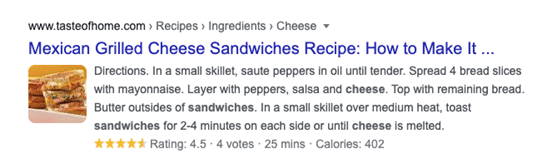
A recent update from Google states that there are no strict rules on how long meta descriptions need to be. This helps the users to find the product information they are looking for without clicking on 10 different links. The below-given snippet has 310 characters in its meta description. But it answers the users’ query properly, so Google displays the entire description in the search results.
9) Rich Results
Customers prefer enhanced results or rich results. Rich results include additional details like pictures, reviews, prices, showtimes, etc. To generate rich results like the example given below, use Schema formatted Structured Data Markup of your website content. Microdata & JSON/LD are the two main options. Google prefers JSON-LD! Try out http://schema.org/Product to get started.

10) Reviews That Influence Your Customers
Every customer now checks the reviews before purchasing a product online.

Guidelines given by Google are as follows:
- The reviews on your site must not be taken from other websites.
- Both positive and negative reviews must be posted.
- Only genuine, independent, and unpaid reviews are allowed.
- Every review must be specific to a particular product or location.
To learn more, read Google’s Review Guidelines.
11) Video Content
Some videos are designed to answer most of the frequently asked questions in a single go. Hence, videos save users’ reading time and help in making online purchase decisions. The only disadvantage is the page load time. Using an image link that opens on a new page with the video can be an easy way to reduce the load time.
12) Single Product Page with Many Options
Products are combined into a single page mostly when they differ in few specifications like size, color, etc. For example, a trouser that is available in various sizes and colors. The selection of a specific size or color generates a unique number or SKU. Such pages are preferred by customers and give better results.

Before creating combined pages, the points that must be considered include the following:
- Make the site easy to use, so that all the combined products can be accessed by the customers without any hassles.
- The SKU of every product on a combined page will not be shown on the page until that product is selected. Therefore, Google ranking is not possible.
A product page can rank on Google when the details of all the products are simplified in a chart or listed on the page. Check out the table given below to understand clearly. Creating such tables definitely takes a lot of time, but the rewards are also higher.

13) Easy-To-Follow Product Details & Ordering Process
Adding unwanted information or complex functions can drive your customers away. The customers must easily understand the options and receive what they have ordered. Redesign your page and make some internal changes if needed to improve your online sales conversion rates. Also, your ‘Buy now’ or ‘Add to Cart’ buttons must be optimized (location, color, button text, size, and shape) to improve the click rate.
14) Quality Signals
Quality Signals are very important for every e-commerce site.
The basic requirements are:
- A DV (Domain Verification) certificate
- A 100% HTTPS secure site (all pages)
These certifications will help you rank higher and assure your customers that your company is reliable & valid.
A shopping site must include Payment Policies, Exchange Policy / Information, Return Policy, easy to find Full Contact/Customer Service Information, Secure Server, etc. Check out the Google Quality Raters Handbook (PDF) for more details.
15) Fast Loading Website
A study shows that for every 1-second delay in page responsiveness, conversions can suffer by 7%. Also, Core Web Vitals will be included in page experience signals. So, Fast Loading Pages will be ranked higher.
16) The Marketing Team & Keywords
The marketing team that spends time learning about their products, their target customers, participates in Online Forums, joins various groups, attends shows, etc., can form highly optimized keywords & excellent sales copy. This will help make the business highly profitable.
After going through all these features, make a list of issues that your site might have and start improving it. To stay ahead of your competition, you must focus on enhancing your site.
What’s Your SEO Score? Find Out Now!
Aren’t yet seeing messages in your GMB desktop dashboard? Soon you will! Google My Business is rolling out messaging for desktop this month. Within a couple of weeks in March 2021, all businesses will have access to messaging on the web.
Opt-in to enable users to send messages via your GMB account to use the service. You can automate the welcome responses as per your brand and interact with the users messaging you.
This new feature will allow you to track messages and save and download all your conversations. However, you should take note that Google expects you to respond to the messages within 24 hours. By failing to do so, you can lose access to messaging tools. Also, know that your customized automated welcome messages do not count as a response here.
As per Google, this is how it works:
Once you turn on messaging, customers will find a “Message” button on your Business Profile and will be able to message you at any time.
- The messages will appear in your Business Profile on Google. You’ll receive notifications for incoming messages.
- You can customize the automated welcome message that your customers will get when they message you.
- You can even share photos with your customers through messages.
- If multiple people own or manage your Business Profile, each one can message the customers.
- Customers may find your name and profile photo from your About Me
Steps to Take
- Make sure to thoroughly go through the Guidelines for Messaging and for Reading and Replying to the messages.
- Join the waitlist if you are interested in the messaging API, currently in closed beta.
Have Questions? We Can Help!
Aren’t yet seeing messages in your GMB desktop dashboard? Soon you will! Google My Business is rolling out messaging for desktop this month. Within a couple of weeks in March 2021, all businesses will have access to messaging on the web.
Here’s another update by Google! Last month, Google My Business added a new Years in Business feature. So business owners can now tag onto their Business Profile to tell their customers in which year a business opened or will open, at its address.
Have a look at the image below:

Follow the below steps to set your opening date
- Sign in to Google My Business.
- If you have multiple locations, open the location you’d like to manage.
- From the menu, click Info.
- Click Add opening date.
- Enter your opening date.
- Click Apply.
All you require is the year and month of your opening date. It allows you to enter a date in advance up to one year, but it won’t show on Google until 90 days before the date.
Google says that “On certain places in Google Search, the opening date may be used to let customers know how many years a business has been in operation.”
Actionable Strategy — The new feature is being viewed as a trust factor by several consumers. So if you’ve been around, you should take advantage of your years in business.
ARE YOU GETTING THE BEST RETURN OUT OF YOUR DIGITAL MARKETING?
Need another pair of hands to make sure you’re up to date with all of Google’s new updates?
Team eBizUniverse is ready to dive into your current state and do a comprehensive
Digital Marketing Analysis at no cost to you!
Give us a call at (800) 379-2829 or contact us so we can get to work right away!
NAVIGATION
CONTACT US
CORPORATE OFFICE
SCHAUMBURG LOCATION
COMMUNITY