





In August, Google announced a new big search ranking algorithm update, named the helpful content update – probably its biggest update in a decade.
What We Know
The helpful content update will target websites with a relatively high amount of unsatisfying or unhelpful content, where the content has been written explicitly for search engines to leverage rankings.
Unlike many Google algorithms that get applied page-by-page, this new helpful content update will be sitewide. That means that if Google determines your site is producing a relatively high amount of unhelpful content, it will impact your whole site.
This reminds us of the early Panda and Penguin update days. Just as a quick reminder – or in case you weren’t working in SEO a decade ago – those updates did a lot of damage back then, and we made significant changes to our SEO strategies to recover and protect our client websites.
Which Sites Were Likely Impacted?
According to Google, this update impacted these types of content the most:
- Online educational materials.
- Arts and entertainment.
- Tech-related.
This is because content written in those areas has historically been written more for search engines than humans.
These are the folks that were hit the hardest:
- Publishers focused on a broad range of topics like CNET, Forbes, etc.
- Sites that collect and monetize organic search traffic without providing unique value.
- Sites that have content created with AI tools like Jasper or Copymatic.
- Sites with SEO doorway pages created for the sole purpose of boosting rankings.
- Sites with spammy content with a very high keyword density.
Our Observations:
We were quick to run a deep ranking audit of more than 3.5K websites, and we are happy to inform you that so far, this update did not have any significant negative impact on our client’s websites. In fact, we have seen good improvement in positions for the sites we are working on. This implies that our content strategy, in conjunction with our other SEO efforts like on-page optimization and link building, is working well and protecting our client’s websites.
Analyze your site to see if it is up to date!
Are your GBP posts getting rejected? Well, that’s because GBP has added more restrictions to its list of guidelines. As stated in their support document under the “Avoid Spam” header, Google warns business owners to avoid uploading duplicate photos, posts, videos, or logos.
Here’s a screenshot of the other guidelines that you should know.

So, using original images & relevant content is the only way to get your posts accepted.
Need help? Get in touch with our technical support team for assistance.
See How You Can Improve Your SEO!
Recently, it has been discovered that Google Maps is emailing customers who have posted a review for any business when their review is flagged as fake and, therefore, not posted.
It came to light after Lucio Laria – Consultant SEO International raised this issue on the Google Business Profile community. When a help forum titled Legitimate review started getting flagged as “Fake Engagement”, he wrote:
Hello,
I just settled my Google profile and asked my client for a review. Google is filing this review as a fake engagement when this person is a legitimate client of mine.
I’m waiting for this to be fixed before asking other of my clients for their reviews.
Why is this happening, and how can I fix it?
Thanks,
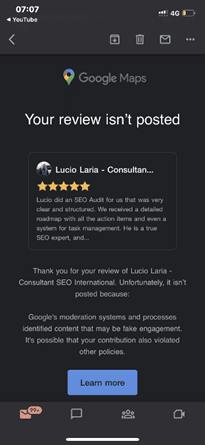
Among the many conjectured reasons and suggestions put forth by knowledgeable forum members are the following:
- It may be related to the review content. See Prohibited and restricted content. Ask the reviewer to delete it and then write a new review.
- It may be due to a problem with the reviewer’s account.
- Because the provider is in France and the client is in Argentina, the distance between them could be the reason.
- Ask the reviewer to try again, leaving a 4-5 sentence review, and add specifics about the services provided and, if pertinent, the location at which they were provided. If that fails, ask them to leave a review from another account.
The reviewer received the email notification about 15 minutes after posting the review. As the forum community pointed out, the review was being “filtered by an algorithm that enforces Google’s content policies”.
Why You Should Pay Attention to This Issue:
As we all know, getting legitimate reviews is not an easy task. It takes a lot of effort to impress a client and even more to convince the client to post a good review. It is disappointing when our sometimes hard-to-get legitimate reviews get taken down for “algorithmic” reasons, as requesting the client to post it again can be a bit awkward.
So, it’s crucial to learn how to get our good reviews to stick the better we can prep our customers and clients to get it right the first time.
Are you getting the best return out of your digital marketing?




As we all know, Google launches core updates at least two to three times a year. These updates cause a hassle to all the web developers and SEO specialists because they have to monitor the rankings and make the required changes.
On May 25th, Google announced an update via a tweet.
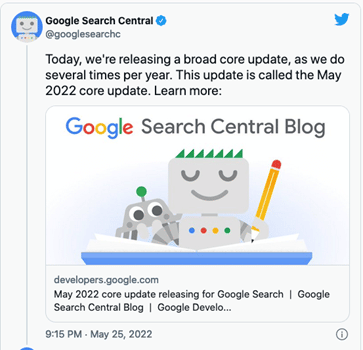
This core update was further explained on Google Search Central. According to this article, Google makes changes to the ranking process to increase the accuracy of the search results. These improvements are called core updates. The core updates are not specific to certain sites but will certainly generate notable effects. Some sites’ ranking may drop, while others may rank better.
Also, Google said that if any site does experience a drop in its ranking, they don’t have to fix anything. These updates are meant to improve the system, helping under-ranked sites to get better traffic.
So, if your ranking suddenly drops, there’s nothing to worry about. You have not violated any webmaster guidelines. You just have to sit back and wait for the next core update. One last thing you can do is observe the sites that have ranked higher and try to figure out the factors that helped them.
Still have any issues? You can get in touch with our experienced team for assistance.
Analyze your analytics?
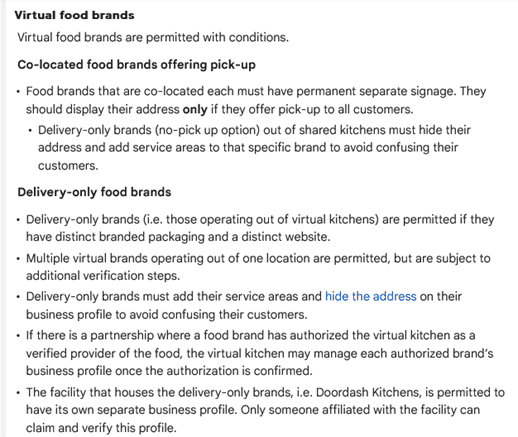
Last month Google laid out new, more specific guidelines to help the virtual food brands and delivery-only businesses with their Business Profiles on Google. These guidelines are meant for food businesses that don’t really have a physical location in an area, but they do re-package and deliver the local restaurants’ food.
The guidelines can be found in Google’s Guidelines for representing your business on Google, under the section Guidelines for chains, departments & individual practitioners.
Here’s a look at what these new guidelines have to say:
Final Takeaway
If you own a virtual food business, it is in your best interest to take a look at the new guidelines so that you can create a business profile on Google that isn’t suspended.
See How You Can Improve Your SEO!
Recently Google’s Dikla Cohen gave a presentation on video indexing, which explains that video indexing does not rely on where and how you host your videos. You can host them yourself or choose from the most popular video hosting platforms and services.
With this, he announced Google is soon launching a new set of reports and tools in Search Console to make video indexing easier to track and diagnose.
With this new launch, the Video Page Indexing report will show a summary of all the pages that Google’s systems find with a video while crawling and indexing your website. At a glance, you can see how many video landing pages were indexed.
Issues will be grouped with a trend line and counts of the affected videos. For example, which videos are missing a thumbnail URL, with reasons – the largest impact ranked on top.
You can click on one of the rows to get more details, such as affected video page URLs. You can also download the list of examples and double-check them. So, you can narrow down the details and understand what is happening and how to resolve issues.
Once your website is updated; and you think you have resolved the issue you were facing, you can go back to the Video Indexing Report, go to that specific issue type, and then use the validate fix button to inform Google.
This way, you can initiate the recrawling of known URLs affected by the issue. And as the pages are being reprocessed, you will be notified if everything is resolved or if there are remaining issues.
But you will have to note that it can take some time to go through all the URLs.
If you wish to check the video indexing status, you can get there by entering the URL of the video landing page at the top of the search console. It will first show you the current status of that URL, as well as the video index status of the page. It will inform you whether Google detects a video on the page. And, if so, did they manage to index it. If a detected video is not indexed, it will list the reasons preventing it from being indexed.
Also, please note that Google indexes only one video per page, even when a page has multiple videos.
To summarize, with the new tools,
- You will be able to see how many video landing pages Google has discovered and how many of them were indexed.
- Examine reasons for unindexed videos on video landing pages.
- You can use the list of affected video page URLs to debug and fix issues.
- You can use the Validate Fix button to initiate recrawling of the known URLs affected by the issue.
- You will be able to check the video indexing status of a specific video using the URL inspection tool.
Are you getting the best return out of your digital marketing?




In a new move, Google has announced the use of the AI approach to update the operation hours for over 20 million businesses around the globe in the next six months. Also, Google’s AI algorithms are busy figuring out if your posted business hours are accurate.
Google said, “We developed a machine learning model that automatically identifies if business hours are likely wrong, then instantly updates them with AI-generated predictions.”
How Does It Work?
The AI considers multiple factors, such as:
- The last time you updated your hours
- What they know about other shops’ hours
- The Popular Times information for your shop determined by location trends
Then, the algorithm analyzes the business hours of other similar shops that are nearby, information from the shop’s website, and Street View images of the shop’s storefront. Also, they will look specifically for business hour signs to determine the most accurate business hour prediction.
Google will take the help of the Google Maps community — including Local Guides and even the business owners themselves through their Google Business Profile — to verify the information they have predicted.
What Do You Need To Do?
All the business owners located in Argentina, Australia, Chile, France, Japan, Mexico, New Zealand, Peru, or the United States, should prepare their staff to expect inquiry calls powered by Google’s conversational AI asking about their business hours.
Also, check Google Maps from time to time to ensure that Google has correctly listed the timings, in case they have been changed without your input.
Analyze your analytics?
Google performing random display testings are no longer surprising. This time around, it is Google Maps testing the position of local listing previews.
Recently, one of the users noticed that when a specific listing is clicked on from the Google Maps search results that appear on the left-hand side, the local listing pops up in a new position.
Instead of its original position on the left bar, the local listing preview now hovers in a new position, overlayed on top of the map. So far, this new position testing seems to be limited to the Google Maps interface for the desktop.
Here’s a look at the local listing overlay box:

Normally, there would be no overlay box hovering over the map, and the local listing details would appear in the left bar, pushing the search results to the bottom footer.
See How You Can Improve Your SEO!
We have highlighted the main steps involved in setting up an e-commerce site & depending on the work required in each step you can determine the price of the project.
Step One –
- Calculate the time required to set up a WordPress site, install plugins, install a WordPress theme, and meet a client’s requirements.
Step Two –
- Calculate the time you need to finalize images. Mostly, it depends on whether you are –
- Using existing images
- Making new images
- Modifying manufacturer’s images
Step Three –
- Determine the number of products or SKUs included in the project.
- Also, make a note of whether you will take the content from an old site, create your own new content, or reword the manufacturer’s website content.
- Lastly, you need to know if you must create custom category pages and the amount of product information that will be provided.
Step Four –
- Customizing a plugin may need about 20-30 mins, so extra features like Shipping Plugins, Invoicing Plugins, & more should be noted down.
After you have a good idea of the level of work required, you can give an estimated price range for the project. If the estimate is approved by the client, you can charge by the hour to ensure you are paid for your work.
Have any questions? Get in touch with our experts for assistance.
Are you getting the best return out of your digital marketing?
There are a lot of social media platforms out there and realistically unless you are a huge national brand your chances of dominating them all for your niche is slim to none which is why many businesses focus on just a few at a time. Many people discredit Google+ as a flop and don’t see much value in spending time there. But with that attitude you could be missing out on a huge opportunity, here’s why.
Google Authorship
Since Google dominates the search engines it makes sense that having a presence on Google+ can help boost your SEO efforts. If you have a Google+ account you can register your blog posts with Google Authorship and increase your exposure in search engine results. Your results will stand out with a photo of you and link to your Google+ profile.
Free E-Mail Marketing

Who doesn’t love some subtle (and free!) marketing? As a little bonus, anyone you e-mail that happens to be using a Gmail account will see a small ad to the left of the message with a direct link to follow you on Google+. You can also use a lot of Google’s integrated features like Google Hangouts to interact with users. This doesn’t reach all of your audience but it’s free, so who’s complaining?
Less Competition
There are more Google+ users than you might think (around 540 million active users) and they generally spend less time on Google+ than they do on Facebook, but you know what that means – less competition! With less noise and fewer hands in the air waving for attention you have a better chance at being seen and interacting with potential customers. The regular users of Google+ tend to be more business and professional related so know your audience and be visible where they hang out!
Ready to get started on Google+? Start by adding eBizUniverse to your circles.
NAVIGATION
CONTACT US
CORPORATE OFFICE
SCHAUMBURG LOCATION
COMMUNITY