





In August, Google announced a new big search ranking algorithm update, named the helpful content update – probably its biggest update in a decade.
What We Know
The helpful content update will target websites with a relatively high amount of unsatisfying or unhelpful content, where the content has been written explicitly for search engines to leverage rankings.
Unlike many Google algorithms that get applied page-by-page, this new helpful content update will be sitewide. That means that if Google determines your site is producing a relatively high amount of unhelpful content, it will impact your whole site.
This reminds us of the early Panda and Penguin update days. Just as a quick reminder – or in case you weren’t working in SEO a decade ago – those updates did a lot of damage back then, and we made significant changes to our SEO strategies to recover and protect our client websites.
Which Sites Were Likely Impacted?
According to Google, this update impacted these types of content the most:
- Online educational materials.
- Arts and entertainment.
- Tech-related.
This is because content written in those areas has historically been written more for search engines than humans.
These are the folks that were hit the hardest:
- Publishers focused on a broad range of topics like CNET, Forbes, etc.
- Sites that collect and monetize organic search traffic without providing unique value.
- Sites that have content created with AI tools like Jasper or Copymatic.
- Sites with SEO doorway pages created for the sole purpose of boosting rankings.
- Sites with spammy content with a very high keyword density.
Our Observations:
We were quick to run a deep ranking audit of more than 3.5K websites, and we are happy to inform you that so far, this update did not have any significant negative impact on our client’s websites. In fact, we have seen good improvement in positions for the sites we are working on. This implies that our content strategy, in conjunction with our other SEO efforts like on-page optimization and link building, is working well and protecting our client’s websites.
Analyze your site to see if it is up to date!
Are your GBP posts getting rejected? Well, that’s because GBP has added more restrictions to its list of guidelines. As stated in their support document under the “Avoid Spam” header, Google warns business owners to avoid uploading duplicate photos, posts, videos, or logos.
Here’s a screenshot of the other guidelines that you should know.

So, using original images & relevant content is the only way to get your posts accepted.
Need help? Get in touch with our technical support team for assistance.
See How You Can Improve Your SEO!
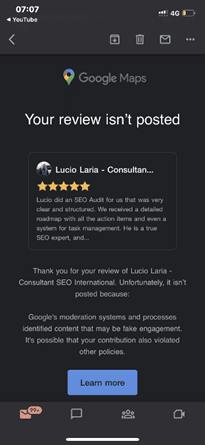
Recently, it has been discovered that Google Maps is emailing customers who have posted a review for any business when their review is flagged as fake and, therefore, not posted.
It came to light after Lucio Laria – Consultant SEO International raised this issue on the Google Business Profile community. When a help forum titled Legitimate review started getting flagged as “Fake Engagement”, he wrote:
Hello,
I just settled my Google profile and asked my client for a review. Google is filing this review as a fake engagement when this person is a legitimate client of mine.
I’m waiting for this to be fixed before asking other of my clients for their reviews.
Why is this happening, and how can I fix it?
Thanks,
Among the many conjectured reasons and suggestions put forth by knowledgeable forum members are the following:
- It may be related to the review content. See Prohibited and restricted content. Ask the reviewer to delete it and then write a new review.
- It may be due to a problem with the reviewer’s account.
- Because the provider is in France and the client is in Argentina, the distance between them could be the reason.
- Ask the reviewer to try again, leaving a 4-5 sentence review, and add specifics about the services provided and, if pertinent, the location at which they were provided. If that fails, ask them to leave a review from another account.
The reviewer received the email notification about 15 minutes after posting the review. As the forum community pointed out, the review was being “filtered by an algorithm that enforces Google’s content policies”.
Why You Should Pay Attention to This Issue:
As we all know, getting legitimate reviews is not an easy task. It takes a lot of effort to impress a client and even more to convince the client to post a good review. It is disappointing when our sometimes hard-to-get legitimate reviews get taken down for “algorithmic” reasons, as requesting the client to post it again can be a bit awkward.
So, it’s crucial to learn how to get our good reviews to stick the better we can prep our customers and clients to get it right the first time.
Are you getting the best return out of your digital marketing?
then



To help your start-up or medium-sized business gain momentum, we have listed some important local marketing strategies. These strategies can help you to increase your brand’s awareness & gain new customers. Hiring a marketing agency can help you to generate leads right away, but if you wish to do it on your own, this article is for you!
Here are some SEO tips for the DIYers:
- Plan the structure of your website carefully. Add navigation tabs on every page of your site to lead the users to other relevant pages.
- Re-direct or eliminate broken links.
- Use the local keywords & geographical area names in the meta descriptions & website content smartly.
- We recommend using page-specific, optimal length title & meta descriptions.
- Keep your webpage content precise and relevant to get a good ranking.
- Register your business on Google My Business (GMB) & other business citation sources.
- Local Citation is a must! List your business with local directories & popular directories.
- Get recognized for your services! Let other businesses you have worked for, mention you on their sites.
- If you want to do better than your competitors, analyze the key factors that are helping them stay on the top.
- Positive reviews can build trust and help increase your customer base significantly.
- Use quality graphics and videos to avoid repetitive content and boost your Click-Through Rate.
Even when you are done following these tips, it takes patience & expertise to achieve the ranking you desire! If you need quick results, consulting an SEO expert is your best choice. We’re here for help!
See How You Can Improve Your Website!
Recently, Google made an announcement saying, “Today we’re completing the migration of the Disavow links tool to the new Search Console interface.” The migration of the Disavow tool was pending for a long time. Almost a year after officially closing down the old version of Google Search Console, they migrated the disavow link tool from the old Search Console to the new Search Console.
Importantly, Google goes on to caution that “This is an advanced feature and should only be used with caution. If used incorrectly, this feature can potentially harm your site’s performance in Google Search results.”
Google explains, “If you have a manual action against your site for unnatural links to your site, or if you think you’re about to get such a manual action (because of paid links or other link schemes that violate our quality guidelines), you should try to remove the links from the other site to your site. If you can’t remove those links yourself, or get them removed, then you should disavow the URLs of the questionable pages or domains that link to your website.”
The new location for the disavow link tool is – https://search.google.com/search-console/disavow-links
Apart from this, Google will now let you download a disavow file as a text file and will no longer limit the error reports for uploaded files to just 10 errors.
How you can use it?
As we all know, Google has always ignored bad links rather than penalizing businesses for it. However, if manual action is taken against your site for unnatural links or if you think that you are about to get one because of paid links or link schemes that violate the quality guidelines. Importantly, Google prefers that you ask the other site to remove those links first and if you can’t get them removed, you can use this tool to disavow those sites.
Do You Have Questions? Ask Us!
In October, Twitter launched Carousel Ads for advertisers globally. These ads enable marketers to display 2-6 horizontally swipeable images or videos.
“The Carousel ad format also includes an edge-to-edge design, 3rd party measurement reporting, accessibility support, and new reporting features, such as swipes within the Carousel and breakdowns to measure individual Carousel card performance.”
You can check out Twitter’s new Carousel Ad Format here.
It takes just a few easy steps to create Carousel Ads. Advertisers can create them via Tweet Composer in Ads Manager or via the Ads API using creative specifications similar to other image and video formats.
Ads can then be promoted or used organically.
If you wish to learn more about Carousel Ads, visit this page!
Are you getting the best return out of your digital marketing?
Need an extra pair of eyes to review your online game plan? Let our experts take a look at your current state and do a comprehensive digital marketing analysis at no cost to you. Please call us at (800) 379-2829 or contact us today and we will get to work right away.
It’s easy to get excited watching the number of “likes” and “re-tweets” accumulate. You feel important, like someone is listening to you and agrees with your brand. But does the number of “likes” you get on a social media post translate to brand recognition and more sales?
Counting your follows and tracking the amount of “likes” or “favorites” you get is an easy way to track success but it’s missing a few key metrics like, why people liked the post and whether or not the post converted anyone from a prospect to a sale. There are a lot of reasons why someone might click the like button on your Facebook business page or post including things that have nothing to do with your business, like the fact that their friend liked it or maybe because they thought the image you used was cute or funny. You’re not really going to find out if your social media accounts are making an impact until you start engaging with your followers.
Engagement is the conversation that happens about your brand online, it could be between you and your customers or it could be between your customers and their sphere of influence. With engagement an intentional action takes place that raises awareness about your business, your article or your post. Interaction is a much better validity test to your social media endeavors.
So how is engagement measured? There are several paid services out there but you can do some research yourself for free as well. Here are three easy and cheap ways to track your engagement:
- Track individual accounts yourself. Facebook has a tab called “Facebook Insights” that makes tracking engagement a snap. Remember you are looking for comments and shares as well as likes and post clicks. For other social media platforms like Twitter and Instagram you can track the number of “@ mentions” and comments your posts generate.
- Klout – Klout is a free web app that helps you track your posts popularity and level of engagement all in one.

- Cloze – also free, this web app will not only track your engagements but also your online relationships, alerting you when you’ve been neglecting people and posts that you should be paying better attention to.


Managing your company’s Twitter account can quickly become a full time job when you’re successful and the desire to reduce noise in your feed might have you a bit bewildered when it comes to knowing who you should be following. There are no hard and fast rules and opinions on the subject vary but here are a few ideas to get you started in the right direction.
Following Your Followers

This is the most intensely debated twitter following conundrum out there today. While some people feel obligated to “follow back” anyone and everyone that follows them, others are afraid to clutter up their own news feed with so many tweeters.
Think of it this way – not following users back sends a message that while you’ll accept their support you really don’t care about what they have to say as an individual. Also it limits your customer’s ability to direct message you and that could be a critical marketing mistake. You want to keep the lines of communication as open as possible.
Afraid of over-loading your own newsfeed and missing industry-critical news? Never fear, that’s what filters and lists are for! Spend a little time setting up lists on a social media management app like HootSuite and you can easily stay on top of the tweets you most want to see, no matter how many connections you have.
Following Industry Titans and Competing Companies
You need to keep up with market trends that are related to your industry and there is no easier way than keeping your finger firmly placed on the twitter-pulse of your chosen industry. Find out who the movers and shakers are in your niche and follow them all. Not only do you get their ideas, news and wisdom but you become more exposed to the people that follow them as well. Strike up conversations with individuals in your industry to add even more exposure. If you’re really savvy you can also follow their entire follower list but don’t add too many people too fast or you’ll get Twitter-Banned!
Keep a watchful eye on your competition because you can bet they’ll be watching you. You can even snag some valuable ideas to put your own spin on them. Make a list of your top 5-10 competing companies and find their Twitter accounts.
Following Local and Industry-Specific Media Outlets
Up your chances of free media exposure by following news outlets, writers, bloggers, podcasters and other presenters in your local area or industry. If you post things they like you might just be their next featured story. To find article writers to follow in your industry check out the free resource MuckRack and follow anyone that might be interested in what you have to offer. They are always looking for new story ideas!
You can also make a list of all the media outlets that have already shown you a little love and make sure to seek them out as well. They already like you so they are a warm lead. Make sure to share the wealth by re-tweeting them as well. Everyone loves to see their content shared!
Final Tips
 Don’t follow anyone silently. Make sure to reach out with a quick personal message. You can use a social media management client to automate the process somewhat but sending some personal messages to the right people can also add a touch of class.
Don’t forget to follow your own family and friends, leverage your SOI (sphere of influence) as these are the people most likely to star and re-tweet your content. People you already know will be champions for your business and help it grow.
Periodically reach out to followers by staring their content, commenting, re-tweeting or direct messaging them. These are the more hands-on nitty-gritty details of account management that can easily suck up a lot of your time. If you find it overwhelming you can hire a social media assistant or a company to manage it for you.
Don’t get too caught up in balancing your number of followers and followed accounts. Make sure to post rich content that people will find share-worthy and try to have a little fun while you build your social media account. Users like to see the lighter more human side to a business, make it personal and they will fall more easily in love with you.
NAVIGATION
CONTACT US
CORPORATE OFFICE
SCHAUMBURG LOCATION
COMMUNITY