Social media marketing has become one of the most critical marketing strategies used by businesses around the world. According to Hootsuite, over 75% of the world’s population, ages 13 and older, use social media. However, not all companies are doing it right. To succeed in social media marketing, you must have a clear strategy and set goals. You also need to stay current with the latest trends and focus on the platforms, such as Facebook, Instagram, and YouTube, where your target audience is most active. Here are 21 social media marketing tips you can’t afford to ignore.



In the previous month, various news outlets highlighted significant improvements made to OpenAI’s ChatGPT. These enhancements enable ChatGPT to engage in web browsing, react to audio cues, and process images. Here’s a look at some incredible updates about ChatGPT, and you’re going to love them!
Analyze your site?
1. ChatGPT Now Surfs The Web
Did you know ChatGPT used to have a limitation on the data it could use? Well, that’s history now! ChatGPT has learned a new trick—it can browse the internet. Yep, you heard that right! It can fetch you the latest info and even give you direct links to the sources.
Right now, this feature is only available for Plus and Enterprise users, but they’ll expand it to all users soon. Just click on “Browse with Bing” under GPT-4.
One thing to keep in mind though; not all websites’ data will be available due to some restrictions. So, while ChatGPT is super helpful, it’s always a good idea to double-check and edit the info it provides.
See How You Can Improve Your SEO!
2. ChatGPT Can Now See, Hear, And Speak
This is where things get really cool. ChatGPT can now understand and work with voice and images. Here’s how it all works:
- Voice Conversations: OpenAI introduces voice capabilities, allowing you to have interactive conversations with your AI assistant. Just go to settings, opt into voice conversations, and choose your preferred voice from five options. It’s powered by advanced text-to-speech technology and supported by professional voice actors and Whisper, OpenAI’s speech recognition system.
- Image Interaction: You can also show ChatGPT images to make your conversations more engaging. You can snap a pic and have ChatGPT tell you all about it. Or if you’re wondering what to make for dinner—just snap some pics of what you’ve got in your fridge, and ChatGPT will help you cook up a delicious meal, step-by-step. Plus, in their mobile app, there’s a drawing tool that lets you focus on specific parts of an image.
These image capabilities are available for Plus and Enterprise users, with voice coming to iOS and Android (opt-in within your settings) and images available on all platforms. It’s all powered by some super-smart models, GPT-3.5 and GPT-4, which use their language skills to understand a wide range of images, including photos, screenshots, and documents with both text and images
Do You Have Questions About Your Google Business? Ask Us!
In a nutshell
ChatGPT is now your go-to source for real-time web information, a helpful companion for voice conversations and image discussions, and an even more powerful tool to assist you in your daily tasks. These updates are a game-changer, bringing ChatGPT closer to being your ultimate conversation buddy. Use these new features to make your daily tasks easier and more fun.
Are you getting the best return out of your digital marketing?
Need an extra pair of eyes to review your online game plan? Let our experts take a look at your current state and do a comprehensive digital marketing analysis at no cost to you. Please call us at (800) 379-2829 or contact us today and we will get to work right away.


Google has decided to change the results in FAQ and How-To rich results, showing them less often in the search results.
Google wrote in the post, “To provide a cleaner and more consistent search experience, we are changing how some rich results types are shown in Google’s search results. In particular, we are reducing the visibility of FAQ rich results and limiting How-To rich results to desktop devices.”
Overview of the Change
After these changes, the primary use of FAQ and How-To structured data for site owners will be affected.
Going forward, FAQ (from FAQPage structured data) rich results will only be shown for well-known, authoritative government and health websites. For all other sites this rich result will no longer be shown regularly. Sites may automatically be considered for this treatment depending on their eligibility.
There is no need to proactively remove the structured data, as structured data that’s not being used does not cause any problems; moreover, it has no visible effects in Google Search.
How-To (from HowTo structured data) rich results will only be shown for desktop users and not for users on mobile devices. However, to show How-To rich results on the desktop, Google uses the mobile version of a website as the basis for indexing. So, the mobile version of your website must include the appropriate markup.
Changes in Search Console Reporting
These changes will also appear in Search Console reporting for both of the items.
“In particular, this will be visible in the metrics shown for FAQ and How-To search appearances in the performance report and the number of impressions reported in the appropriate enhancement reports. This change does not affect the number of items reported in the enhancement reports. The search appearances, and the reports will remain in Search Console for the time being.”
Analyze your site?

In the previous month, Google published a new help document, to assist you in navigating your Google Business Profile (GBP) regulations. If you happen to be a GBP Merchant, it’s likely that you received an email notification about this update.

In their Overview of Google Business Profile policies, Google emphasizes on the importance of ensuring that all content you add to your Business Profile accurately represents your location and adheres to their provided policies and guidelines. In cases where these rules are violated, Google will proactively take action, which could involve restricting the display of content or limiting access to your profile or merchant account.
This comprehensive guide goes on to offer detailed insights into some key areas of Google’s policies and provides explanations for common issues that merchants may encounter. These topics include:
1. Prohibited and restricted content
2. Account level restrictions
3. Eligibility
4. Ownership
5. Posting restrictions
6. Reasons why submitted content may be rejected
7. Other reasons content may fail to publish
It’s important to note that while this document provides valuable information, it doesn’t cover every aspect of Google’s GBP policies and guidelines. For a more comprehensive understanding, Google encourages you to refer to their complete list.
Final Takeaway
If you’re a Google Business Profile merchant, especially if you’re new to the platform, we highly recommend dedicating some time to studying the help document. It will help you navigate the GBP landscape more effectively and ensure you comply with Google’s
See How You Can Improve Your SEO!

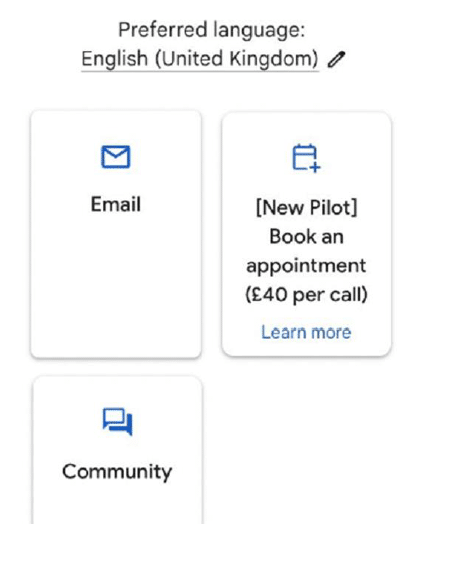
In an unanticipated move, Google Ads has started testing a paid version of customer support for its small business advertisers. And guess what? They didn’t even make a grand announcement. Instead, they casually dropped the news via email to one of the digital agencies. Talk about keeping things low-key!
Google mentioned that this pilot is a result of “customer feedback” and is aimed at enhancing the Ads customer experience. The objective? To ensure that small businesses receive the same level of support as the big fish in the pond. However, there’s a twist in the tale. Google’s statement that they’ll be “building on this strategy over time” has raised a few eyebrows. Could this mean that even the big players might have to pay for personalized support in the future? Only time will tell.
For now, it’s still in the pilot phase, and not all small advertisers have been granted access. But if the stars align, Google might roll this out more broadly post-pilot.
For agencies collaborating with clients in this program, there’s a silver lining. They can schedule specialized paid support sessions, ensuring their clients get the attention they deserve.
Wondering if you’ve been chosen for this exclusive pilot program? A quick peek into your Google Ads interface might reveal the answer. And for those scratching their heads at the £40 price tag, it’s roughly $50US. Currency conversion, check!
The digital community had its say on X (formerly Twitter), with reactions ranging from sheer disbelief to labeling it as “straight garbage.” One comment aptly captured the sentiment:
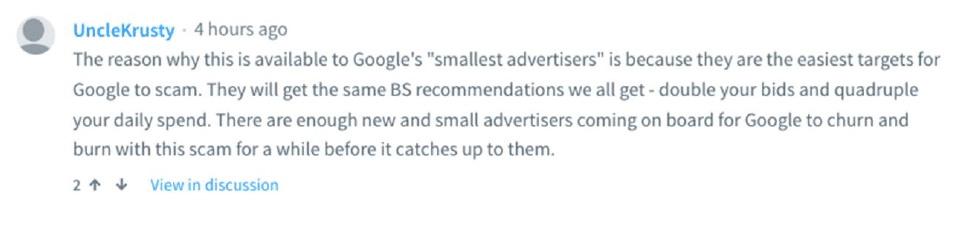
It’s hard to trust the Big G. The underlying concern? That this “paid support” might just be a gateway for Google to nudge businesses to increase their budgets, even if it’s not in their best interest.
To get the full scoop on this whole affair, tune in to the discussions on X.
Do You Have Questions About Your Google Business? Ask Us!
Are you getting the best return out of your digital marketing?
Need an extra pair of eyes to review your online game plan? Let our experts take a look at your current state and do a comprehensive digital marketing analysis at no cost to you. Please call us at (800) 379-2829 or contact us today and we will get to work right away.


Google launched a broad core update that lasted for almost 15 days. This update was global, impacting all regions and all languages.
It was a major update that appeared to have a significant impact on search results. Due to this update, some websites witnessed a dip, while others saw an increase, and some websites even lost their rankings.
The update caused significant volatility during the rollout period and even after the official end of the update, with some websites seeing their rankings fluctuate. But, the unpredictability and the rankings have finally stabilized.
The main concern that is now troubling the businesses is regarding “Ad-spam” — the sponsored listings that appear above, and compete with, the organic listing for traffic. Most of the accounts reported more ad-spam above the fold in the search results. In some cases, the #1 organic listing, being below the fold, reported terribly low traffic numbers due to competition from the many ad listings appearing above them.
Here are a few tips to keep in mind for future updates:
- Remember, content is king! Ensuring your content is original, engaging, and useful to your target audience, will attract more audience and increase your ranking.
- Use relevant keywords to optimize your website, create a sitemap, and build high-quality, relevant backlinks to your website.
- It’s important to keep track of Google’s latest Quality Rater Guidelines. It will provide you with insights into what types of content Google’s algorithm is looking to reward.
- If your ranking isn’t improving, wait. Google takes time to index new content and to adjust its rankings. Don’t expect to see results overnight.
If you’ve recently experienced a drop in your website’s rankings, please don’t hesitate to reach out to our team for assistance.
Analyze your site?

Keeping up with all the changes that Google makes can be a bit of a challenge. Hence, we wanted to take a minute to talk about the new updates Google Maps just released regarding prohibited and restricted content.
Let’s start with civil discourse, meaning personal information must not be distributed or posted without consent on Google Maps. It includes full or last names, images, videos, financial information, and other identifying information. While merchants are allowed to post contact information, an individual’s full name may only be used when it is part of their business or they are public-facing professionals. If you become aware of personal information being posted without their consent, follow the instructions on the Google Maps platform to report it.
Moving onto the next one – deceptive content. It is not allowed on Google Maps. This includes incentivizing, paying for, or encouraging the posting of fake content, as well as selectively soliciting positive reviews from customers. Additionally, businesses are not allowed to delete reviews or offer incentives in exchange for the removal of negative reviews. Finally, content from multiple accounts or services that mimics genuine engagement is prohibited.
For local businesses, customer reviews are a great way to get noticed and build up viewership. But it’s important to follow Google’s guidelines and make sure the reviews you receive are genuine and represent your services accurately. No one wants to be tempted with rewards just to give a positive review, so it’s important to make sure that’s not part of the picture.
We hope this summary helps you to stay up to date on Google’s policies, so you can make sure you’re always in the know and running a successful operation.
See How You Can Improve Your SEO!

Google Ads Editor recently released version 2.3, and it comes packed with new features and improvements. Most notably, the update includes file support for image assets, a card view for image assets, and an improved type list that shows rearranged asset tables under the “Asset Library” folder. Additionally, the update provides support for legacy image assets, automatically created assets, location assets, and business information assets.
This version also provides several clickable buttons to make it easier to resolve Primary Display Status (PDS) reasons, as well as opt-in or opt-out of text asset automation for Performance Max campaigns. Users can also benefit from the bid explorer, which displays several recommended bids that include projected improvements for each option.
The update also includes location targeting for “radius around location groups” and “radius around all locations in linked feed,” as well as support for Discovery ads and campaigns with product feeds. Plus, the update provides proper pluralization in messages, and more notification types to keep users informed of their account status. On the other hand, the update has removed some features, such as the “top content bid adjustment” setting and the recommendation to create Dynamic Search Ads.
In conclusion, version 2.3 of Google Ads Editor is much more powerful and better than ever, ready to take your campaigns to the next level! With features like Google video partners recommendation, Location targeting, and Discovery ads and campaigns with product feeds support, you’ll be able to get the most out of your campaigns and achieve incredible results. Don’t miss out on this exciting update and upgrade your campaigns today!
Do You Have Questions About Your Google Business? Ask Us!
Are you getting the best return out of your digital marketing?
Need an extra pair of eyes to review your online game plan? Let our experts take a look at your current state and do a comprehensive digital marketing analysis at no cost to you. Please call us at (800) 379-2829 or contact us today and we will get to work right away.
1. Set Clear Goals And Objectives For Your Social Media Campaigns
Before starting your social media marketing campaign, you should clearly know what you want to achieve. Set specific, measurable goals that align with your overall business objectives. This will help you stay on track and track your progress over time.
2. Research Your Target Audience And Tailor Your Content Accordingly
Before starting your social media marketing campaign, you should clearly know what you want to achieve. Set specific, measurable goals that align with your overall business objectives. This will help you stay on track and track your progress.
3 . Establish A Consistent Brand Image Across All Platforms
Your brand’s image is the first impression people have of your business. Ensure you establish a consistent image across all your social media platforms. This includes your branding, messaging, and tone of voice.
4. Focus On The Platforms Most Relevant To Your Target Audience
There are numerous social media platforms available. However, it’s not necessary to be active on all of them. Focus on the platforms where your target audience is most active. For example, LinkedIn is likely to be a better choice than TikTok or Facebook if your target audience consists mainly of professionals.
5. Create Content That Is Engaging, Informative, And Entertaining
Your content should be engaging and informative to your audience. Use a mix of videos, images, and text to create diverse content. If you don’t have the resources to develop your content, work with a digital marketing agency.
Contact eBizUniverse at 1-800-379-2829 or complete our contact form for expert help!
6. Provide Quality Content That Is Relevant To Your Audience
Content is crucial to success. Provide quality content that applies to your audience and meets their needs. With each post, ask yourself whether your content is helpful to your audience. The more relevant and useful the content, the more likely your audience is to engage with it. This will help you build trust and loyalty with your followers.
7. Utilize Visuals To Draw Attention To Your Content
Visuals are more likely to grab people’s attention and are more memorable than text alone. Incorporating visuals into your content can significantly increase engagement.
8. Leverage Influencers To Reach A Wider Audience
Influencer marketing is a popular social media marketing strategy. By partnering with influencers, you can reach a wider audience and build trust with potential customers.
9. Partner With Micro-Influencers To Reach Niche Audiences
Micro-influencers are influencers with smaller followings, usually between 1,000 to 10,000 followers, and they can be valuable assets for reaching niche audiences. Studies have shown that micro-influencers have a higher engagement rate than macro-influencers and tend to have a more loyal following who trust their recommendations.
10. Capitalizing on Upcoming Festivals and Special Days
Holidays and special days allow businesses to create content that resonates with their audience. Create content that aligns with upcoming holidays and special days, and personalize it to your brand.
11. Make Sure All Of Your Goals Are S.M.A.R.T
SMART goals are specific, measurable, attainable, relevant, and time-bound. When setting your goals, make sure they meet all of these criteria.
12. Improve Future Results With Analysis and Strategy Adjustment
Data is critical to improving your social media marketing strategy. Analyze the data on each post and adjust your strategy accordingly for better results in the future.
13. Use Numbers to Highlight Key Points and Achievements
Numbers are eye-catching and can help draw attention to critical points or achievements.
14. Set Deadlines for Goals to Stay Motivated and On Track
Deadlines help keep you motivated and on track. Setting deadlines for each goal allows you to stay accountable and keep your campaigns running smoothly
15. Be Creative With Hashtags
Hashtags are a great way to increase visibility and engagement. However, not all hashtags are created equal. Be creative with your hashtags and use them strategically to improve your visibility on social media platforms.
16. Engage With Oher Users
Engaging with your followers is one of the best ways to build relationships. Respond promptly to comments and messages to build a strong community around your brand.
17. Use Automation Tools
Scheduling posts in advance can save you time and ensure that you consistently post content. Use automation tools like Hootsuite or Sprout Social to schedule your posts in advance.
18. Create Contests Or Giveaways
Contests and giveaways can be a great way to engage with your followers and generate leads. Be creative with your contests and giveaways to make them fun and engaging.
19. Add Value Through Interactive Live Chat
Interactive live chat options have become increasingly popular for businesses looking to add value to their social media presence. This feature allows customers to engage with your brand in real-time, increasing their trust and confidence in your business. Live chat options also provide an opportunity for you to address any potential concerns or questions that customers may have, leading to higher customer satisfaction
20. Utilize User-Generated Content to Build Trust and Increase Engagement
User-generated content (UGC) is created by users promoting your brand, product, or service. This could be anything from a customer review on your website to a user-generated video on social media. UGC is essential to any social media marketing strategy, as it can help build trust with potential customers and increase engagement.
21. Work With a Digital Marketing Agency For Professional Support
A digital marketing agency can provide valuable support and guidance throughout your social media campaigns. They will have the knowledge and expertise to help you create a successful social media strategy tailored to your business goals. Social media for businesses is far different from personal use, and digital marketing agencies can help ensure you are getting the most out of your efforts. Don’t waste time trying to figure it out on your own – work with a digital marketing agency and get the professional you need.


See How You Can Improve Your SEO!
Do You Have Questions About Your Google Business? Ask Us!

See How You Can Improve Your SEO!
Do You Have Questions About Your Google Business? Ask Us!
Are you getting the best return out of your digital marketing?
Need an extra pair of eyes to review your online game plan? Let our experts take a look at your current state and do a comprehensive digital marketing analysis at no cost to you. Please call us at (800) 379-2829 or contact us today and we will get to work right away.




You might be wondering how this is possible. You are doing just fine with AI tools and even progressing in your business. They write for you, act as your virtual assistant, and pretty much help you with everything. But there’s also a shadier side to it. Last month, Google rolled out a spam update in which it targeted websites that have content generated by AI. It affected AI pages that were poorly done and their rankings on search results, leaving an overall negative impact on businesses online.
The following are the global categories that have suffered the most damage:

(Source: NeilPatel.com)
As you can see from the chart, news and sports sites were hit the hardest. Arts and entertainment were close behind, and communities also made the top five.
Most of these sites were content-based rather than product-based.
Google’s spam update was based on mainly 3 elements:
Content
To get more search links and traffic, sites have content on their pages that provide little or no valuable information to users. These are thin-content scraper sites created by AI.
Meta tags and descriptions
Every business wants to appear on the first page of search engine results. And to do so, they allow their meta tags to be repetitive and poorly written, targeting them only for search engines. They forget that they are operating for humans and not search engines.
Keywords
The best way to turn a user into a customer is by providing him with the precise and valuable information he is searching for. But it doesn’t mean that you ruin his reading experience by stuffing your content with keywords to make it more relevant. It will shoo him away.
Google had kept all of this in mind and targeted such websites that were heavily dependent on AI for their content.
However, you must know that not all AI pages were affected. AI content that was modified by humans fared way better.
To give you a summary, here’s a chart for you:

(Source: NeilPatel.com)
This means the more “human-generated” content you have, the better your business will do.
So what do you do now? How do you check if your content is authentic and valuable to your potential customers? How do you still use AI tools for content without causing damage to your website’s search rank and traffic?
Google has provided some actionable advice to prevent such damage.
Take the front seat in a content generation:
If you’re using AI to generate content, don’t rely on it completely! Instead, modify your content. Your brand has its own voice; adjust the tone to match it. Don’t run after keywords; provide value in your information.
Get help from Google:
Google has invited users to learn more about its AI-based spam prevention system, SpamBrain. If your site’s rankings drop, review Google’s spam policies and ensure your web pages are compliant.
Final takeaway
While it is established that AI is beneficial to your business, relying completely on it is not. Let it help you, but have your own control. Consult with digital marketing firms to build your online presence in a reliable way. And most importantly, stay updated in this ever-changing environment!
With the increasing popularity of mobile searches, Google has announced a new update. Google recently announced that it will be introducing site names on mobile searches. It says that site names are currently available for mobile Google Search results in English, French, Japanese, and German. Over the next few months, they will be rolling out additional languages.
New Site Name Structured Data Documentation
Google has several sources to identify the site name for a search result; you can use structured data on your homepage to indicate your preferred site name and let Google know what the site name should be.
According to Google,
When Google lists a page in search results, it shows the name of the site the page comes from. It is called the site name. Google uses several different sources to determine the site name, and you can indicate your preference by adding WebSite structured data. Note that the site name is different from the per-page title links (title links are specific to each web page, whereas the site name is for the entire site).
Site names can appear in English, French, Japanese, and German for mobile Google Search results. You can learn everything you need to know by studying Google’s developer doc, which provides details on each of the following topics.
- How site names in Google Search are created
- How to add structured data
- Guidelines
- Structured data type definitions
- Troubleshooting common issues
- Troubleshooting structured data issues
Also — Google recommends revisiting the documentation for favicons. Since they intend to continue showing favicons on Search, they also recommend providing an icon that’s at least 48px and following the existing favicon guidelines.
See How You Can Improve Your SEO!
In order to combat review manipulation on Google Maps, two new restrictions have been put in place. These should help to create a more level playing field for businesses and give users a better idea of what to expect when they visit a place.
In Google’s Prohibited and restricted content support document, you’ll find a Deceptive Content section that talks about Fake Engagement, Impersonation, Misinformation, and Misrepresentation. The new restrictions are included under the Fake Engagement point. Here’s a screenshot of the same below.

So we can conclude that only genuine reviews are encouraged, and if anyone tries to violate these restrictions, they can be penalized.
Are you getting the best return out of your digital marketing?
Need an extra pair of eyes to review your online game plan? Let our experts take a look at your current state and do a comprehensive digital marketing analysis at no cost to you. Please call us at (800) 379-2829 or contact us today and we will get to work right away.




In a new move, Google has announced the use of the AI approach to update the operation hours for over 20 million businesses around the globe in the next six months. Also, Google’s AI algorithms are busy figuring out if your posted business hours are accurate.
Google said, “We developed a machine learning model that automatically identifies if business hours are likely wrong, then instantly updates them with AI-generated predictions.”
How Does It Work?
The AI considers multiple factors, such as:
- The last time you updated your hours
- What they know about other shops’ hours
- The Popular Times information for your shop determined by location trends
Then, the algorithm analyzes the business hours of other similar shops that are nearby, information from the shop’s website, and Street View images of the shop’s storefront. Also, they will look specifically for business hour signs to determine the most accurate business hour prediction.
Google will take the help of the Google Maps community — including Local Guides and even the business owners themselves through their Google Business Profile — to verify the information they have predicted.
What Do You Need To Do?
All the business owners located in Argentina, Australia, Chile, France, Japan, Mexico, New Zealand, Peru, or the United States, should prepare their staff to expect inquiry calls powered by Google’s conversational AI asking about their business hours.
Also, check Google Maps from time to time to ensure that Google has correctly listed the timings, in case they have been changed without your input.
Analyze your analytics?
Google performing random display testings are no longer surprising. This time around, it is Google Maps testing the position of local listing previews.
Recently, one of the users noticed that when a specific listing is clicked on from the Google Maps search results that appear on the left-hand side, the local listing pops up in a new position.
Instead of its original position on the left bar, the local listing preview now hovers in a new position, overlayed on top of the map. So far, this new position testing seems to be limited to the Google Maps interface for the desktop.
Here’s a look at the local listing overlay box:

Normally, there would be no overlay box hovering over the map, and the local listing details would appear in the left bar, pushing the search results to the bottom footer.
See How You Can Improve Your SEO!
We have highlighted the main steps involved in setting up an e-commerce site & depending on the work required in each step you can determine the price of the project.
Step One –
- Calculate the time required to set up a WordPress site, install plugins, install a WordPress theme, and meet a client’s requirements.
Step Two –
- Calculate the time you need to finalize images. Mostly, it depends on whether you are –
- Using existing images
- Making new images
- Modifying manufacturer’s images
Step Three –
- Determine the number of products or SKUs included in the project.
- Also, make a note of whether you will take the content from an old site, create your own new content, or reword the manufacturer’s website content.
- Lastly, you need to know if you must create custom category pages and the amount of product information that will be provided.
Step Four –
- Customizing a plugin may need about 20-30 mins, so extra features like Shipping Plugins, Invoicing Plugins, & more should be noted down.
After you have a good idea of the level of work required, you can give an estimated price range for the project. If the estimate is approved by the client, you can charge by the hour to ensure you are paid for your work.
Have any questions? Get in touch with our experts for assistance.
Are you getting the best return out of your digital marketing?
Need an extra pair of eyes to review your online game plan? Let our experts take a look at your current state and do a comprehensive digital marketing analysis at no cost to you. Please call us at (800) 379-2829 or contact us today and we will get to work right away.
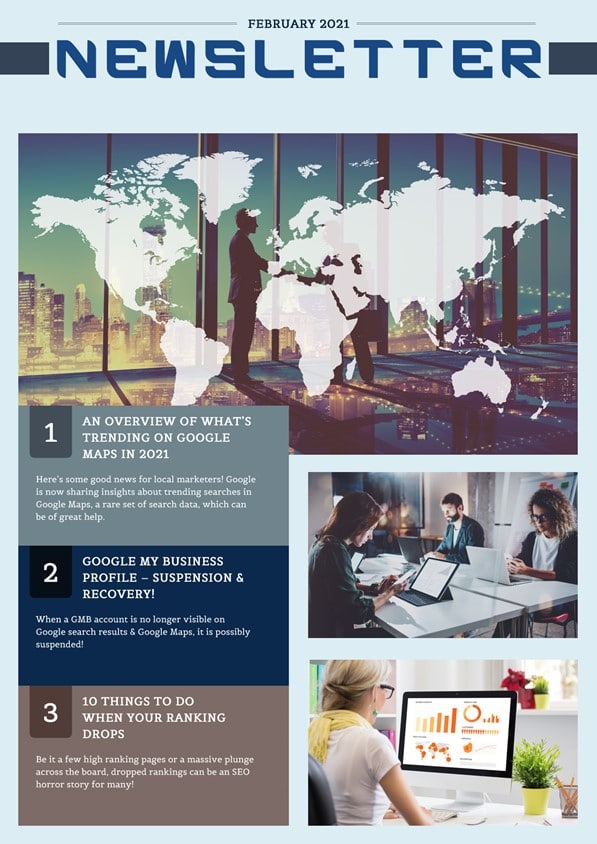




Here’s some good news for local marketers! Google is now sharing insights about trending searches in Google Maps, a rare set of search data, which can be of great help.
Previously, local search data for January used to provide a sneak-peek into people’s New Year’s resolution plans, showing searches for gyms, healthy restaurants, winter vacations, and various forms of self-improvement spiking during the entire month.
But the difference about January 2021 is that this set of Google Maps search data offers a look into what people are doing when they leave home during a time when travel is discouraged. Although, data shows us that people are doing a lot of the same things they do every January but with a different approach to it this year.
For example, unlike every year, people are searching for local travel instead of international travel destinations. Same way, they are searching for at-home workouts instead of the nearest gyms.
Let’s have a deeper look into January 2021 Google Maps search trends.
Local Travel
For this year, people’s focus has shifted from international travel to local travel. Compared to every year, searches for countries outside one’s hometown were low this January.
In January 2020, Maps searches for international destinations increased by 65% over December 2019. Whereas searches for local bed and breakfasts have increased by 20% in January 2021 as compared to late 2020.
Google also noted that ski resorts are trending “in a big way” on Maps. As skiing is a socially distant activity, more people are focusing on it; as a result, searches for ski resorts were more than twice as high as they were last year.
New Year’s Resolution
Search trends in January have always represented people’s New Year’s resolution plans like drinking less, eating better, and exercising more.
Usually, every year, the query “Dry January” tends to spike at the beginning of the year, as people vow to abstain from alcohol in the month following the holiday season.
But this year, it seems very few people are taking this challenge because searches for wine shops and liquor stores dropped by 11% and 6% respectively as compared to December. Whereas, last year at this same time, searches for both the queries were down nearly 40% as compared to the holiday season.
Eating healthy remains a priority this year too. As data shows, searches for “healthy” options increased by 46% in January as compared to December. But it also shows that people’s appetite for sweets is up this year. Searches for ice cream shops are up by 10% as compared to December.
Unlike every year, searches for fast-food restaurants in January 2021 haven’t decreased. Contrary to January 2020, this year’s searches for fast food dropped only by 1.5% from December to January.
Searches related to workouts and exercise remained high even this year, witnessing an increase of 25% from December to January.
According to Google, searches for hiking areas have gone down this year. Data shows only a 16% increase as compared to last year’s 55% increase.
Google My Business (GMB) Suspension
When a GMB account is no longer visible on Google search results & Google Maps, it is possibly suspended! The suspension process is carried out because the business details are not according to the terms and conditions of Google. The trickiest part here is – Google doesn’t specify the reasons as to why a GMB profile was suspended. If you have a GMB account or if your account was suspended, this article is for you!
Signs That Indicate Your GMB Profile Was Suspended
- Comparatively fewer phone calls or less foot traffic than normal
- An email notification from Google stating that your GMB profile has been suspended
- Your Google My Business dashboard displays a “Suspended” notification
Types Of Suspension
- Hard Suspension: When you search for your business on the web, your company’s name is not shown in the search results or Google Maps.
- Soft Suspension: In this case, your business is visible, but you cannot make any changes or manage your listings.
Common Reasons For GMB Suspensions
- Two or more businesses share the same address.
- The address on your website does not match with the business listings.
- The address, name, or phone number on your GMB profile does not match with your directory listings.
- Making frequent small or big changes to your address, business name, website, phone number, etc. is considered spam.
- You have mentioned a P.O. box or UPS box in the address.
- The address on your GMB profile is a virtual office address.
- You have used too many keywords in your business name.
- Business name is not the same across the web.
- Service Area Business displaying your home address.
- Running an online business and don’t have a physical store.
- You belong to industries like Locksmiths, HVAC, Plumbing, and other home service businesses. These industries are known to have more fake listings, making them prone to suspensions.
- The link on your GMB profile redirects to another website or a social media page.
- You have multiple locations or listings for a single business.
- Someone reported your listing through a Redressal form.
- You or your GMB manager violated GMB TOS (Terms of Service).
- Other reasons for suspension include Bugs, Algorithmic Sweep, etc.
How To Avoid A Suspension?
- Read the GMB Guidelines thoroughly before you create an account.
- If you have any questions while you are registering, ask the experts or contact Google.
- Provide the necessary documents like photos, valid proofs, etc. as and when required.
- Check the GMB Guidelines (TOS) once a month to stay updated with all the rules.
What To Do After Your Account Has Been Suspended?
- Don’t panic! If you are a legitimate business, there is nothing to worry about.
- Identify the reason/s due to which your account was suspended. Here, you must check whether you or your manager has violated any of the GMB TOS.
- Follow the guidelines and make the required changes to your suspended account. Yes, these steps can be tedious but still hold on. Do not create a new GMB profile; it won’t be helpful.
- To ensure you have actually fixed the issues, post your details on the GMB help forum or confirm it with an expert.
- Fill in the Reinstatement Form. Answer the questions asked on the form honestly and also provide the required proofs. Please file only a single request to avoid further delays.
- You will receive an update regarding your form from Google within 2-3 weeks.
- If you do not get a reply after 3 weeks, contact GMB support through Facebook or Twitter.
In The End…
If your business totally relies on GMB, then follow the rules and stay updated. We also suggest you utilize other online marketing tools.
See How You Can Improve Your GMB!
Be it a few high ranking pages or a massive plunge across the board, dropped rankings can be an SEO horror story for many!
So what do you do when your ranking goes down?
Google never fails to remind us that they update almost everyday which can sometimes result in your rankings going the wrong way. So when you check the SERPs or console or some other rank monitoring software and see your rankings take a dive, DO NOT PANIC!!!
Strategic troubleshooting can help take things in the right direction. These 10 tried and tested tricks shall help you get back on track with your organic SEO rankings!
1) Take Care of the Basics
When deploying and monitoring keyword performance and focusing on the advanced strategies, it is likely to overlook the on-page SEO ABCs.
Just a quick fix on your website can resolve a lot of issues, which you could be trying to improve with things like anchor text ratio, link velocity, or citation optimization.
Also, do your pages return a 200 status code? They indicate that your site is communicating successfully. The standard 200 OK status code indicates a successful HTTP request.
Free tools such as httpstatus can be used to confirm that your site is returning a successful request. You can troubleshoot based on the failed status codes like 404 (page not found) or 410 (page permanently removed).
Next, you need to know that robots.txt is a text file in the top-level directory of your web server that instructs bots on how to interact with your website. You can include and exclude things in the file as per your liking, like disallowing bots from crawling a dev site or indexing duplicate pages.
Make sure you haven’t set the restrictions too tightly, preventing search bots from crawling any of your main pages. Double-check the robots.txt file with Google’s free Robots Testing Tool, and if you find anything missing, upload a more permissive file to the server.
2) Don’t Forget the SEO Basics
Setting your SEO basics right ensures that you are prepared to compete in the game. Although title tags aren’t a search engine ranking factor, they do have an influence.
Make sure that SEO basics, such as title tags, meta descriptions, and headings, aren’t holding back your rankings.
Have you optimized your homepage title and meta tags, and are they displayed correctly in the search results? Do not miss the simple yet massive opportunity to tell the bots using the homepage title tag what your page is about. Title tags that aren’t very unique can adversely affect the ranking of your page. While meta descriptions do not directly affect SEO, relevant, persuasive metas can improve the click-through rates.
Get your title and meta tags customized within the head section of your site’s HTML. If your site runs on WordPress, install a free plugin like Yoast SEO or All in One SEO Pack to easily manage titles and meta tags across your site.
Besides the information provided in the title tag, the main heading also lets your visitors know what is the primary purpose of the page. But when it is contained in an H1 tag, it becomes difficult for search bots to differentiate them from the rest of the content on the page.
See to it that a single, relevant H1 is used on each page.
3) Keep an Eye on Google Algorithm Updates
Since link algorithm Penguin and quality algorithm Panda have become a part of Google’s core algorithm, you always need to be on your toes regarding how the minor tweaks can impact your rankings.
Every day we see dozens of updates! To stay on top of the breaking developments in SEO, you can follow influencers like Danny Goodwin, Barry Schwartz, and Google’s Gary IIIyes.
When you see webmasters panicking, it is a sure sign that something has been adjusted. Don’t stress about ranking fluctuations if you are doing things the right way; in-depth content, clean and intuitive site layout, and fast load times.
Are you getting the best return out of your digital marketing?
Need an extra pair of eyes to review your online game plan?
Let our experts take a look at your current state and do a comprehensive digital marketing analysis at no cost to you.
Please call us at (800) 379-2829 or contact us today and we will get to work right away.
then


To help your start-up or medium-sized business gain momentum, we have listed some important local marketing strategies. These strategies can help you to increase your brand’s awareness & gain new customers. Hiring a marketing agency can help you to generate leads right away, but if you wish to do it on your own, this article is for you!
Here are some SEO tips for the DIYers:
- Plan the structure of your website carefully. Add navigation tabs on every page of your site to lead the users to other relevant pages.
- Re-direct or eliminate broken links.
- Use the local keywords & geographical area names in the meta descriptions & website content smartly.
- We recommend using page-specific, optimal length title & meta descriptions.
- Keep your webpage content precise and relevant to get a good ranking.
- Register your business on Google My Business (GMB) & other business citation sources.
- Local Citation is a must! List your business with local directories & popular directories.
- Get recognized for your services! Let other businesses you have worked for, mention you on their sites.
- If you want to do better than your competitors, analyze the key factors that are helping them stay on the top.
- Positive reviews can build trust and help increase your customer base significantly.
- Use quality graphics and videos to avoid repetitive content and boost your Click-Through Rate.
Even when you are done following these tips, it takes patience & expertise to achieve the ranking you desire! If you need quick results, consulting an SEO expert is your best choice. We’re here for help!
See How You Can Improve Your Website!
Recently, Google made an announcement saying, “Today we’re completing the migration of the Disavow links tool to the new Search Console interface.” The migration of the Disavow tool was pending for a long time. Almost a year after officially closing down the old version of Google Search Console, they migrated the disavow link tool from the old Search Console to the new Search Console.
Importantly, Google goes on to caution that “This is an advanced feature and should only be used with caution. If used incorrectly, this feature can potentially harm your site’s performance in Google Search results.”
Google explains, “If you have a manual action against your site for unnatural links to your site, or if you think you’re about to get such a manual action (because of paid links or other link schemes that violate our quality guidelines), you should try to remove the links from the other site to your site. If you can’t remove those links yourself, or get them removed, then you should disavow the URLs of the questionable pages or domains that link to your website.”
The new location for the disavow link tool is – https://search.google.com/search-console/disavow-links
Apart from this, Google will now let you download a disavow file as a text file and will no longer limit the error reports for uploaded files to just 10 errors.
How you can use it?
As we all know, Google has always ignored bad links rather than penalizing businesses for it. However, if manual action is taken against your site for unnatural links or if you think that you are about to get one because of paid links or link schemes that violate the quality guidelines. Importantly, Google prefers that you ask the other site to remove those links first and if you can’t get them removed, you can use this tool to disavow those sites.
Do You Have Questions? Ask Us!
In October, Twitter launched Carousel Ads for advertisers globally. These ads enable marketers to display 2-6 horizontally swipeable images or videos.
“The Carousel ad format also includes an edge-to-edge design, 3rd party measurement reporting, accessibility support, and new reporting features, such as swipes within the Carousel and breakdowns to measure individual Carousel card performance.”
You can check out Twitter’s new Carousel Ad Format here.
It takes just a few easy steps to create Carousel Ads. Advertisers can create them via Tweet Composer in Ads Manager or via the Ads API using creative specifications similar to other image and video formats.
Ads can then be promoted or used organically.
If you wish to learn more about Carousel Ads, visit this page!
Are you getting the best return out of your digital marketing?
Need an extra pair of eyes to review your online game plan? Let our experts take a look at your current state and do a comprehensive digital marketing analysis at no cost to you. Please call us at (800) 379-2829 or contact us today and we will get to work right away.


After RankBrain, BERT is the biggest update by Google Search and is likely to impact 1 in 10 search queries. The previous major algorithm update, RankBrain was introduced by the company around 5 years ago.
BERT stands for Bidirectional Encoder Representations from Transformers. It is Google’s neural network-based technique for natural language processing (NLP) pre-training.
BERT can help computers understand languages a bit more as humans do. In 2018, it was open-sourced by Google. Detailed information about BERT is provided in the Google AI blog.
The rolling out of BERT began earlier this week and it is likely to be fully live within a few more days. As of now, the feature is suitable for only English language queries, but shortly Google might try out other languages.
Google further revealed that BERT is being used globally in all languages in featured snippets.
Understanding the context of words in searches will help better match those queries with relevant results.
Examples of Google Search before and after the release of BERT.

In one example, Google said, with a search for “2019 Brazil traveler to USA need a visa” the word “to” and its relationship to the other words in query are important for understanding the meaning. Earlier, Google did not understand this connection between words and would return with results about U.S. citizens traveling to Brazil. Google further explained, “With BERT, Search is able to grasp this nuance and know that the very common word “to” actually matters a lot here, and we can provide a much more relevant result for this query.”

In yet another example, a search for “do estheticians stand a lot at work”, Google said it previously would have matched the term “stand-alone” with the term “stand” used in the query. Google’s BERT models can “understand that ‘stand’ is related to the concepts of the physical demands of the job, and displays a more useful response,” Google said.
In the example below, Google can understand a query more like a human to show a more relevant result on a search for “Can you get medicine for someone pharmacy.”

Here is an example of Google showing a more relevant featured snippet for the query “Parking on a hill with no curb”. Previously a query like this would confuse Google. “We placed too much importance on the word “curb” and ignored the word “no”, not understanding how critical that word was to appropriately respond to this query. So we’d return results for parking on a hill with a curb.”

The first AI method for understanding queries, that Google introduced back in 2015, was RankBrain. To understand the meaning of the words, it looks at both – the queries and the content of web pages in Google’s index. It’s additive to Google’s ranking system. BERT is not a replacement for RankBrain, but an addition to Google’s methods for understanding content and queries. It will continue to be in use for some queries unless Google thinks a query can be better understood with the help of BERT. A single query can use multiple methods to understand the language including BERT.
Google utilizes a lot of ways to understand the language in your query and how it is relevant to the content on the web. In case you misspell something, Google’s spelling systems will help you get the right word that you would be looking for. Also, if you use a synonym that is there in its relevant documents, Google will still return with appropriate search results.
Optimizing for BERT is unlikely! Google already cleared that optimizing for RankBrain cannot be done, which only means that Google is improving at understanding natural language. Users can continue to create digital content as they always do.
Google said this change is “representing the biggest leap forward in the past five years, and one of the biggest leap forward in the history of Search.” This update has so far impacted 10% of all queries, which is a big change. However, after running reports for our clients, we have noticed that the rankings haven’t been affected at all – which isn’t surprising considering we do our basics well.
Final Takeaway
We recommend you to keep an eye on your search traffic changes sometime next week and check how much your site got impacted by the addition. If your search traffic seems to be affected, know which landing pages got impacted and by which query. And, if you need professional help – do get in touch with us for assistance.
Do You Have Questions About Googles Algorithm? Contact Us!

According to a Yelp-commissioned study conducted by SurveyMonkey, almost all online adult users are ready to buy services or products from the local businesses that they discover on Yelp. The survey shows that around about 97% of adult users conduct some sort of transaction with the businesses they find on Yelp.
This survey of over 6,000 adults, is actually a follow up of the study conducted by Nielsen in 2012 and 2016. The figures derived from the 2016 study showed that:
- 92% of online adults conducted a transaction after visiting Yelp “at least sometimes, frequently or almost always”.
- 42% of respondents claimed that they made a purchase within 24 hrs and 79% made a purchase within a week.
The 2019 Survey Shows High Purchase Intent
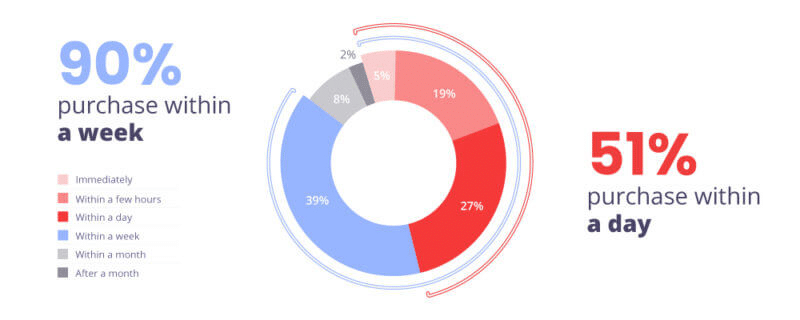
The figures found in the 2019 survey show considerable growth in Yelp’s influence, as more than half i.e. 51% users claim to transact within 24 hours of visiting a site and close to 90% admit to doing so within a week. It also revealed that 93% of Yelp users compare businesses before making any buying decisions.
Yelp claims that both the 2016 and 2019 studies show that Yelp is the “most influential and trustworthy” site when it comes to finding local businesses as compared to “Google, Facebook, TripAdvisor and HomeAdvisor”.
Users Look For More Than Reviews While Comparing Businesses
Although Google has more reviews than Facebook and Yelp, respondents appreciate the other factors, beyond reviews, that they can take into consideration when comparing and evaluating local businesses on Yelp.
- 75% cared about seeing a business or trade license that a business has
- 71% cared about the ability to request price estimates online
- 69% cared about seeing the pictures and costs of previously completed projects
- 58% cared about knowing the unique characteristics of a business like being open late or being family-owned
Final Takeaway
At the end of the day, even though the survey responses do give an indication of the user preferences, it may not be the actual user behavior. However, according to an individual study conducted by FreshChalk Yelp does appear in the top 5 results of 92% of the local business searches on Google. This makes Yelp a critical directory for ranking. The company is also set to roll out new products and features this year, in an effort to differentiate from Google and to diversify revenues.
Do You Know Your Online Review Score! Check It Now!

To improve your SEO it is essential to find and make the most of every opportunity. With digital marketers these days, the first thing they turn to is finding keywords that have a high search volume. However, doing so is not as beneficial as it seems.
Competing with large websites for high or medium volume keywords does not make a huge difference. Here are a few simple methods to rank higher, using more precise, long-tail keywords as primary keyword targets.
Although you might overlook these long-tail keywords as they get less attention than broad keywords that most people look for, they could be just what your SEO needs. With high volume keyword searches becoming more specific, the number of people searching for those terms is likely to decrease. As long-tail keywords have a lower search volume, the competition over them is naturally very less. Fortunately, concentrating on long-tail keywords enables most organizations to set realistic goals for SEO success.
- Appeal to local searches
Most local businesses struggle to compete with large organizations for broad keywords, and here is where long-tail keywords come into play. Local business owners can get more out of making use of long-tail keywords as compared to broad keywords.
According to statistics, almost half of all Google searches are local searches, and 76% of people will either call or visit the business within 24 hours after making a local business search on mobile. Hence, to give your business more visibility locally, going after local-intent keywords such as your city, zip code, or even state is best for your business. Focus and choose keywords that cater to your city and surrounding areas as they are more specific and the competition is less. This allows your business to become more visible in local searches leading to new customers and increased footfalls.
- Focus on intent keywords
Be sure to include “Intent Keywords” when tailoring long-tail keyword research for your site’s SEO content as they tend to represent the later stage of a sales funnel and are usually commercial.
Before buying anything online, we always tend to look-up on the internet before making a purchase decision. Online searchers go through the buyer’s journey to get the information they need before they reach any final purchasing decision. During this time, people are inclined more towards long-tail keywords to get more definitive results for the product or service they’re interested in. At first, people search for more general terms such as “black turtleneck” but eventually narrow down the search with specific long-tail keywords such as “ribbed” or “cashmere black turtleneck” to get down to the best, cheapest, or on-sale items.
Intent keywords, such as “best,” “cheapest,” and “discount” have a lower search volume, but the people searching for them can be worth more than a bigger, less interested audience. The search volume decreases as searches get more and more specific with intent keywords, but at the same time, these searches are more valuable.
Checking your organic traffic regularly in Google Analytics is a good practice and the factors that you must consider while analyzing this are as follows:
See which keywords drive more traffic to your site and to what pages specifically.
Check out the landing pages to find out what drove the users there.
Analyze the low-traffic web pages that you would want to rank higher and figure out how you can optimize them.
Make the most of what you have learned about intent keywords on high-traffic pages to fix up the pages that are deteriorating without traffic.
- Use conversational language for long-tail keywords
As the use of voice searches increases drastically, may it be playing songs by commanding Alexa or searching for a local restaurant with Siri, it is now an essential part of our searches. Although voice searches have made our life easier, many in the world of SEO feel uneasy because of it. There is a fear that voice searches will take over consumer behavior and make the traditional practices obsolete, which is not the case.
To rank for voice searches, you will have to change your ways of choosing keywords as whatever people search for verbally will have different verbosity as compared to what they would have typed.
Start using long-tail keywords for you to compete in the long run. These keywords are more conversational; as if the person is asking a question to someone. Voice searches also include local searches, so prioritizing long-tail keywords considering verbal search is crucial. Keep in mind that the content you create must rank higher for not just voice searches but also traditional searches.
Conclusion
Long-tail keywords may not be a top priority for many, but when implemented with the right amount of work and efforts, they can be a source of easy and direct way of ranking higher on search engines. After all, long-tail keywords are a great example of the adage that not even the smallest things must be missed out when it comes to improving your SEO.

Agencies just love our SEO Audit reports. It helps them close SEO deals faster. Some of them have been asking for new features in the SEO Audit report for some time now. As always, we have been listening to their feedback and after a lot of research and brainstorming, we have rolled out some awesome features to our SEO Audit report.
Top features you’d love!
- Do you know that more than 50% of all searches will be voice searches by 2020! So, is your business ready? Our proprietary algorithm tests your local business for voice search readiness and shows how your information is picked up by Google Assistant in real-time.
- We’ve upgraded our SEO Audits to check your business for local visibility issues including NAP (Name, Address, Phone) consistency in Top 8 sites now instead of 4 in the earlier versions.
(Top 8 sites include – Google, Bing, Yelp, Facebook, Merchant Circle, Tupalo, CitySquares and HotFrog)
- Learn what people are saying online about your business. We check your business reviews on Top 6 sites now instead of 3.
(Top 6 sites include – Google, Facebook, Yelp, Merchant Circle, CitySquares, HotFrog)
Plus tons of changes under the hood to make SEO Audit reports run faster and deliver more accurate results.
Please start using our new SEO Audit Report. Don’t hesitate to share your valuable feedback with us. You can also get in touch with our Support team to know more about this New SEO Audit Report.
Free Instant SEO Audit Of Your Website

Here are the latest pay per click updates we have curated for you this month.
- With the holiday season coming up, Google rolls out holiday updates for merchants with some latest features.
- Determine whether TrueView video discovery ads are the better option for your brand. Click here to find out.
- Stay on top of your game by following these expert guidelines to Facebook Ad creatives.
- Ex-Googler brings to you the ultimate guide on how to improve your Quality Score via the landing page.
- Google Ads rolls out the App campaign asset updates.
- Have you started with your Google Shopping Campaigns for this holiday season? Here are Google holiday forecasts for each industry.
- In a new move, Google is replacing responsive display ads with legacy display ads in your Google Display Network campaigns.
- Microsoft Advertising redesigns its ads to help advertisers easily & intuitively manage ads and achieve more.
- Here are the early PPC results on what we have seen of YouTube for Action Lead Form Ads.
- 3Q issues the key points from the IAB Internet Advertising Revenue Report on U.S. Digital Ad spend.
- Google Ads is testing a new way for businesses to capture customer information with lead form extensions.
- Google Ads rolls out conversions by time with 6 new columns to help you better understand conversions & the value the ads generate for your business.
- Facebook Ads releases new search results placements to help advertisers reach & connect with audiences shopping through the ads in the Facebook Search Results.
- To help advertisers reach their ideal customers, Google is soon rolling out two new segments: Affinity audiences & seasonal event segments for in-market audiences.
- The new forecasts in Google Ads Display Planner provide advertisers with access to better targeting options & ad formats.
- Use the new Facebook Inspect tool to boost your campaign performance.
- Google Ads now allows you to set conversation action at campaign level in Google Ads video campaigns too.
- Google releases machine learning technology – A privacy-safe approach to manage ad frequency.
- Now managing multiple accounts becomes easier with Microsoft Advertising launching manager accounts.
- Amazon introduces Sponsored Display Ads – A new self-service advertising solution helping businesses to reach relevant audiences.
Are you getting the best return out of your digital marketing? Need an extra pair of eyes to review your online game plan? Let our experts take a look at your current state and do a comprehensive digital marketing analysis at no cost to you. Please call us at (800) 379-2829 or contact us today and we will get to work right away.
NAVIGATION
CONTACT US
CORPORATE OFFICE
SCHAUMBURG LOCATION
COMMUNITY











Copyright 2026 eBizUniverse Terms of Use | Privacy Policy