
With the end of GA3, the last day for collecting new data in Google Analytics Universal Analytics (aka, GA3) has passed, and this didn’t go down well with lots of publishers.
According to a poll, which asked publishers whether they are ready for the switch or not, the response says that many publishers weren’t yet prepared.
Google’s John Mueller published a poll asking, ‘Ready for GA4?’
Which shows:

The poll results tell a high 39% of respondents are “Not yet” ready, with only about 27% confidently reporting that they are.
Have a look at another poll result by Google Analytics expert Krista Seiden asking, ‘Are you ready for the switch to GA4? (Please only answer if you are using Universal Analytics and considering what’s next.)’
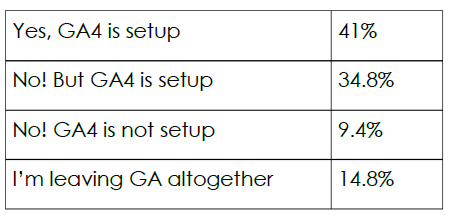
These poll results show that 41% say they are ready, while 59% are in some phase of not ready or else planning to leave Google Analytics altogether.
A few days before the end of GA3, MARTECH reported that a majority of sites (28M compared to 11M) were still using UA.
Analyze your site?

Those who are familiar with the Google Business Profile (GBP) guidelines would know that the search engine giant has some special suggestions for Service Area Businesses (SAB). Google recommends that since these businesses do not serve customers at their business address, they hide the address under the “Info” tab in Business Profile Manager.
The Idea Does Seem Plausible
Hiding the address or even leaving the Business Location field blank makes sense for small businesses like plumbers, electricians, gardeners, etc. where they are required to visit the job site rather than have their customers show up at their business address. And going by Google’s guidelines, it looks like they completely understand this.
But All Is Not As It Seems!
A study that was recently conducted by a local search expert revealed that following Google’s guidelines can cause one’s ranking in the search engine result pages to take a serious hit. In fact, the drop in the rankings caused by hiding the address in the SAB listing also results in reduced number of calls for services.
Here’s a look at what happens when the Business Location field is left blank in an SAB listing:

In the images above, green tags indicate ranking 1-3, the yellow tags indicate ranking 4-7 and the red ones indicate rankings at position 8 or lower. While the image to the left shows the ranking before removing the address, the middle one shows the effect of removing the address on the ranking, while the last one shows the recovery of rankings on adding an address.
Final Takeaway
Although the above mentioned study may be too small to actually count as one, it is better to be aware of what hiding the address can do to your local search rankings.
See How You Can Improve Your SEO!

Did you catch the latest from Google? In June, they tweaked the Search Console’s rich results report for breadcrumbs. Now, if you’re using the HTML ‘id’ attribute to assign an ID to Breadcrumb structured data, you might see a few more warnings popping up in your Breadcrumb report. The change was reported on the SC data anomalies page.
You’re

You’re probably already familiar with breadcrumb trails—those handy little guides that show users where they are on a website or web application. They leave a trail of crumbs (or, in this case, links) that users can follow back to previous pages or levels of the site hierarchy.
But breadcrumbs aren’t just about helping users find their way around. They’re also about keeping users engaged. By making navigation easier, breadcrumbs can help reduce bounce rates. After all, if users can easily find what they’re looking for on your site, they’re less likely to leave and more likely to stick around.
Also, let’s not forget about efficiency. Breadcrumbs provide a quick way for users to see the overarching category or section of the page they’re on, without having to hit the ‘Back’ button or dig around in other navigational features. This isn’t just good for user experience; it’s also a big win for SEO, helping search engines understand the structure and hierarchy of your website.
So, what does this all mean for you? Well, it’s a good idea to check your Breadcrumb report in the Google Search Console and make sure your website is playing by the new rules. We don’t want those warnings to catch you off guard.
As we continue to ride the wave of SEO and user experience design, let’s use these updates as a chance to make our websites even better.
Do You Have Questions About Your Google Business? Ask Us!


Google has made an impressive stride in supporting small businesses. Last month, at GML2023, Google showcased a revamped version of its Merchant Center, aptly named Merchant Center Next, along with an innovative AI feature called Product Studio. This duo is aimed at simplifying and empowering business processes, particularly for small businesses.
What Is Product Studio?
In the contemporary market, product visibility is paramount. Engaging and unique visuals are essential for businesses to stand out. However, creating such content often requires significant time and resources. Product Studio addresses this issue by employing generative AI to help businesses create eyecatching product images.
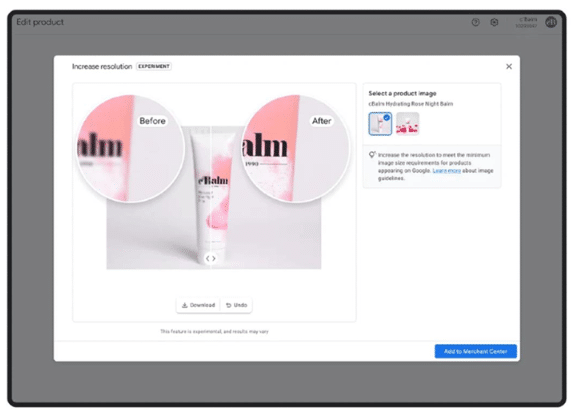
Product Studio can remove backgrounds, generate scenes, and improve the quality of low-resolution images. This tool is intended to create product imagery using generative AI. You can highlight your products in unique and captivating ways, without the need for costly and time-consuming photoshoots.
How Product Studio Can Help?
1. Add custom product scenes: With Product Studio, you can now incorporate custom product scenes into your marketing efforts with ease.

2. Remove a distracting product background: Whether you desire a clean and professional look with a plain white background or need to remove a complex background, Product Studio provides a simple solution.

3. Quickly increase resolution: With just a few clicks, you can quickly increase the resolution of your images, resulting in improved clarity and sharpness.
What Is Merchant Center Next?
Merchant Center Next is Google’s enhanced platform designed to facilitate the listing of products across Google’s various services. This includes making Product Studio features readily available to merchants who utilize the Google & YouTube app on Shopify.
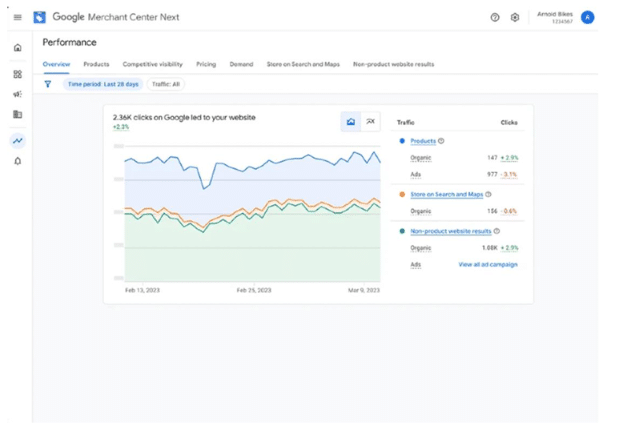
Key Highlights:
1. Streamlined Product Feed: Merchant Center Next simplifies the setup of a product feed. Instead of manual entry, Google will automatically populate your product feed with information from your website.
2. Consolidated Insights: Access comprehensive insights regarding your performance in a single tab. Review best-selling products, see which businesses are shown alongside yours, and understand how shoppers engage with your business.
3. Integrated Inventory Management: Manage online and in-store product inventory efficiently through a unified view
Google has already commenced the rollout of Merchant Center Next for new users. It plans to upgrade small businesses progressively, with the goal of completing the global rollout by 2024.
In A Nutshell:
This introduction of AI-powered tools by Google is a testament to the evolving landscape of ecommerce and the continuous efforts to provide small businesses with effective resources. With such tools at their disposal, small businesses are better equipped to optimize their online presence and drive growth.
Stay ahead of the curve with these new offerings from Google!
Analyze your site?

In the latest announcement, Microsoft said that Bing Search is now the default search engine for OpenAI’s ChatGPT.
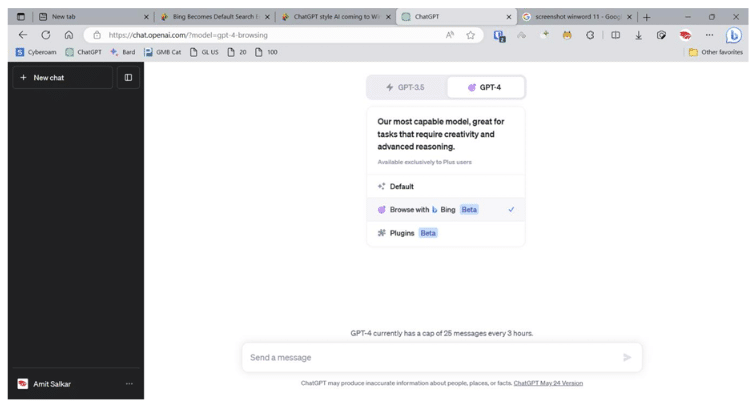
In this announcement, Yusuf Mehdi, VP at Microsoft, stated, “ChatGPT will now have a world-class search engine built-in to provide timelier and more up-to-date answers with access from the web. Now, ChatGPT answers can be grounded by search and web data and include citations so you can learn more—all directly from within a chat. The new experience is rolling out to ChatGPT Plus subscribers starting today and will be available to free users soon by simply enabling a plugin that brings Bing to ChatGPT
Further, he added, “As we talked about today at Build, Microsoft, and OpenAI are jointly committing to support and grow the AI plugins ecosystem by embracing interoperability. This means developers can now use one platform to build and submit plugins that work across both consumer and business surfaces, including ChatGPT, Bing, Dynamics 365 Copilot, Microsoft 365 Copilot, and Windows Copilot.”
To read the rest of the announcement and to learn more about how Microsoft is accelerating the Bing ecosystem and supercharging with plugins, and integrating Bing across Microsoft’s copilots, click here.
Considering the approaching update, here are some suggested approaches:
- Generate High-Quality, Relevant Content – Create high-quality, relevant content that resonates with your target audience, as this remains a crucial factor in improving search rankings.
- Boost Rankings with Long-Tail Keywords – Utilize long-tail keywords, which are less competitive and more specific, increasing the chances of ranking for targeted searches.
- Write Clearly for Google’s Generative AI – Ensure your content is well-written and easily comprehensible to accommodate Google’s new generative AI capabilities.
- Enhance Engagement with Multimedia Content – Incorporate multimedia content, such as images, videos, and infographics, as Google’s generative AI can process and understand such media, making your content more engaging and informative.
- Keep Up with SEO Trends – Stay updated with the latest SEO trends, as Google frequently updates its algorithm. Remaining informed about emerging trends will help you adapt and optimize your strategies effectively.
By implementing these approaches and closely monitoring the developments, we can navigate the impact of Google’s search upgrades and continue to optimize our SEO efforts.
See How You Can Improve Your SEO!

Microsoft made strides with AI innovations at their Build event last month – an event that might as well be dubbed Tech Paradise of the Year. It graciously lifted the curtain to showcase how AI is set to be a game changer in everything they offer.
Introducing Windows Copilot: Your AI-Enhanced Personal Assistant on Windows 11!
Windows 11, the latest and finest from Microsoft, comes packed with a useful feature called Windows Copilot. Imagine having an assistant that’s just one click away, ready to streamline your work! It’s conveniently placed on the taskbar, making it easier than ever to access and enhance your productivity.
Here’s the official word from Microsoft:
“We are introducing Windows Copilot, making Windows 11 the first PC platform to announce centralized AI assistance to help people easily take action and get things done.”
But that’s not all! There are also Bing Chat plugins, new Hybrid AI loops, Dev Home, and an array of other such AI-based features on the Microsoft Store. Quite the innovation-packed bundle, wouldn’t you agree?
Watch this video for a swift tour of these integrations. But be warned, it might make you strongly consider hopping onto the Windows 11 bandwagon!
Microsoft vs. Google: A Tech Colossus Face-Off!
Now, let’s put this in perspective. Google is known as the master of internet search. However, when it comes to integrating AI into an operating system, Microsoft has the home-field advantage. Their stronghold in the enterprise realm is nothing short of impressive. This integration might very well be the starter’s whistle for a riveting competition between Microsoft and Google.
And where does Google stand? They appear to be strategizing in the background while Microsoft takes the limelight. Relying solely on advertising might not be the winning ticket in this contest. As the saying goes, the best defense is a good offense!
Something To Ponder: On a PC, you’ll be using Microsoft or Apple’s operating system. But Google? It’s not a must-have. A noteworthy point to consider.
Stay Tuned: We’re on the cusp of a major shift, one that could redefine the technological landscape. Keep your eyes peeled and your senses alert – this is a development you’ll want to track closely!
For a comprehensive overview of the highlights from Microsoft’s Build event, visit this link.
Do You Have Questions About Your Google Business? Ask Us!


See How You Can Improve Your SEO!

Do You Have Questions About Your Google Business? Ask Us!

See How You Can Improve Your SEO!

Analyze your site?



Thanks to a study that was earlier published by Sterlingsky, we learned that if a local listing manages to garner 10 reviews or more, they get a ranking boost in the Local Search Results by Google. The study also shed light on the fact that the recency and length of the reviews play an important role.
Last month, we saw the results of another study being published! This new study suggests that reviews with more than one upvote tend to stay in the top ten for around 100 more days as compared to those with one or no upvote.
Take a look at the chart below that clearly indicates the more upvotes a review gets, the longer it stays in the top ten.

Considering the fact that a previous study conducted in 2021 reported that the upvotes play no role in moving a review up in position, the findings of the latest study have surprised many.
Why This Is Important?
Having useful reviews appear in the top ten is bound to be more beneficial not only for your business but also for your customers. Hence, it is recommended that while asking your customers to leave a review, you also ask them to upvote the helpful reviews they find on your listing.
Are you interested in repairing your online reputation to increase your review quantity? Contact us to see how eBizUnvierse can improve your online reputation.
According to Google, links may become less important in the future. But a recent survey contradicts Google’s prediction. The survey says that links continue to be a critical ranking factor.
The survey anonymously asked 755 professional link builders about how they build links, what works best / worst for them, and what it really takes to make link building work for their business.
Here’s a summary of the most interesting findings and key statistics:
- 3% of link builders pay for links. We knew this number would be high, but didn’t expect it to be this high.
- We broke down the specific amount being paid and found that the average cost of a paid link is $83.
- However, when comparing those who pay for links VS those who don’t, we found that paying for links yields only an extra 2 links per month.
- In-house SEOs pay 75% more for links than niche site owners. Nobody seems to have a problem spending other people’s money.
- Looking at all links, when salaries are factored in, we found that experienced link builders can build links 41% cheaper.
- It takes an average of 3.1 months to see the impact of a link on the search ranking, with very few saying it takes longer than 6 months or less than 1 month.
- Guest posting is, by far, the most popular link-building tactic. It is somewhat contradictory to the point that the same people said creating content or linkable assets is the most effective link-building tactic.
- Google has told us that nofollow is a hint, not a rule. Our participants agreed, as 89.1% of link builders say nofollow links have an impact on rankings.
- Looking for a way to boost your results? Are you using social media for outreach? Link builders using social media build 22% more links than those who don’t.
This survey was published in November 2022, just before Google’s Link Spam Update. This update specifically targeted purchased links, showing that Google still considers links to be an important part of its ranking algorithm.
However, there is a possibility that Google is overestimating its ability to detect purchased links. Only time will tell if buying links is still a viable ranking strategy. So, for now, be careful and stay tuned for updates.
Are you having trouble keeping up with all the Google SEO updates recently? Contact us and see how we can help you maintain your high ranking without sacrificing your time.
There is a question that is being discussed all over the world now: Can ChatGPT answer all of our questions in the way we want? And if it can, will it revolutionize how we search for and ask for things on search engines? Well, you may wonder, discuss, or throw your opinions straightaway, but Microsoft is bringing ChatGPT’s AI question-and-answer service to its Bing Search, opening a whole new world of possibilities for us to interact with AI in everyday life.
This chatbot, launched by OpenAI, has become incredibly popular across the globe. Everyone, not just professionals, is using it for their projects, research, homework, writing essays, and getting answers to their queries. Some people loved it so much that they called it the “Google killer!” So, is it a code-red for Google, or are we going too far? Let’s find out.
Launched in November 2022, ChatGPT is based on OpenAI’s GPT-3.5 family of large language models and has been refined through supervised, reinforcement learning techniques. It can teach itself how to answer questions by using content drawn from the web that dates up to 2021. However, it has difficulty keeping up with recent and popular topics!
Keeping all that in mind, Microsoft is planning to launch a version of its Bing search engine that uses the artificial intelligence behind ChatGPT to answer search queries instead of simply providing a list of links. This feature will depict a human-like interaction, which Microsoft thinks will help it outflank Google.
So is it really a “Call the ambulance!” moment for Google? Well, experts in the industry are saying no. Google already has advanced AI and machine learning that can do the same as ChatGPT or even better. And to add to this, it has ways to detect AI-generated plagiarism and scraped content. In conclusion, it’s a “Call the ambulance, but not for me!” from Google’s side.
Are you getting the best return out of your digital marketing?




Last month it was reported that a new bug caused businesses to lose all of their reviews after their Google listings were auto-updated. Mike Blumenthal has issued a detailed report.
According to the Blumenthal report:
What is the New GBP bug?
A lot of businesses are saying they lost all of their reviews after their listings were auto-updated.
Here are some representative posts on the Google Business Profile Help:
- Change in Profile and lost reviews : Suddenly I woke up to see that the details about my
profile were changed and all the reviews were deleted. I am confused about how to approach this situation. Do guide me..
- All Reviews Gone : On Friday (11/4) I got an email from Google that my business profile was updated. Much of the information changed was changed to incorrect information or just removed entirely. I went to review and undo many of the changes. Today I noticed that all my reviews are now gone. I had 18+ reviews on my profile and I need to get them restored but I don’t know how to go about getting them restored.
- My genuine reviews have all been removed, 95 of them : 95 reviews have all been removed, even 5-6 1-star reviews. They also slightly changed my business; I was able to instate [sic] though. But I haven’t had no luck getting my reviews. Please help.
- Customer reviews disappeared : [105] reviews were lost all at once. Google had automatically updated my business information. They had shortened the business name to (Sydney Steemer) without the carpet cleaner. And changed my website information to a different link that also went to my website. This when I realized all the reviews had VANISHED!
- All reviews are gone : We had 170+ all 5-star reviews. One day they were all gone. In the settings it showed that google changed the name and phone number and short name for our business. After trying to contact them with the issue for over a week we still are not able to get reviews back or any answer. Also, some changes that google made we are not able to accept or decline.
The report further says after running through the typical scenarios where one might expect to lose reviews, it is clear that, in every instance, reviews disappeared immediately after the Suggested Edits update.
Mike discovered that in each case, Google had changed the Customer ID Number (CID), the identifier Google uses to tie all relevant information to a business, including reviews. But this is unusual because CID only changes when two listings merge or Google has hard-suspended a listing for guidelines violations and then reinstated it.
Mike’s report goes on to say, “Changing the CID and losing reviews with ——-a Suggested Edit update is a new and disturbing bug. It could happen to almost anyone for no reason or no apparent reason. Yet, in Google’s infinite wisdom, it could also be working as intended.”
We would suggest reading Mike’s report to learn what you need to do to recover from such an
event if/when it happens to you.
Is this not a real concern for your business because you currently don’t have a lot of reviews?
eBizUniverse can help your business increase the amount of authentic reviews across several different platforms like Google, Yelp, BBB, etc. Contact us today to see how we can help you manage your online reputation.
It is a well-observed fact that reviews affect your business’s rankings in local searches. But nobody has told you how or in what manner. And you may believe that the more reviews your business has, the higher its ranking gets. But is it actually the case? Well, Google has cooked up some algorithms for it, and we have uncovered everything for you!
In a recent study by SterlingSky on local ranking, we found that once a business or practitioner garners 10 reviews on listings, Google’s algorithms boost its ranking in local search results.
But that’s not all there is to it. After some time, the boost does not continue as you get or pump in more reviews. Reminds us of the law of diminishing returns, and in this case, it is there.
To help you with an example, here’s an image for you.

As you can see in the image above, when the reviews went from 3 to 16, there was a ranking
increase. But when the reviews increased to 31, not much happened there.
Many business founders stated that 10 could be a “ magic number,” as they observed a
sudden increase in ranking but not much later.
Rankings Are More Than Just Reviews:
Reviews are just one piece of the puzzle. Getting a ton of them does not mean you are going to
rank well. What’s important is that you have to have at least 10 reviews for a better listing. And
having them also helps in building trust and getting conversions.
Recency Matters:
While numbers tell their own story, the recency of reviews also matter. We found that when
businesses got reviews from time to time, their rankings surged. But as the stagnancy settled,
there was a decline. Therefore, by setting up a system that regularly updates your ratings, you
can enjoy being on top for a longer time.
Length Can Make All The Difference
The above-mentioned scenarios, lead us to the third one – Length matters! The more genuine, longer, and wordier reviews your business gets, the better it will perform in search rankings. So encourage your customers to express their opinions freely. Haven’t you noticed that one-star reviews are longer because the customer is genuinely writing about something that he didn’t like? Persuade you customers to do the same for positive reviews.
Key Takeaway
The bottom line here is that reviews can make or break your rankings. No matter how many or how long they are, reviews matter for your business – to become a trusted brand, a company that people genuinely talk about and a reflection of how well it is doing. Businesses that listen to their customers will always stay among them. And you can do so by asking your customers to express themselves!
Are your review numbers suffering because you’re too anxious to out-right ask for reviews?
eBizUniverse has a strategic business plan that utilizes your current contact/client list for new reviews. Contact us today to learn more about our email campaign options for your business.
It’s good news all around for those who’ve always wished to be able to crop the photos uploaded to their Google Business Profile posts!
Last month, a user spotted a cropping tool overlaid on the pictures she uploaded

to her Google Business Profile and took to Twitter to inform the world about this
latest development. It seems like the tool has been added to enable businesses to
make their GBP posts and updates as effective and presentable as they wish.
Why This is Important
Images play a major role in promoting products and services to prospective customers and/or clients. Any tool that can help enhance these images to make them more appealing is always welcome!
Are you getting the best return out of your digital marketing?



If you receive this message from Google, “Your business profile on Google has been unfortunately suspended, and the reason for the suspension normally is only “due to quality issues” or “suspicious activity”, if you are on Google Business Profile Manager, or “this profile doesn’t follow the guidelines” if you are on Google Search Dashboard,” Google has suspended your account.
Let’s know more about the “Suspended” alert messages from Google and the most common reasons for a profile suspension.
Main Suspended Messages from Google:
Suspended for suspicious activity:
- “Your listing has been suspended because it was flagged for suspicious activity”
- “This location has been suspended because it was flagged for suspicious activity”
- or “Your Business profile on Google has been suspended because it was flagged for suspicious activity”
Suspended due to quality issues:
- “Your listing has been suspended due to quality issues”
- “This location has been suspended due to quality issues”
- “Your profile has been suspended due to quality issues”

Suspended because this profile doesn’t follow the guidelines:
- “Your business is not visible” followed by “Your access has been suspended because this profile doesn’t follow the guidelines. Edit your business info and learn how to regain access”
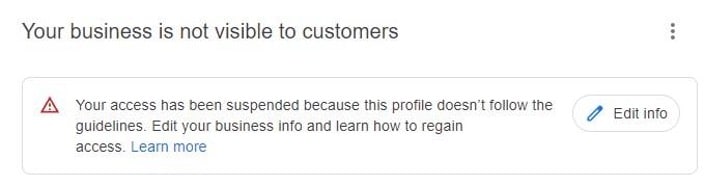
Want to know what that means?
Your Business Profile Listing has been suspended because it was flagged for suspicious activity.
Why was your Google Business Profile flagged for suspicious activity?
Normally this type of suspension is due to:
Certain Profile Edits (Business name, Address, Service Area Business, Phone number, Category)
Several edits were made in one single section, and it does not matter which edits were
The owner’s Google Account was suspended
Your Business Profile Listing has been suspended due to quality issues or doesn’t follow the guidelines.
Why was your Google Business Profile suspended due to quality issues?
Normally, this type of suspension is due to:
- Google Algorithm signalized issues with your profile, most of the time because:
- Finds conflicting information about your business on the web (directories, Social Networks, your website)
- Identifies your address as a residential address, co-working space, PO Box, UPS Store, Virtual address
- Found duplicates (How to find and remove duplicates)
- User(s) reported the listing on Google through the “Suggest an edit” feature – Algorithm suspension if it thinks reporting is justified
- User(s) reported through redressal form – Manual suspension by a Support Agent
Here are the Main Reasons That Get Your Google Business Profile Suspended:
- Keyword stuffing your business name.
- Using a P.O. Box or UPS store address.
- You set up your listing at a virtual office or co-working space address.
- You have a service-area business and are displaying a physical address.
- You have an online-only business.
- You are in a high-risk business category, like lawyers, plumbers, HVAC, locksmiths, rehab centers, etc.
- If another business shares the same address.
- You have made a bunch of changes/edits to your GMB profile in one sitting.
- The URL you add to your GMB profile forwards/redirects to another website or links to a social media page.
- If you change your listing from a Storefront to a Service Area Business (SAB).
- Your address or hours don’t match what is listed on your website or other online business directories/citations.
- You list your business hours as 24/7.
- An owner user (sometimes a manager) on your profile got their Account suspended – so your listing got suspended because they got suspended.
- You created multiple listings for the same business at the same address (duplicate listings).
- Photos, Posts, Services, and Business descriptions are spammy or against Google’s policies.
The thing you need to worry about is Google doesn’t tell you the reasons why your business account was suspended.
Yes, Google doesn’t tell the business owners about the reasons why their profile was suspended. Even if you contact support asking for the reasons, they just tell you to go through the guidelines and try to figure out by yourself the why.
Google’s advice on how to resolve the business profile suspension issue
Google Business Profile’s support article only advises:
- Review the Google Business Profile guidelines.
- Ensure your profile follows the guidelines.
- After your profile meets the guidelines, you can ask for reinstatement

And if it is denied, you can appeal; but it does not tell you how.
Note: Even though the reinstatement process can be very frustrating, please note you should never: remove the profile from the dashboard (you will lose all the reviews); create a new profile (high chances of getting suspended, even if Google support tells you to do it); or submit multiple reinstatements yourself (will only delay your case).
Is your listing suspended? Get in touch with our team to get it unsuspended!
Many business owners and SEO experts had a baffling afternoon on 23rd September, Friday. The reason being the roll out of a fix for the bug that caused a number of businesses to experience a drop in local rankings in the last month.
A local search expert uploaded a post on Twitter about this.

Referred to as the “Kansas” bug, it has been dropping some service area businesses in the middle of the USA — in Independence, Kansas in Google Maps / Google My Business.
However, thanks to the recent fix rolled out by Google, some of the businesses have recovered their local rankings, albeit not as they were before the shakeup.
Why this matters — It’s always nice to know it wasn’t you when it was them.
See How You Can Improve Your SEO!
Your meta descriptions are important for your website’s SEO. Make sure they are clear and concise so potential viewers will be able to get a good idea of what your page is about before clicking through to it. In addition, high-quality descriptions can be displayed on SERPs, and can also help improve the quality & quantity of your website’s search traffic.
Let’s dive into some examples to get better at writing meta descriptions
| DETAILS INCLUDED | BAD WAY OF WRITING | GOOD WAY OF WRITING |
| Keywords |
|
|
| Description for articles |
|
|
| Summary of the page |
|
|
| Length of the description |
|
|
Lastly, your descriptions should be easy for people to read and understand and should also be diverse, so potential customers can get a good sense of what your product or service can offer them.
Are you getting the best return out of your digital marketing?




In August, Google announced a new big search ranking algorithm update, named the helpful content update – probably its biggest update in a decade.
What We Know
The helpful content update will target websites with a relatively high amount of unsatisfying or unhelpful content, where the content has been written explicitly for search engines to leverage rankings.
Unlike many Google algorithms that get applied page-by-page, this new helpful content update will be sitewide. That means that if Google determines your site is producing a relatively high amount of unhelpful content, it will impact your whole site.
This reminds us of the early Panda and Penguin update days. Just as a quick reminder – or in case you weren’t working in SEO a decade ago – those updates did a lot of damage back then, and we made significant changes to our SEO strategies to recover and protect our client websites.
Which Sites Were Likely Impacted?
According to Google, this update impacted these types of content the most:
- Online educational materials.
- Arts and entertainment.
- Tech-related.
This is because content written in those areas has historically been written more for search engines than humans.
These are the folks that were hit the hardest:
- Publishers focused on a broad range of topics like CNET, Forbes, etc.
- Sites that collect and monetize organic search traffic without providing unique value.
- Sites that have content created with AI tools like Jasper or Copymatic.
- Sites with SEO doorway pages created for the sole purpose of boosting rankings.
- Sites with spammy content with a very high keyword density.
Our Observations:
We were quick to run a deep ranking audit of more than 3.5K websites, and we are happy to inform you that so far, this update did not have any significant negative impact on our client’s websites. In fact, we have seen good improvement in positions for the sites we are working on. This implies that our content strategy, in conjunction with our other SEO efforts like on-page optimization and link building, is working well and protecting our client’s websites.
Analyze your site to see if it is up to date!
Are your GBP posts getting rejected? Well, that’s because GBP has added more restrictions to its list of guidelines. As stated in their support document under the “Avoid Spam” header, Google warns business owners to avoid uploading duplicate photos, posts, videos, or logos.
Here’s a screenshot of the other guidelines that you should know.

So, using original images & relevant content is the only way to get your posts accepted.
Need help? Get in touch with our technical support team for assistance.
See How You Can Improve Your SEO!
Recently, it has been discovered that Google Maps is emailing customers who have posted a review for any business when their review is flagged as fake and, therefore, not posted.
It came to light after Lucio Laria – Consultant SEO International raised this issue on the Google Business Profile community. When a help forum titled Legitimate review started getting flagged as “Fake Engagement”, he wrote:
Hello,
I just settled my Google profile and asked my client for a review. Google is filing this review as a fake engagement when this person is a legitimate client of mine.
I’m waiting for this to be fixed before asking other of my clients for their reviews.
Why is this happening, and how can I fix it?
Thanks,
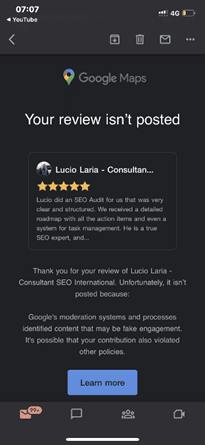
Among the many conjectured reasons and suggestions put forth by knowledgeable forum members are the following:
- It may be related to the review content. See Prohibited and restricted content. Ask the reviewer to delete it and then write a new review.
- It may be due to a problem with the reviewer’s account.
- Because the provider is in France and the client is in Argentina, the distance between them could be the reason.
- Ask the reviewer to try again, leaving a 4-5 sentence review, and add specifics about the services provided and, if pertinent, the location at which they were provided. If that fails, ask them to leave a review from another account.
The reviewer received the email notification about 15 minutes after posting the review. As the forum community pointed out, the review was being “filtered by an algorithm that enforces Google’s content policies”.
Why You Should Pay Attention to This Issue:
As we all know, getting legitimate reviews is not an easy task. It takes a lot of effort to impress a client and even more to convince the client to post a good review. It is disappointing when our sometimes hard-to-get legitimate reviews get taken down for “algorithmic” reasons, as requesting the client to post it again can be a bit awkward.
So, it’s crucial to learn how to get our good reviews to stick the better we can prep our customers and clients to get it right the first time.
Are you getting the best return out of your digital marketing?




Google updates its algorithm frequently. At times, they announce the major updates beforehand, and at times they inform after initiating one. The last update was rolled out on May 25th, and to learn about such updates, we had to wait for tweets & official answers from the team.
Google thought of improving this process and has created a dedicated Google Search ranking updates page. With the help of this page, you can check all the latest and previous updates easily.

If you wish to learn how Google improves the search engine, there are several articles from Google to help you. Also, its blog page has more information related to the updates. This page is definitely important for all site owners and SEO experts.
Need more details? Reach out to our support team for assistance.
Analyze your site to see if it is up to date!
To help businesses grow their eCommerce site, Google developer advocate Alan Kent recently hosted a video that outlines “8 tips” for SEO-optimizing an eCommerce site.
Here are the 8 tips that Alan believes will help you:
Tip 1: Make sure you have the technical basics in place – You need to ensure your URLs and internal links are friendly to crawlers.
Check out Designing a URL structure for E-Commerce Websites on Google Search Central for advice on how to design URLs for your website.
Tip 2: Create content relevant to users at different stages in their shopping journey – To check the breadth and quality of your site, think about likely searches by shoppers at different stages in their shopping journey. Once you have a set of queries, try them out. Does your site come up well-positioned? What about your competitors?
Tip 3: Be sure to mark up your product variant pages correctly – Product variants are when you have multiple colors or sizes of the same product. Informing Google of the relationship between the product pages can help Google better understand your site content.
The URL Inspection tool can also be used to check the status of individual pages.
Tip 4: For sales events that occur regularly, use the same URL across all event occurrences – This can help Google understand and trust the purpose of such pages. To identify problems, check the URL for promotional event pages on your site.
Tip 5: The “performance” of your web pages matters – Performance is important to users as a page that takes too long to load may be abandoned by them. It is also an important Google ranking signal. It can be particularly important if you use the same supplier-provided product description as other sellers online. The PageSpeed Insights report is useful for checking the performance of the web page.
Tip 6: Wait for it – Be patient to see the results. SEO, unfortunately, is a long game. Some ranking signals may take months to change. Worse, there is no guarantee of success. While it may take months to reap the benefits of a content creation strategy, it does not mean there is nothing you can do until then.
Tip 7: Seek professional help for your website – If you have done your best to improve your site but are still not getting the results you want, we’re here to provide expert SEO advice.
Tip 8: It’s all about the user – The ultimate goal for Google Search is to put the best possible content in front of the users. Algorithms change over time, but the ultimate goal does not. It does not mean you should not measure your site’s performance. It is still recommended to use tools such as Google Search Console and Google Analytics to collect data on your site.
Here is just one of our success stories that shows the importance of SEO! Ready to be our next success story?
See How You Can Improve Your SEO!
As known to most SEO experts out there, Google renamed Google My Business to Google Business Profile last year while also rolling out more support for managing a business profile.
Going a step further, the search engine giant has now launched another feature that is bound to give small businesses operating out of homes a reason to be happy.
Google Business Profile now features a toggle that will allow businesses to hide their business address from customers if they wish to do so.

The screenshot above shows the businesses can now toggle ‘Show business address to customers’ on and off.
Why Is This Important?
This recently launched support feature is perfect for entrepreneurs operating virtual businesses that aren’t tied to a physical location. It can also prove to be quite helpful for all those home-based service operators who wish to avoid customers visiting.
Are you getting the best return out of your digital marketing?




Local SEO strategy refers to the overarching strategy or process used to optimize your site content and online presence for higher rankings. Local SEO strategy focuses on improving business rankings in local search engine results pages (SERPs).
The difference between traditional SEO and local SEO is local SEO focuses your efforts on attracting customers near your physical location — and getting them through your door, while traditional SEO boosts your visibility on a wider scale.
The main benefit of local SEO is that it lets you take advantage of increased visibility in your immediate area.
How does it work?
Google uses numerous factors when ranking local content, but it predominantly focuses on these three signals:
- Relevance: Does your business listing match the searcher’s intent?
- Distance: How close is your business to the searcher at the time of the search?
- Prominence: Is your business well-known both online and offline?
When a user conducts a search using a location or “near me” and your business listing best matches the query, you’ll appear in Google’s local SEO 3-pack — a listing of the top three local businesses that meet the search criteria.
12 local SEO strategy tips to boost rankings and revenue:
- Optimize your local listings and citations
- Understand your local personas
- Conduct local keyword research
- Earn backlinks from local sources
- Write in-depth, local content
- Optimize your title tags and meta descriptions with local keywords
- Include an internal linking structure for location pages
- Update your website
- Improve your UX
- Post local content on social media
- Earn reviews from happy customers
- Track the results of your local SEO strategy
Analyze your analytics?
In true Google fashion, the search engine giant has now come up with an update for its rich results guidelines. These updated guidelines are meant to better align the rich results content with the overall Google merchant guidelines.
The new guidelines deny rich results for products that are widely prohibited and are known to facilitate harm in any way to anyone. For example, products that fall into categories like weapons, fireworks, recreational drugs, tobacco, gambling, etc.
The guidelines now have an additional section
Google rich results content guidelines, which have already come into effect, have been updated to add the following section:
“Don’t mark up content that promotes widely prohibited or regulated goods, services, or information that may facilitate serious and/or immediate or long-term harm to self or others. This includes content related to firearms & weapons, recreational drugs, tobacco & vaping products and gambling-related products.”
The new policy applies to all forms of markup
According to Google, the new guideline policies will apply to rich result markups in all forms, be it star ratings, prices, information regarding a product’s availability or other such factors. This, in turn, will impact the prohibited products’ structured data markup.
How does this affect your business?
If you are into the business of selling products that fall into any of the above-mentioned prohibited categories, this update definitely applies to you. All you can do right now is remove the structured data markup from your product pages because Google will not show rich results for them.
Although the search engine will not issue any manual action, the removal of rich results in itself will act as a penalty against violating the rich results content guidelines.
See How You Can Improve Your SEO!
For years, Google’s SERPs have been including knowledge panels so users can find the required results quickly. In this article, we’ll discuss how knowledge panels are created and how they work.
Introduction To Knowledge Panels
Knowledge panels/entity boxes are information boxes that appear on Google’s search results page when you search for specific content. The main aim of these boxes is to provide users with the information they need in brief. The content you search for (for example – people, places, organizations, things) should be present in knowledge graphs to appear in knowledge panels.
Only limited categories or entity types (books and book series, educational institutions, government, local shops, companies, events, movies & film series, music groups & albums, and more) are considered for the knowledge graph. Also, only the most relevant or popular entities of every category are included in the knowledge graph.
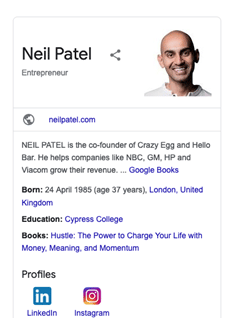
Knowledge panels are different from business boxes, as the latter is based on Google Business. The best way to spot a classic knowledge panel is by looking for a share button in the upper area of the panel. Also, the entity type is specified below the name & depending on the category, various attributes are assigned & the available content is filled.
The image below is an example of a classic knowledge panel. Google prefers using different templates for various entities.
How Are Entities Selected For A Knowledge Panel?
Google has not given any criteria or procedure to select an entity for a specific category. But we have listed some of the most possible ways that Google uses to create a knowledge panel. Several websites that provide semi-structured data, for example – Wikipedia and Soundcloud, can be used by Google to select relevant entities for each category.
How Are Knowledge Panels Created?
In the Google patent, you can learn more about the basic methodology related to knowledge panels. The steps given below describe the basic process followed to create a knowledge panel:
- Finding relevant entities in the query
- Shortlisting relevant sources
- Creating the most appropriate search results
- Cross-checking whether the search query refers to the actual entity
- Determining an entity type/category for the entity requested
- Finalizing a suitable template for the panel (which should match the entity type)
- Arranging relevant content elements for the main entity from a trusted source
- Referring to another trusted source for content elements
- Attaching placeholders in the selected panel template with the finalized content elements
- Merging search results and knowledge panel on one SERP
How Are Images Selected For A Knowledge Panel?
The Google patent describes how images are selected for various entity types and incorporated into the knowledge panel. The steps given below are a shorter version of the same.
- Most relevant images are selected
- Cluster by similarity
- Most popular clusters are identified and separated
- Image format (portrait or not) is determined
- A portrait score is assigned
- The most representative image is selected
- The image is attached to the knowledge panel
The clustering of images into various categories depends on the proximity to the entity as well as the aspect ratio. We can also determine the possible categories by looking at Image Search.

In Google’s patent related to images, the images are labelled with attributes and are assigned to specific entities. These attributes are primarily determined by considering the initial image. Additional attributes can also be added by referring to similar images. It is believed that Google selects relevant images by using data from popular sites (Wikidata, Wikipedia, Wikimedia, social media profiles, magazines, and more).
Reasons Why Knowledge Graph Is Gaining Importance
The SERP features are gaining more importance every year, so it’s expected that the Knowledge Graph will also follow the trend. Since the entities are at the center of the Knowledge Graph, it will definitely affect the rankings and overall search results. To conclude, SEOs should not miss out on the Knowledge Graph when preparing their SEO strategies.
Are you getting the best return out of your digital marketing?




As we all know, Google launches core updates at least two to three times a year. These updates cause a hassle to all the web developers and SEO specialists because they have to monitor the rankings and make the required changes.
On May 25th, Google announced an update via a tweet.
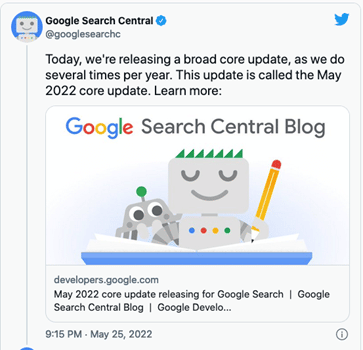
This core update was further explained on Google Search Central. According to this article, Google makes changes to the ranking process to increase the accuracy of the search results. These improvements are called core updates. The core updates are not specific to certain sites but will certainly generate notable effects. Some sites’ ranking may drop, while others may rank better.
Also, Google said that if any site does experience a drop in its ranking, they don’t have to fix anything. These updates are meant to improve the system, helping under-ranked sites to get better traffic.
So, if your ranking suddenly drops, there’s nothing to worry about. You have not violated any webmaster guidelines. You just have to sit back and wait for the next core update. One last thing you can do is observe the sites that have ranked higher and try to figure out the factors that helped them.
Still have any issues? You can get in touch with our experienced team for assistance.
Analyze your analytics?
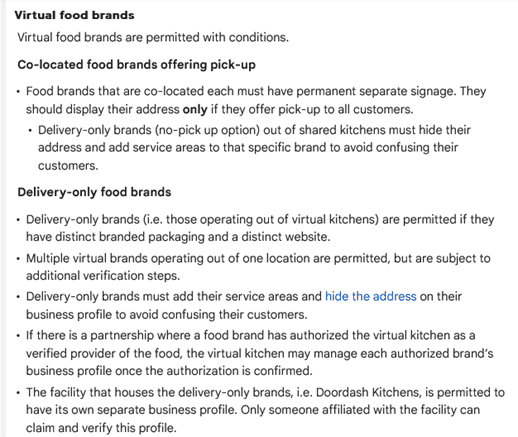
Last month Google laid out new, more specific guidelines to help the virtual food brands and delivery-only businesses with their Business Profiles on Google. These guidelines are meant for food businesses that don’t really have a physical location in an area, but they do re-package and deliver the local restaurants’ food.
The guidelines can be found in Google’s Guidelines for representing your business on Google, under the section Guidelines for chains, departments & individual practitioners.
Here’s a look at what these new guidelines have to say:
Final Takeaway
If you own a virtual food business, it is in your best interest to take a look at the new guidelines so that you can create a business profile on Google that isn’t suspended.
See How You Can Improve Your SEO!
Recently Google’s Dikla Cohen gave a presentation on video indexing, which explains that video indexing does not rely on where and how you host your videos. You can host them yourself or choose from the most popular video hosting platforms and services.
With this, he announced Google is soon launching a new set of reports and tools in Search Console to make video indexing easier to track and diagnose.
With this new launch, the Video Page Indexing report will show a summary of all the pages that Google’s systems find with a video while crawling and indexing your website. At a glance, you can see how many video landing pages were indexed.
Issues will be grouped with a trend line and counts of the affected videos. For example, which videos are missing a thumbnail URL, with reasons – the largest impact ranked on top.
You can click on one of the rows to get more details, such as affected video page URLs. You can also download the list of examples and double-check them. So, you can narrow down the details and understand what is happening and how to resolve issues.
Once your website is updated; and you think you have resolved the issue you were facing, you can go back to the Video Indexing Report, go to that specific issue type, and then use the validate fix button to inform Google.
This way, you can initiate the recrawling of known URLs affected by the issue. And as the pages are being reprocessed, you will be notified if everything is resolved or if there are remaining issues.
But you will have to note that it can take some time to go through all the URLs.
If you wish to check the video indexing status, you can get there by entering the URL of the video landing page at the top of the search console. It will first show you the current status of that URL, as well as the video index status of the page. It will inform you whether Google detects a video on the page. And, if so, did they manage to index it. If a detected video is not indexed, it will list the reasons preventing it from being indexed.
Also, please note that Google indexes only one video per page, even when a page has multiple videos.
To summarize, with the new tools,
- You will be able to see how many video landing pages Google has discovered and how many of them were indexed.
- Examine reasons for unindexed videos on video landing pages.
- You can use the list of affected video page URLs to debug and fix issues.
- You can use the Validate Fix button to initiate recrawling of the known URLs affected by the issue.
- You will be able to check the video indexing status of a specific video using the URL inspection tool.
Are you getting the best return out of your digital marketing?
NAVIGATION
CONTACT US
CORPORATE OFFICE
SCHAUMBURG LOCATION
COMMUNITY