




In August, Google announced a new big search ranking algorithm update, named the helpful content update – probably its biggest update in a decade.
What We Know
The helpful content update will target websites with a relatively high amount of unsatisfying or unhelpful content, where the content has been written explicitly for search engines to leverage rankings.
Unlike many Google algorithms that get applied page-by-page, this new helpful content update will be sitewide. That means that if Google determines your site is producing a relatively high amount of unhelpful content, it will impact your whole site.
This reminds us of the early Panda and Penguin update days. Just as a quick reminder – or in case you weren’t working in SEO a decade ago – those updates did a lot of damage back then, and we made significant changes to our SEO strategies to recover and protect our client websites.
Which Sites Were Likely Impacted?
According to Google, this update impacted these types of content the most:
- Online educational materials.
- Arts and entertainment.
- Tech-related.
This is because content written in those areas has historically been written more for search engines than humans.
These are the folks that were hit the hardest:
- Publishers focused on a broad range of topics like CNET, Forbes, etc.
- Sites that collect and monetize organic search traffic without providing unique value.
- Sites that have content created with AI tools like Jasper or Copymatic.
- Sites with SEO doorway pages created for the sole purpose of boosting rankings.
- Sites with spammy content with a very high keyword density.
Our Observations:
We were quick to run a deep ranking audit of more than 3.5K websites, and we are happy to inform you that so far, this update did not have any significant negative impact on our client’s websites. In fact, we have seen good improvement in positions for the sites we are working on. This implies that our content strategy, in conjunction with our other SEO efforts like on-page optimization and link building, is working well and protecting our client’s websites.
Analyze your site to see if it is up to date!
Are your GBP posts getting rejected? Well, that’s because GBP has added more restrictions to its list of guidelines. As stated in their support document under the “Avoid Spam” header, Google warns business owners to avoid uploading duplicate photos, posts, videos, or logos.
Here’s a screenshot of the other guidelines that you should know.

So, using original images & relevant content is the only way to get your posts accepted.
Need help? Get in touch with our technical support team for assistance.
See How You Can Improve Your SEO!
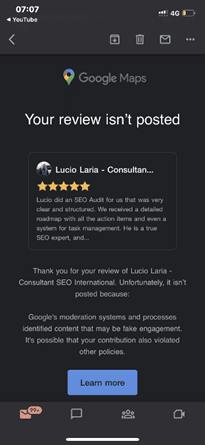
Recently, it has been discovered that Google Maps is emailing customers who have posted a review for any business when their review is flagged as fake and, therefore, not posted.
It came to light after Lucio Laria – Consultant SEO International raised this issue on the Google Business Profile community. When a help forum titled Legitimate review started getting flagged as “Fake Engagement”, he wrote:
Hello,
I just settled my Google profile and asked my client for a review. Google is filing this review as a fake engagement when this person is a legitimate client of mine.
I’m waiting for this to be fixed before asking other of my clients for their reviews.
Why is this happening, and how can I fix it?
Thanks,
Among the many conjectured reasons and suggestions put forth by knowledgeable forum members are the following:
- It may be related to the review content. See Prohibited and restricted content. Ask the reviewer to delete it and then write a new review.
- It may be due to a problem with the reviewer’s account.
- Because the provider is in France and the client is in Argentina, the distance between them could be the reason.
- Ask the reviewer to try again, leaving a 4-5 sentence review, and add specifics about the services provided and, if pertinent, the location at which they were provided. If that fails, ask them to leave a review from another account.
The reviewer received the email notification about 15 minutes after posting the review. As the forum community pointed out, the review was being “filtered by an algorithm that enforces Google’s content policies”.
Why You Should Pay Attention to This Issue:
As we all know, getting legitimate reviews is not an easy task. It takes a lot of effort to impress a client and even more to convince the client to post a good review. It is disappointing when our sometimes hard-to-get legitimate reviews get taken down for “algorithmic” reasons, as requesting the client to post it again can be a bit awkward.
So, it’s crucial to learn how to get our good reviews to stick the better we can prep our customers and clients to get it right the first time.
Are you getting the best return out of your digital marketing?




Google updates its algorithm frequently. At times, they announce the major updates beforehand, and at times they inform after initiating one. The last update was rolled out on May 25th, and to learn about such updates, we had to wait for tweets & official answers from the team.
Google thought of improving this process and has created a dedicated Google Search ranking updates page. With the help of this page, you can check all the latest and previous updates easily.

If you wish to learn how Google improves the search engine, there are several articles from Google to help you. Also, its blog page has more information related to the updates. This page is definitely important for all site owners and SEO experts.
Need more details? Reach out to our support team for assistance.
Analyze your site to see if it is up to date!
To help businesses grow their eCommerce site, Google developer advocate Alan Kent recently hosted a video that outlines “8 tips” for SEO-optimizing an eCommerce site.
Here are the 8 tips that Alan believes will help you:
Tip 1: Make sure you have the technical basics in place – You need to ensure your URLs and internal links are friendly to crawlers.
Check out Designing a URL structure for E-Commerce Websites on Google Search Central for advice on how to design URLs for your website.
Tip 2: Create content relevant to users at different stages in their shopping journey – To check the breadth and quality of your site, think about likely searches by shoppers at different stages in their shopping journey. Once you have a set of queries, try them out. Does your site come up well-positioned? What about your competitors?
Tip 3: Be sure to mark up your product variant pages correctly – Product variants are when you have multiple colors or sizes of the same product. Informing Google of the relationship between the product pages can help Google better understand your site content.
The URL Inspection tool can also be used to check the status of individual pages.
Tip 4: For sales events that occur regularly, use the same URL across all event occurrences – This can help Google understand and trust the purpose of such pages. To identify problems, check the URL for promotional event pages on your site.
Tip 5: The “performance” of your web pages matters – Performance is important to users as a page that takes too long to load may be abandoned by them. It is also an important Google ranking signal. It can be particularly important if you use the same supplier-provided product description as other sellers online. The PageSpeed Insights report is useful for checking the performance of the web page.
Tip 6: Wait for it – Be patient to see the results. SEO, unfortunately, is a long game. Some ranking signals may take months to change. Worse, there is no guarantee of success. While it may take months to reap the benefits of a content creation strategy, it does not mean there is nothing you can do until then.
Tip 7: Seek professional help for your website – If you have done your best to improve your site but are still not getting the results you want, we’re here to provide expert SEO advice.
Tip 8: It’s all about the user – The ultimate goal for Google Search is to put the best possible content in front of the users. Algorithms change over time, but the ultimate goal does not. It does not mean you should not measure your site’s performance. It is still recommended to use tools such as Google Search Console and Google Analytics to collect data on your site.
Here is just one of our success stories that shows the importance of SEO! Ready to be our next success story?
See How You Can Improve Your SEO!
As known to most SEO experts out there, Google renamed Google My Business to Google Business Profile last year while also rolling out more support for managing a business profile.
Going a step further, the search engine giant has now launched another feature that is bound to give small businesses operating out of homes a reason to be happy.
Google Business Profile now features a toggle that will allow businesses to hide their business address from customers if they wish to do so.

The screenshot above shows the businesses can now toggle ‘Show business address to customers’ on and off.
Why Is This Important?
This recently launched support feature is perfect for entrepreneurs operating virtual businesses that aren’t tied to a physical location. It can also prove to be quite helpful for all those home-based service operators who wish to avoid customers visiting.
Are you getting the best return out of your digital marketing?




Local SEO strategy refers to the overarching strategy or process used to optimize your site content and online presence for higher rankings. Local SEO strategy focuses on improving business rankings in local search engine results pages (SERPs).
The difference between traditional SEO and local SEO is local SEO focuses your efforts on attracting customers near your physical location — and getting them through your door, while traditional SEO boosts your visibility on a wider scale.
The main benefit of local SEO is that it lets you take advantage of increased visibility in your immediate area.
How does it work?
Google uses numerous factors when ranking local content, but it predominantly focuses on these three signals:
- Relevance: Does your business listing match the searcher’s intent?
- Distance: How close is your business to the searcher at the time of the search?
- Prominence: Is your business well-known both online and offline?
When a user conducts a search using a location or “near me” and your business listing best matches the query, you’ll appear in Google’s local SEO 3-pack — a listing of the top three local businesses that meet the search criteria.
12 local SEO strategy tips to boost rankings and revenue:
- Optimize your local listings and citations
- Understand your local personas
- Conduct local keyword research
- Earn backlinks from local sources
- Write in-depth, local content
- Optimize your title tags and meta descriptions with local keywords
- Include an internal linking structure for location pages
- Update your website
- Improve your UX
- Post local content on social media
- Earn reviews from happy customers
- Track the results of your local SEO strategy
Analyze your analytics?
In true Google fashion, the search engine giant has now come up with an update for its rich results guidelines. These updated guidelines are meant to better align the rich results content with the overall Google merchant guidelines.
The new guidelines deny rich results for products that are widely prohibited and are known to facilitate harm in any way to anyone. For example, products that fall into categories like weapons, fireworks, recreational drugs, tobacco, gambling, etc.
The guidelines now have an additional section
Google rich results content guidelines, which have already come into effect, have been updated to add the following section:
“Don’t mark up content that promotes widely prohibited or regulated goods, services, or information that may facilitate serious and/or immediate or long-term harm to self or others. This includes content related to firearms & weapons, recreational drugs, tobacco & vaping products and gambling-related products.”
The new policy applies to all forms of markup
According to Google, the new guideline policies will apply to rich result markups in all forms, be it star ratings, prices, information regarding a product’s availability or other such factors. This, in turn, will impact the prohibited products’ structured data markup.
How does this affect your business?
If you are into the business of selling products that fall into any of the above-mentioned prohibited categories, this update definitely applies to you. All you can do right now is remove the structured data markup from your product pages because Google will not show rich results for them.
Although the search engine will not issue any manual action, the removal of rich results in itself will act as a penalty against violating the rich results content guidelines.
See How You Can Improve Your SEO!
For years, Google’s SERPs have been including knowledge panels so users can find the required results quickly. In this article, we’ll discuss how knowledge panels are created and how they work.
Introduction To Knowledge Panels
Knowledge panels/entity boxes are information boxes that appear on Google’s search results page when you search for specific content. The main aim of these boxes is to provide users with the information they need in brief. The content you search for (for example – people, places, organizations, things) should be present in knowledge graphs to appear in knowledge panels.
Only limited categories or entity types (books and book series, educational institutions, government, local shops, companies, events, movies & film series, music groups & albums, and more) are considered for the knowledge graph. Also, only the most relevant or popular entities of every category are included in the knowledge graph.
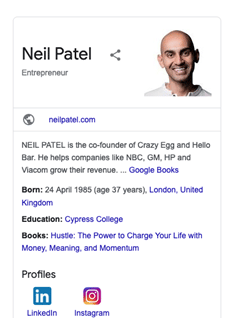
Knowledge panels are different from business boxes, as the latter is based on Google Business. The best way to spot a classic knowledge panel is by looking for a share button in the upper area of the panel. Also, the entity type is specified below the name & depending on the category, various attributes are assigned & the available content is filled.
The image below is an example of a classic knowledge panel. Google prefers using different templates for various entities.
How Are Entities Selected For A Knowledge Panel?
Google has not given any criteria or procedure to select an entity for a specific category. But we have listed some of the most possible ways that Google uses to create a knowledge panel. Several websites that provide semi-structured data, for example – Wikipedia and Soundcloud, can be used by Google to select relevant entities for each category.
How Are Knowledge Panels Created?
In the Google patent, you can learn more about the basic methodology related to knowledge panels. The steps given below describe the basic process followed to create a knowledge panel:
- Finding relevant entities in the query
- Shortlisting relevant sources
- Creating the most appropriate search results
- Cross-checking whether the search query refers to the actual entity
- Determining an entity type/category for the entity requested
- Finalizing a suitable template for the panel (which should match the entity type)
- Arranging relevant content elements for the main entity from a trusted source
- Referring to another trusted source for content elements
- Attaching placeholders in the selected panel template with the finalized content elements
- Merging search results and knowledge panel on one SERP
How Are Images Selected For A Knowledge Panel?
The Google patent describes how images are selected for various entity types and incorporated into the knowledge panel. The steps given below are a shorter version of the same.
- Most relevant images are selected
- Cluster by similarity
- Most popular clusters are identified and separated
- Image format (portrait or not) is determined
- A portrait score is assigned
- The most representative image is selected
- The image is attached to the knowledge panel
The clustering of images into various categories depends on the proximity to the entity as well as the aspect ratio. We can also determine the possible categories by looking at Image Search.

In Google’s patent related to images, the images are labelled with attributes and are assigned to specific entities. These attributes are primarily determined by considering the initial image. Additional attributes can also be added by referring to similar images. It is believed that Google selects relevant images by using data from popular sites (Wikidata, Wikipedia, Wikimedia, social media profiles, magazines, and more).
Reasons Why Knowledge Graph Is Gaining Importance
The SERP features are gaining more importance every year, so it’s expected that the Knowledge Graph will also follow the trend. Since the entities are at the center of the Knowledge Graph, it will definitely affect the rankings and overall search results. To conclude, SEOs should not miss out on the Knowledge Graph when preparing their SEO strategies.
Are you getting the best return out of your digital marketing?




As we all know, Google launches core updates at least two to three times a year. These updates cause a hassle to all the web developers and SEO specialists because they have to monitor the rankings and make the required changes.
On May 25th, Google announced an update via a tweet.
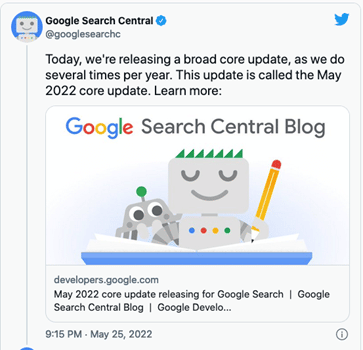
This core update was further explained on Google Search Central. According to this article, Google makes changes to the ranking process to increase the accuracy of the search results. These improvements are called core updates. The core updates are not specific to certain sites but will certainly generate notable effects. Some sites’ ranking may drop, while others may rank better.
Also, Google said that if any site does experience a drop in its ranking, they don’t have to fix anything. These updates are meant to improve the system, helping under-ranked sites to get better traffic.
So, if your ranking suddenly drops, there’s nothing to worry about. You have not violated any webmaster guidelines. You just have to sit back and wait for the next core update. One last thing you can do is observe the sites that have ranked higher and try to figure out the factors that helped them.
Still have any issues? You can get in touch with our experienced team for assistance.
Analyze your analytics?
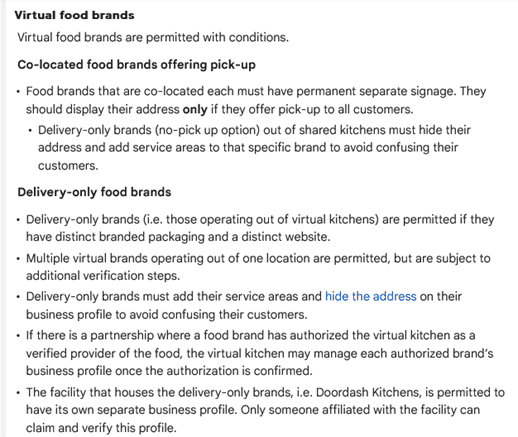
Last month Google laid out new, more specific guidelines to help the virtual food brands and delivery-only businesses with their Business Profiles on Google. These guidelines are meant for food businesses that don’t really have a physical location in an area, but they do re-package and deliver the local restaurants’ food.
The guidelines can be found in Google’s Guidelines for representing your business on Google, under the section Guidelines for chains, departments & individual practitioners.
Here’s a look at what these new guidelines have to say:
Final Takeaway
If you own a virtual food business, it is in your best interest to take a look at the new guidelines so that you can create a business profile on Google that isn’t suspended.
See How You Can Improve Your SEO!
Recently Google’s Dikla Cohen gave a presentation on video indexing, which explains that video indexing does not rely on where and how you host your videos. You can host them yourself or choose from the most popular video hosting platforms and services.
With this, he announced Google is soon launching a new set of reports and tools in Search Console to make video indexing easier to track and diagnose.
With this new launch, the Video Page Indexing report will show a summary of all the pages that Google’s systems find with a video while crawling and indexing your website. At a glance, you can see how many video landing pages were indexed.
Issues will be grouped with a trend line and counts of the affected videos. For example, which videos are missing a thumbnail URL, with reasons – the largest impact ranked on top.
You can click on one of the rows to get more details, such as affected video page URLs. You can also download the list of examples and double-check them. So, you can narrow down the details and understand what is happening and how to resolve issues.
Once your website is updated; and you think you have resolved the issue you were facing, you can go back to the Video Indexing Report, go to that specific issue type, and then use the validate fix button to inform Google.
This way, you can initiate the recrawling of known URLs affected by the issue. And as the pages are being reprocessed, you will be notified if everything is resolved or if there are remaining issues.
But you will have to note that it can take some time to go through all the URLs.
If you wish to check the video indexing status, you can get there by entering the URL of the video landing page at the top of the search console. It will first show you the current status of that URL, as well as the video index status of the page. It will inform you whether Google detects a video on the page. And, if so, did they manage to index it. If a detected video is not indexed, it will list the reasons preventing it from being indexed.
Also, please note that Google indexes only one video per page, even when a page has multiple videos.
To summarize, with the new tools,
- You will be able to see how many video landing pages Google has discovered and how many of them were indexed.
- Examine reasons for unindexed videos on video landing pages.
- You can use the list of affected video page URLs to debug and fix issues.
- You can use the Validate Fix button to initiate recrawling of the known URLs affected by the issue.
- You will be able to check the video indexing status of a specific video using the URL inspection tool.
Are you getting the best return out of your digital marketing?




In a new move, Google has announced the use of the AI approach to update the operation hours for over 20 million businesses around the globe in the next six months. Also, Google’s AI algorithms are busy figuring out if your posted business hours are accurate.
Google said, “We developed a machine learning model that automatically identifies if business hours are likely wrong, then instantly updates them with AI-generated predictions.”
How Does It Work?
The AI considers multiple factors, such as:
- The last time you updated your hours
- What they know about other shops’ hours
- The Popular Times information for your shop determined by location trends
Then, the algorithm analyzes the business hours of other similar shops that are nearby, information from the shop’s website, and Street View images of the shop’s storefront. Also, they will look specifically for business hour signs to determine the most accurate business hour prediction.
Google will take the help of the Google Maps community — including Local Guides and even the business owners themselves through their Google Business Profile — to verify the information they have predicted.
What Do You Need To Do?
All the business owners located in Argentina, Australia, Chile, France, Japan, Mexico, New Zealand, Peru, or the United States, should prepare their staff to expect inquiry calls powered by Google’s conversational AI asking about their business hours.
Also, check Google Maps from time to time to ensure that Google has correctly listed the timings, in case they have been changed without your input.
Analyze your analytics?
Google performing random display testings are no longer surprising. This time around, it is Google Maps testing the position of local listing previews.
Recently, one of the users noticed that when a specific listing is clicked on from the Google Maps search results that appear on the left-hand side, the local listing pops up in a new position.
Instead of its original position on the left bar, the local listing preview now hovers in a new position, overlayed on top of the map. So far, this new position testing seems to be limited to the Google Maps interface for the desktop.
Here’s a look at the local listing overlay box:

Normally, there would be no overlay box hovering over the map, and the local listing details would appear in the left bar, pushing the search results to the bottom footer.
See How You Can Improve Your SEO!
We have highlighted the main steps involved in setting up an e-commerce site & depending on the work required in each step you can determine the price of the project.
Step One –
- Calculate the time required to set up a WordPress site, install plugins, install a WordPress theme, and meet a client’s requirements.
Step Two –
- Calculate the time you need to finalize images. Mostly, it depends on whether you are –
- Using existing images
- Making new images
- Modifying manufacturer’s images
Step Three –
- Determine the number of products or SKUs included in the project.
- Also, make a note of whether you will take the content from an old site, create your own new content, or reword the manufacturer’s website content.
- Lastly, you need to know if you must create custom category pages and the amount of product information that will be provided.
Step Four –
- Customizing a plugin may need about 20-30 mins, so extra features like Shipping Plugins, Invoicing Plugins, & more should be noted down.
After you have a good idea of the level of work required, you can give an estimated price range for the project. If the estimate is approved by the client, you can charge by the hour to ensure you are paid for your work.
Have any questions? Get in touch with our experts for assistance.
Are you getting the best return out of your digital marketing?




In a shocking move for SEO experts, Google Analytics 3 will stop collecting new data July 1, 2023 onwards.
Google posted a notice on Google Analytics stating, “Two and a half years ago, we introduced Google Analytics 4 to address these evolving measurement standards and help businesses succeed. Google Analytics 4 has the flexibility to measure many different kinds of data, delivering a strong analytics experience that’s designed for the future.
It allows businesses to see unified user journeys across their websites and apps, use Google’s machine learning technology to the surface and predict new insights, and most importantly, it’s built to keep up with a changing ecosystem.”
Explaining the difference between Google Analytics 3 and Google Analytics 4, Google says, “GA3 was built for a generation of online measurement that was anchored in the desktop web, independent sessions and more easily observable data from cookies. However, this measurement methodology “is quickly becoming obsolete.
While GA4 operates across platforms, does not rely exclusively on cookies and uses an event-based data model to deliver user-centric measurement.”
Further, Google says GA4 is advanced in terms of privacy as it provides more comprehensive and granular controls for data collection and usage — and it does not store IP addresses, a necessary adjustment required by data privacy regulations in many locations.
Google promises that GA4 will better support your business by helping you:
Understand your customers across touch points – Get a complete view of the customer lifecycle with an event-based measurement model that isn’t fragmented by platform or organized into independent sessions.
- Improve ROI with data-driven attribution – Use data-driven attribution to analyze the full impact of your marketing across the customer journey.
- Measure engagement and conversions – With business and compliance needs in mind. With GA4, you’ll have country-level privacy controls that enable you to manage and minimize the collection of user-level data — like cookies and metadata — while preserving key measurement functionality.
- Get greater value from your data – With predictive insights about user behavior and conversions generated by machine learning.
- Easily activate your insights – With expanded integrations with other Google products — like Google Ads — making it easier to optimize your campaigns.
What to do now:
From July 1, 2023, all standard Universal Analytics properties will stop processing new hits, and from October 1, 2023, 360 Universal Analytics properties will do the same. After that, you can access your previously processed data in Universal Analytics for at least six months.
If you want to build the necessary historical data before Universal Analytics stops processing new hits, you need to move to Google Analytics 4 as soon as possible.
Analyze your analytics?
The recently updated Google Business Profile Help document states that you may now have to verify your Google Business Profile through “more than one method”.
Here’s a look at exactly what the updated document says.
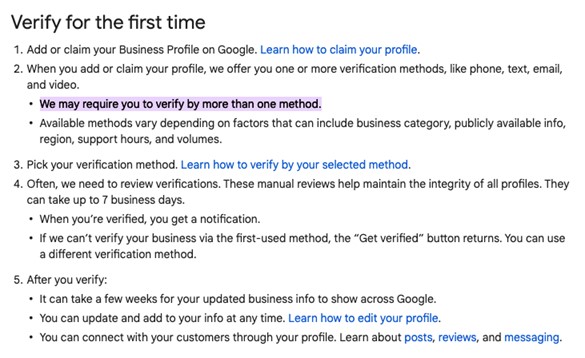
It looks like Google rolled out this update, apart from pushing for video verification, to hopefully tackle one of the persisting problems – fake locations on Google Maps.
Check out this video to better understand the steps to getting your business verified on Google.
Final Takeaway
There’s really no way you can build a strong online presence without getting your business verified on the search engine giant. Click here for more information on Google Business Profile verification and all the options available to you.
See How You Can Improve!
Google has now allowed all U.S. auto advertisers to advertise their vehicles on its page. Customers shopping for vehicles online will now be able to see vehicle details such as make, model, price, mileage, and advertiser name. The latest format of the advertisement is given below. When a customer clicks on the ad, it directs the customer to the vehicle description page.

Advantages Of Vehicle Ads:
- Vehicle ads are designed to help you reach your potential customers easily.
- Advertisers can now optimize their site accordingly to get a good conversion rate (both online and offline).
- Users will only see the most relevant listings from your inventory, helping you get qualified leads.
What You Need To Know:
- Both new & used vehicles can be advertised
- Only non-commercial vehicles can be advertised
- Only available for U.S. auto advertisers
How To Get Started
- Upload vehicle data to Google Merchant Center
- Create Smart Shopping campaigns on Google Ads
- Link your Google Ads account to a Merchant Centre account and a Google Business Profile
- Visit Google’s Support page for more details
Are you getting the best return out of your digital marketing?




The month of June saw SEOs scrambling to keep up with a number of updates rolled out by Google, namely core, page experience, and spam updates. These updates also had the SEOs scratching their heads, trying to figure out the exact cause of the change in rankings.
While the rolling out of the core update finished on the 12th of June, Google started rolling out the page experience update right on its heels, on the 15th of June. This roll-out is expected to go on right until the end of August. Also, Google went on to roll out a two-part spam update – part one of the update began on the 23rd of June, and part two began on the 28th of June.
What These Updates Signify
The page experience update has a lot to do with HTTPS and metrics such as the speed, responsiveness, and core web vitals. If you wish to see how this update may affect your site, the updated layout is live in all the testing tools and Google Search Console. However, you need to bear in mind that the Search Console data is delayed, as it is based on the CrUX (Chrome UX Report) data aggregated over the past 28 days.
As this roll-out is going to last months, chances are you may not see any drastic shift in a site’s visibility. This should give you the time to work on your site’s metrics so that its performance meets your expectations.
Unlike core and page experience updates, spam updates begin and end on the same day, which means your website rankings may be impacted almost immediately. Hence, if a website saw any changes in rankings on the days when this two-part update rolled out, you know what may have caused it.
That said, none of our websites experienced any major shift in rankings.
Final Takeaway
Although there is a great deal of talk around these updates, it is still too early to know exactly how they will affect site rankings. As for the spam updates, the SEOs do not seem to be too impressed and feel that too many spam sites are still being ranked.
When it comes to core updates, here’s a look at all a site owner should know about Google’s core updates. Also, if you would like some more information on the page experience update that is still rolling out, keep an eye out for the updates posted on the Page Experience Blog and the Core Web Vitals & Page Experience FAQs.

Last month Google Search Central announced via Twitter “a new experience” called Search Console Insights “to help you better understand which content of yours resonates with your audiences.”
“This experience joins data from both Search Console and Google Analytics with a goal of making it easy to understand your content’s performance. Whether you are a web content creator, blogger, or a website owner, and independent of your technical expertise, it can provide you with an overview and helpful insights on how your content is performing.”

This experience will help you answer certain sample questions listed by Google.
- What are your best-performing pieces of content, and which ones are trending?
- How do people discover your content across the web?
- What do people search for on Google before they visit your content?
- Which article refers users to your website and content?
At present, you can access Search Console Insights in a couple of ways:
- Select Search Console Insights from the top of Search Console’s Overview page.
- Access it directly and save a bookmark.
- You will “soon” be able to access it in the iOS Google App by selecting Search Console Insights in the account menu. Google went on to say that they are “working to also add Android Google App support.”

What Actions To Take
Search Console and Google Analytics give a great amount of information, but if you do not have the time to regularly go through everything, it can be a bit too much. Search Console Insights filter this information, giving you a brief overview of the updates related to your site.
When it comes to SEO agencies, Search Console Insights will come in handy to help less savvy site owners see how your work is benefiting their site. This also means that you can use Search Console Insights even if you do not use Google Analytics.
To get complete insights about your content, Google suggests linking your Google Analytics property with your relevant Search Console property.
Queries, if any, can be directed to one of Google’s support channels and also at @WebCreators on Twitter or @GoogleWebCreators on Instagram.

Have a business that serves a specific location? It is important to develop an SEO strategy that can help you target local customers and rank higher in Google search. While all businesses can benefit from search engine optimization, certain industries, like Professional Service Industry (banks, accountants, attorneys, financial planners, and many others), Home Repair & Renovation Service Industry, Medical Industry, Restaurant and Food Service Industry, etc., can benefit more.
Let’s take a look at some important benefits that Local SEO offers for small as well as large businesses.
- SEO puts you up higher on Google’s search result pages and helps you get more traffic to your site.
- Other local businesses can find you easily to create a coordinated marketing campaign that can benefit both.
- SEO helps you get positive reviews, rank higher, and earn more trust.
- You can save on advertising costs if your business is sufficiently high in the rankings.
- Your business can appear in local business directories.
- Voice searchers can find your business easily.
The above-mentioned benefits give a clear answer to your question ‘why my business needs SEO?’. Let’s now understand how to create a local SEO strategy for any business.
Follow the steps given below:
- Prepare a list of keywords related to your business. For example, if you run a restaurant, your keywords can be Mexican Food, Chinese Food, etc.
- Perform an SEO audit on your site to identify any existing technical issues. If you are already aware of any issues, address them first.
- Conduct a competitive analysis using SEO tools to find out what keywords your competitors are ranking for. This analysis will help you determine which keywords are a perfect fit for your site.
- Add your location to the keywords and perform an SEO analysis to find out the search volume and keyword variations of Geo-specific Keywords (example: Mexican Food Seattle, best Mexican Food Seattle, etc.).
- Follow on-page SEO best practices to optimize your site for local search. On-page optimization would include –
- Keyword mapping of individual site pages
- Unique & relevant title and description for each page
- Informative content about your products & services
- Relevant internal links on your site pages
- Images that are appropriate & compressed
- Short & targeted URL structure
- Localized landing pages can help you get more organic searches. To create perfect landing pages, you must optimize your page headings, include keywords in page content, etc.
- Create your GMB account, and be sure to add the correct business address, contact number, images, and other details.
- List your business with other online directories to gain more customers.
- Create a Link Building Strategy to increase the ranking of your site.
- Try to generate positive reviews across the directories your business is listed in. Also, respond to negative reviews in a professional & kind manner.
Are you getting the best return out of your digital marketing?
Need an extra pair of eyes to review your online game plan? Let our experts take a look at your current state and do a comprehensive digital marketing analysis at no cost to you. Please call us at (800) 379-2829 or contact us today and we will get to work right away.




Google has always placed a great deal of importance on User Experience (UX). In fact, every Google algorithm update has been about ensuring the users can gain access to user-friendly, relevant results quickly.
Now, with the introduction of Core Web Vitals, UX will play a vital role in increasing organic traffic. Hence, it is important that we understand all that we can about these Core Web Vitals.
What Exactly are Core Web Vitals
For the past few years, Google has been pushing website owners to go mobile-first. Building a mobile-friendly website is now crucial to SEO success.
Taking it a step further, Google is now ready to focus on mobile performance, also known as Core Web Vitals.
This summer, we will see algorithm updates that will focus on a new ranking factor, which happens to be page experience. Google will be measuring page experience using Web Vitals metrics. Largest Contentful Paint (LCP), First Input Delay (FID) and Cumulative Layout Shift (CLS) are the core metrics within Web Vitals.
How Will the Core Web Vitals Impact SEOs
Search engine algorithms work on helping users find the information they need while collecting data that throws light on user behaviour, which then helps them provide more relevant results.
Websites that meet searchers’ needs naturally rank higher in the search engine results and enjoy increased organic traffic. With Google focusing on improving UX, paying mind to Core Web Vitals will mean the difference between SEO success or failure.
By optimizing for the new ranking factor, one can see a drastic rise in their organic traffic. The Core Vitals report in Google Search Console will tell you exactly which pages on your website need improvements in terms of UX.
What’s Important
While it may all seem very technical, it is important to understand what exactly is being measured by the Core Web Vitals. To put it simply, Core Web Vitals focus on three aspects of a good UX:
- Loading Performance
- Responsiveness
- Visual Stability
These aspects are measured based on the user data from Chrome’s user experience report. You can check out the data for your website using the Google Data Studio report. This report offers detailed data on the important aspects of Core Web Vitals, along with information about usage on different devices.
The Three Main Elements of Core Web Vitals
- Largest Contentful Paint (LCP)
LCP is a metric used to measure how long it takes for the largest element of a webpage to load. This metric applies to the loading of the above-the-fold content; anything beyond a user’s screen is not taken into consideration.
Overall, LCP measures images, video poster images, block-level text elements, as well as elements that come with a background image. You can measure your website’s LCP with the help of lab scoring tools like PageSpeed Insights and Lighthouse.
Ways to Optimize for LCP
Google suggests that the LCP should happen within 2.5 seconds of page loading. Anything that takes beyond 2.5 seconds to load needs improvement.
Ideally, you should be able to reduce the LCP time by doing the following:
- Optimize the images – Ensure you choose the right format, incorporate width and height attributes and use compressed images whenever necessary.
- Optimize your server – You may want to look into upgrading the hosting plan and using a CDN to improve the server performance.
- Add caching – Make sure you use URLs consistently and that caches store images.
- Fix render-blocking CSS and JavaScript – See if you can implement Critical CSS, deliver smaller payloads and compress the code file.
- First Input Delay (FID)
FID is a metric used to measure a user’s first interaction, meaning the delay between the time when a person clicks on something and the time it takes for the site to respond to the action and process it. However, it only measures finite user interactions, like clicks, taps and key presses, and not continuous interactions like scrolling and zooming.
Ways to Optimize for FID
Monitoring and optimizing your site’s UX is the only way you can do well with this metric. Ideally, your site’s FID score should be no more than 100 ms. If it goes beyond that, your site’s UX needs improvement.
Try the following to improve your site’s FID score:
- Optimize the JavaScript code – Try breaking up long tasks, minimizing unnecessary polyfills and deferring or a-syncing unused JavaScript.
- Optimize the CSS code – See if you can remove the unused CSS code and try compressing your files.
- Cumulative Layout Shift (CLS)
CLS is a metric used to measure the visual stability of your site. It checks whether there is any unexpected shifting of any of your page elements and how often it occurs.
Ways to Optimize for CLS
Generally, you should be able to avoid the unexpected items shifting by doing the following:
- Opt for transform animations with context and continuity.
- Avoid inserting any content above your existing content.
- Incorporate size attributes, such as width and height, on your image and video elements.
To understand which elements on your site are keeping you from getting a good CLS score, check out the Layout Shift GIF Generator tool.
Final Takeaway
It is a known fact that users now expect and tolerate nothing less than a seamless web experience. In order to ensure that your site delivers just that, it is essential to invest in LCP, FID and CLS improvements. After all, an improved user experience is key to higher rankings and increased organic traffic.
For help with Core Web Vitals, do get in touch with our expert team for assistance.
To understand how a user will perceive the experience of a specific web page, Google will evaluate a set of signals. This includes existing Google Search signals such as mobile-friendliness, safe-browsing, HTTPS, and intrusive interstitial guidelines. It also includes metrics in Google’s Web Vitals to do with a site’s loading speed, interactivity, and visual stability.
How to prepare for the Page Experience update?
For site owners and others, understanding these signals and making the necessary changes should be a priority. Among the steps to take are optimizing for mobile, improving page speeds, CTAs, and alt text for images.
You can start preparing now for user experience to become a ranking factor now. The Core Web Vitals report in Google Search Console is an excellent place to start getting a sense of how your site is performing in these areas. Alternatively, you can also make use of the PageSpeed Insights tool by Google (which is a part of our SEO Audit) to understand how your site stacks up.
How are we helping our clients with the Page Experience update?
To cope up with the update, we are already doing the below things for our clients:
- Implement search-friendly alt texts for images while doing on-page optimization of your website.
- Implement relevant schema tags on the website.
We have also updated our SEO Audit Reports to bring back the Mobile and Desktop Page Speed Insights sections which are a critical part in improving the Page Speed experience for users. In addition, our Audit also shows the Website HTTPS (secure website) status which is a critical ranking factor in relation to this update.
By showing this to your clients, it presents a lucrative opportunity for you to upsell add-on services like “mobile friendly optimization”, “improving page load speed”, “making website secure”, “CTA optimization”, “landing page optimization”, etc. If you’re interested, our team can discuss this further how to best provide these services to your clients at a minimal cost.
For more information, do get in touch with our reps.
Google’s “Page Experience” algorithm update is expected this month, June 2021. But what you need to know is that you shouldn’t expect a major fluctuation in the rankings, as of now!
We believe that Google will be rolling out the update carefully, as suddenly shaking up the ranking scene will draw unwanted attention to their powerful monopoly on search. Keeping this in mind, you can expect them to implement gradual changes over time. For now, relevancy will rule the ranking game!
Here are a few important tips on how to respond to the Core Web Vitals ranking signal going LIVE.
Reduce JavaScript (JS) Execution – If your report shows a poor FID score, consider reducing and optimizing your JS execution. As per Google, one of the ways to reduce the execution is by deferring unused JS. Start by cutting down unused JS, which can be done using code splitting.
Implement Lazy Loading – Implementing lazy loading is essential if you display images on your site. With lazy loading, your site’s UX and core web vitals score will remain unharmed. For sites with heavy elements, such as images, animations or videos, lazy loading is considered a must. It allows the loading of images at the exact same time when users scroll down through the page, without compromising on the overall website loading speed. Lazy loading offers a bunch of other benefits.
- Improves site performance
- Limits bandwidth usage
- Improves your site’s SEO
- Reduces bounce rate by keeping visitors on the page
Optimize & Compress Images – For some websites, the largest element is images. Optimizing images will make your page significantly lighter, thus improving several factors.
- Loading speed
- LCP score
- UX
- Search engine rankings
There are a lot of free tools available, using which you can compress your images. If you think that compression will affect the quality of the images, well, it isn’t true. Always ensure to save landscape images in .jpg format and the graphics in .png format.
Provide Proper Dimensions For Images & Embeds – CLS score below 0.1 is considered to be poor. To improve your CLS score, you need to have your dimensions in place. Setting proper width and height helps the browser allocate the correct amount of space on the page while the element is loading.
Also, make sure to set proper dimensions for embeds, like when inserting videos from YouTube into your site. At times, the video might look proper on the backend, but it may end up looking way too big or messy on the front end. See to it that the video you insert goes well with the interface of your site.
Improve Your Server Response Time – Google says, “The longer it takes a browser to receive content from the server, the longer it takes to render anything on the screen. A faster server response time directly improves every single page-load metric, including LCP.”
Most importantly, a long server response time can negatively affect your SEO and UX. Google suggests your server response time to be lower than 600 milliseconds. To measure server response time, use Time to First Byte (TTFB). But before you begin, note down the details on your server’s current performance so you can compare the results later on.
- First, check how fast is your web hosting.
- Use CDN (Content Delivery Network) for your site.
- Then, review your plugins.
To Summarize It All
What you really need to do is pay very close attention to your competitors. You do not necessarily have to meet or exceed Google’s Core Web Vitals guideline scores, but rather meet or exceed your competitors’ scores. Next, you should focus on the content quality of your site and its relevance in terms of the search terms that you’re looking to rank for.
Are you getting the best return out of your digital marketing?
Need an extra pair of eyes to review your online game plan?
Let our experts take a look at your current state and do a comprehensive digital marketing analysis at no cost to you.
Please call us at (800) 379-2829 or contact us today and we will get to work right away.


Google announced last month that they are launching a new Google My Business App that provides a host of features that can help small business owners to easily manage their online presence and respond to customers.
Following are the biggest features and highlights:
- Profile Tab
Google has made it extremely easy to upload photos, create offers and add events by providing a post button. You can also update information of your business from the profile tab and it will instantly appear on the search as well as Map.
- Customer Tab
People can connect with you in many ways. They can message you, follow you, book a service or leave a review. From now on, you can see all of these customers in one place – The new customer tab. You can not only see but also respond to the reviews & post offers. Not to mention that you will get a notification when you get a new customer connection. Also, you will soon be able to respond to messages directly from the app.
- See your Progress in Real Time
The data that matters to you the most is now on the home screen itself. So you can now check how many new people interacted with your business, new connections & more in one place.
Here’s a short video:

Takeaway
Google My Business App is a very powerful tool that every business owner and SEO professionals must have. It’s easy to use and offers a lot of tools that make tracking, analyzing and making changes easy.
The other big news is that Google is about to launch a chat feature for Maps. So users can directly chat with business owners directly after searching for their business. Having a GMB app will help you with this feature as well.


If you have a WordPress site or manage one for others, then you need to stop everything & check the PHP version of the site. The PHP version 5.6 & 7.0 will no longer receive security patch from 31st December & 3rd December respectively, which makes them very prone to hacking.
WordPress has released data which shows that most of the sites are built on these two or even older version of the PHP. Only a limited few sites are using 7.1 or higher version of the PHP.
If you are not sure how to check the version of the PHP your site is built on, you can simply contact your hosting company.
To know the life cycle of the all the PHP versions, please see the below table:
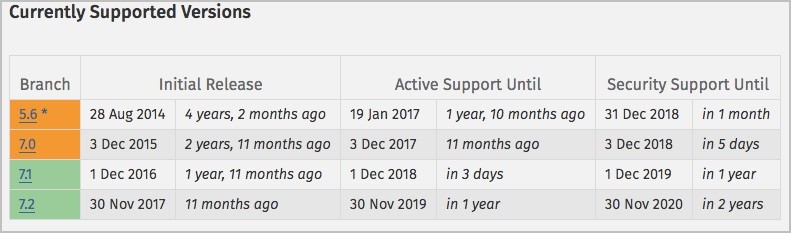
Be informed that updating PHP is not that complicated. However, the outdated plug-ins & themes can make it a bit daunting. So we advise you to back up all your website before making any changes.
Not all the Plug-ins that you are currently using would be compatible with the latest version of the PHP that is 7.1 & higher. So before you even start to upgrade, make sure you identify all the plug-ins and themes that can be updated, and remove those that are not compatible with the latest version of the PHP. The PHP compatibility checker will help with just that.
It’s vital that you remove any plug-ins that are not compatible with the latest version of PHP because they pose a security threat. Upgrading your site’s PHP version will go like this:
- Create a full backup of your WordPress site.
- Check the PHP version.
- Plugin Compatibility With New PHP Versions
- Find an alternative to those plug-ins that can’t be updated.
- Go to your web hosting control panel & click on the PHP section.
- Update the PHP version.
In case you are stuck anywhere between the whole process, make sure to reach out to your hosting provider and ask them your specific question. Alternatively, you can also reach out to us. Our expert team we will be more than happy to assist you. Call us at (800) 379-2829 or contact us.

MyReviewEngine is a review management tool where your business can get more 5 star reviews and triple your sales. The system automates your review process and makes it easy to invite your clients to review your business, via email, SMS, etc. In addition to growing your reviews on auto-pilot, the tool also prevents negative reviews from being published online and be sent to you so you can handle that directly. There are several other features but those are just a few. Go here to run a review scan and check your online reputation.


How It Works

- Just sign up and utilize your custom page. You can place it anywhere you want – on your website, your shopping cart, your email footer, or even send it to your entire email list. You can custom select which platforms you want to improve your reviews!
- Customers rate you on a 1-5 star scale. Anything 4 stars or less prompts the reviewer to a private form that only YOU see, preventing negative public reviews! Any 4 or 5-star ratings are prompted to leave a review on the website of their choosing.
- Your positive review scores increase on the platforms that matter most to you. This helps with conversions and trust! Additionally, you can place a review carousel or randomize reviews on your website to display all the positive reviews you’ve collected.
Popular Review Sites
Many potential customers come to these review sites to see whether or not they would like to come to your business. These reviews have a huge influence on their decision. You can boost reviews on these review sites just like these and even more!
Success Stories

Before: After:

Company Background: Chicago Controls (aka Landlord Thermostats) is an expanding nationwide company headquartered in Chicago IL. In business for over a two decades, Chicago Controls has its origins in a company started by founder Mike Lyle in 1996. The company’s goal is to provide landlord’s, property owners, and property managers tamper-resistant thermostats for their properties. The company has invested heavily in digital marketing to differentiate and to expand their presence online.
Find Your Reputation Score




- Google extending call and message reporting to more places.
- Facebook has just released Facebook Attribution that tracks engagement with Facebook ads to give advertisers a clearer picture of their customer journey across multiple channels and devices.
- Now You Can Shop Instagram via Collections, Video, & Business Profiles.
- Drive more holiday sales with promotions on Shopping Actions.
- With the season finally turning and the holidays upon us, there is no better time to dig into Smart Shopping as a strategy and see if you can convert some of that good old-fashioned seasonal mania into revenue for your business.
- 3 Smart Ways to generate more sales with Google Ads.
- Last month, Google announced a major change to its keyword match types. Here’s a good article that explains how & to which extent it impacted ad performance.
- Google releases Target Impression Share, its latest Smart Bidding strategy.
- Bing recently announced changes to the way Enhanced CPC bidding works in their interface.
- You can now add a 3rd title & additional description on Bing Ads.
- Google has redesigned the workflow in order to help advertisers create goal oriented campaigns in Google ads.
- You can now track your campaign goals with AI-powered Performance Targets in Bing Ads.
- Google has introduced four new search ad position metrics. Make sure to read about it as it will come handy.
- LinkedIn has introduced public Beta of Objective-Based Advertising in Campaign Manager.
- Want to know more about the all new Google Shopping Promotions?
- Google Ads’ Ad preview tool gets two new features.
- Google’s newest Detailed Demographics targeting option enables you to target your campaigns to different users based on their Education, Marital Status, Homeowner Status, or Parental Status. Learn more
- Google is beta testing the possibility to add up to 5 Videos to creative assets for Responsive Display Ads.
- Guide to Facebook Ad Placements: Everything you need to know.
Are you getting the best return out of your digital marketing? Need an extra pair of eyes to review your online game plan? Let our experts take a look at your current state and do a comprehensive digital marketing analysis at no cost to you. Please call us at (800) 379-2829 or contact us today and we will get to work right away.



A Local Service ads click study, sheds some light on how the users interact with local service ads and how it affects organic results.
A total of 5500 “impartial internet users” participated in this study and gave us some invaluable insight into how the local service ads impact the overall results and click through rate.
Below are the highlights from the study:
- Local service ads get 13.8% of the overall Google local search clicks.
- The local service ad on the top of the search result receives the highest clicks while the lowest one receives the least clicks.
- The first organic result gets the highest number of clicks.
- Local service ads encourage people to click on paid ads. When it’s live paid ads get 25.3% of all the clicks, while they are absent, the paid ads receive a mere 14.6%.
- Review & ratings are the biggest driver of clicks in the local search result.
As much as 91% of customers read reviews while shopping online and that is why the reviews and ratings are the number one factor that customers pay attention to when evaluating a local business. Reviews not only help you generate trust among your prospects but also help you stand out from the crowd as it looks good to the eyes too.
Customers prefer a business which has a healthy number of reviews & it increases the click-through rate up to 25%. The more reviews a business has, the more customers they will get as people generally prefer popular business as compared to the new one, because taking risk is not something we as a human-like to do, very often.

And this is why you should be paying more attention to reviews. If your product or service is good, then it is highly likely that there will be happy customers, who are willing to invest some time and effort in writing reviews.
To help you get more reviews for your business, we highly recommend our review widget. It’s a small piece of code which is placed on your website and helps you get positive reviews on Google, Yelp and Facebook. In addition, it helps to filter out negative reviews too thus ensuring positive experience to website users. Need more details? Please connect with us.


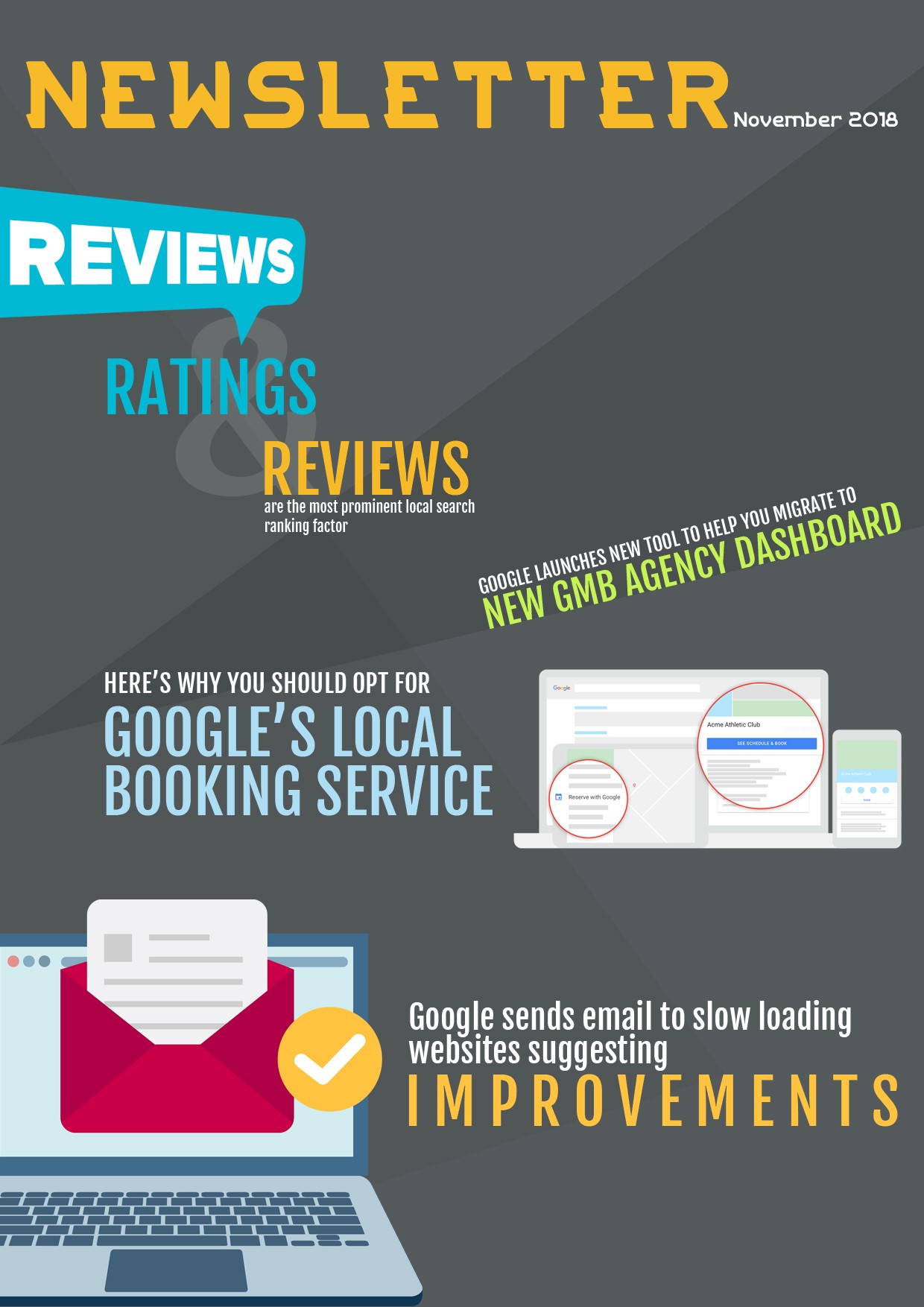
Google rolled out Google My Business agency dashboard in June. It was launched to help agencies manage a large number of listings. But many agencies faced issues while migrating to the new agency dashboard. To help them out, Google has launched a new tool to streamline the entire process.
First, you have to decide whether you want to shift completely to the GMB agency dashboard or not. So far the migration of the location has been the biggest hurdle. In case you decide to shift to the new GMB, Google is offering you two ways to do so.

Assisted Migration: In order to encourage hesitating agencies to shift to the new GMB agency dashboard, Google is ready to offer them personal assistance in migrating the locations and accounts. It’s good for agencies who have a lot of locations to move. You just have to request for the assisted move and for that, you will need to log into your GMB agency account, then go the Overview tab, click the Got existing locations to transfer? and follow the instructions from there. It will take around 48 hours to complete the entire process and then you can see all of the locations in the manage location tab of your agency account.
Self Migration: You can opt for this option if you are managing only a few locations. In order to transfer the locations into your new agency account, you will have to request access to each location or location group manually from your agency account and then accept the request from your personal account. The steps can differ based on the number of locations, so make sure you read Google’s support page.
We would like to inform you that it’s far easier to manage multiple locations and accounts on the agency dashboard than the private account. Google has also fixed the bugs from the initial launch, so we highly recommend you to use the agency account.


Google is sending emails to site owners who are struggling with site speed via Google Search Console. The intention is to help them identify and fix the slow loading pages. Here’s the email.
“Google has noticed that your site’s performance is significantly below average. Real user measurement data from the Chrome User Experience Report shows that pages on your site are slow to become interactive. This can have a severe negative effort on your business metrics and can cause user frustration.
Speed is a ranking factor for both mobile and desktop search results. While we don’t disclose the exact factors used for ranking, we recommend using a variety f metrics to understand your site’s performance, including first content paint, time to interactive, and first input delay. In particular, 8.70% of loads on this site have a slow first input delay and 39.7% have had a slow first contentful paint.”
Our takeaway: Speed is crucial for both mobile and desktop version of your site and it is officially part of the algorithm. It not only help you with your SEO efforts but also massively boost the user experience since most of the users want a fast loading page. So site speed means better ranking and it also directly boost the conversion rate. Hence it is a very crucial aspect of your site which you should be paying attention to.
Need help with site load time? Connect with one of our Sales rep to assist you further.

Google unveiled the option to book appointments with local businesses directly from the search results in August 2017 and since then they have been pushing it to local business owners in a very discreet manner. Maybe it’s because they don’t want to appear like a pushy salesman.
However, this feature didn’t receive the kind of warm welcome they were expecting. It might be because people were not sure whether they are just testing it or planning to fully launch it before putting efforts, money and time into it.

If you want to test this out (recommended), first you have to go to your GMB dashboard and check whether your business is eligible for the booking feature or not.

And if your business is eligible, you will have to choose a third party provider from all the listed options. Yes, you read that right. Google has partnered with third-party booking services for this feature and you have to shell out anywhere between $20-$80 a month. But it “might” be worthwhile for you since bookings can increase given how convenient it is to book appointments directly from the search.

In order to help YouTube advertisers drive more conversion, Google added new features that combine the power of YouTube’s creative canvas with Google’s machine learning and measurement solution.
YouTube advertisers soon will be able to use a wide variety of ad extensions, so that they can provide interesting information and compel the audience to take actions.
Google now wants to encourage viewers to complete a lower funnel action, i.e.: booking flight, downloading app etc. & for that, they are testing additional use cases.

Google also wants to enable YouTube advertisers to measure the full impact of their video campaigns by evolving Brand Lift. They are also partnering with IRI so that it will get easier for the advertisers to act upon upper and lower funnel metrics.
They also have introduced new metrics:
- Lifted Users: To know the estimated number of users whose perception changed after seeing your ads.
- Cost-per-lifted-users: To know the average cost of the lifted users.
Google also added that in order to utilize this new measurement tools to the fullest, you should use Maximize Lift bidding.
Furthermore, Google is investing heavily in Google Measurement Partners to ensure that the measurements you receive is authentic & not exaggerated. Google said that it’s their topmost priority to provide measurements that advertisers can trust, as it is crucial to their overall advertising efforts.
Since Facebook drastically exaggerated activity reports (As much as 900%), having a measurement that you can trust is vital to the success of the ad campaigns. Google also announced their “New MRC accreditations and partners for Google and YouTube ads measurement”.
In the end, we would like to add that if you are a big brand, then you surely want to check all the new measurement tools and metrics that YouTube has to offer in order to get the most out of your YouTube ad campaigns.
NAVIGATION
CONTACT US
CORPORATE OFFICE
SCHAUMBURG LOCATION
COMMUNITY