
In August, Google announced a new big search ranking algorithm update, named the helpful content update – probably its biggest update in a decade.
What We Know
The helpful content update will target websites with a relatively high amount of unsatisfying or unhelpful content, where the content has been written explicitly for search engines to leverage rankings.
Unlike many Google algorithms that get applied page-by-page, this new helpful content update will be sitewide. That means that if Google determines your site is producing a relatively high amount of unhelpful content, it will impact your whole site.
This reminds us of the early Panda and Penguin update days. Just as a quick reminder – or in case you weren’t working in SEO a decade ago – those updates did a lot of damage back then, and we made significant changes to our SEO strategies to recover and protect our client websites.
Which Sites Were Likely Impacted?
According to Google, this update impacted these types of content the most:
- Online educational materials.
- Arts and entertainment.
- Tech-related.
This is because content written in those areas has historically been written more for search engines than humans.
These are the folks that were hit the hardest:
- Publishers focused on a broad range of topics like CNET, Forbes, etc.
- Sites that collect and monetize organic search traffic without providing unique value.
- Sites that have content created with AI tools like Jasper or Copymatic.
- Sites with SEO doorway pages created for the sole purpose of boosting rankings.
- Sites with spammy content with a very high keyword density.
Our Observations:
We were quick to run a deep ranking audit of more than 3.5K websites, and we are happy to inform you that so far, this update did not have any significant negative impact on our client’s websites. In fact, we have seen good improvement in positions for the sites we are working on. This implies that our content strategy, in conjunction with our other SEO efforts like on-page optimization and link building, is working well and protecting our client’s websites.
Are your GBP posts getting rejected? Well, that’s because GBP has added more restrictions to its list of guidelines. As stated in their support document under the “Avoid Spam” header, Google warns business owners to avoid uploading duplicate photos, posts, videos, or logos.
Here’s a screenshot of the other guidelines that you should know.

So, using original images & relevant content is the only way to get your posts accepted.
Need help? Get in touch with our technical support team for assistance.
Recently, it has been discovered that Google Maps is emailing customers who have posted a review for any business when their review is flagged as fake and, therefore, not posted.
It came to light after Lucio Laria – Consultant SEO International raised this issue on the Google Business Profile community. When a help forum titled Legitimate review started getting flagged as “Fake Engagement”, he wrote:
Hello,
I just settled my Google profile and asked my client for a review. Google is filing this review as a fake engagement when this person is a legitimate client of mine.
I’m waiting for this to be fixed before asking other of my clients for their reviews.
Why is this happening, and how can I fix it?
Thanks,
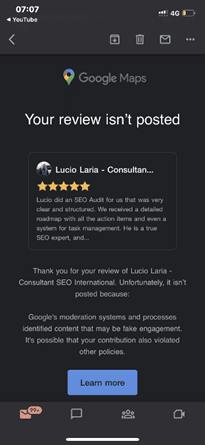
Among the many conjectured reasons and suggestions put forth by knowledgeable forum members are the following:
- It may be related to the review content. See Prohibited and restricted content. Ask the reviewer to delete it and then write a new review.
- It may be due to a problem with the reviewer’s account.
- Because the provider is in France and the client is in Argentina, the distance between them could be the reason.
- Ask the reviewer to try again, leaving a 4-5 sentence review, and add specifics about the services provided and, if pertinent, the location at which they were provided. If that fails, ask them to leave a review from another account.
The reviewer received the email notification about 15 minutes after posting the review. As the forum community pointed out, the review was being “filtered by an algorithm that enforces Google’s content policies”.
Why You Should Pay Attention to This Issue:
As we all know, getting legitimate reviews is not an easy task. It takes a lot of effort to impress a client and even more to convince the client to post a good review. It is disappointing when our sometimes hard-to-get legitimate reviews get taken down for “algorithmic” reasons, as requesting the client to post it again can be a bit awkward.
So, it’s crucial to learn how to get our good reviews to stick the better we can prep our customers and clients to get it right the first time.
Are you getting the best return out of your digital marketing?
Need an extra pair of eyes to review your online game plan? Let our experts take a look at your current state and do a comprehensive
digital marketing analysis at no cost to you. Please call us at
(800) 379-2829 or
contact us today and we will get to work right away.




Google updates its algorithm frequently. At times, they announce the major updates beforehand, and at times they inform after initiating one. The last update was rolled out on May 25th, and to learn about such updates, we had to wait for tweets & official answers from the team.
Google thought of improving this process and has created a dedicated Google Search ranking updates page. With the help of this page, you can check all the latest and previous updates easily.

If you wish to learn how Google improves the search engine, there are several articles from Google to help you. Also, its blog page has more information related to the updates. This page is definitely important for all site owners and SEO experts.
Need more details? Reach out to our support team for assistance.
To help businesses grow their eCommerce site, Google developer advocate Alan Kent recently hosted a video that outlines “8 tips” for SEO-optimizing an eCommerce site.
Here are the 8 tips that Alan believes will help you:
Tip 1: Make sure you have the technical basics in place – You need to ensure your URLs and internal links are friendly to crawlers.
Check out Designing a URL structure for E-Commerce Websites on Google Search Central for advice on how to design URLs for your website.
Tip 2: Create content relevant to users at different stages in their shopping journey – To check the breadth and quality of your site, think about likely searches by shoppers at different stages in their shopping journey. Once you have a set of queries, try them out. Does your site come up well-positioned? What about your competitors?
Tip 3: Be sure to mark up your product variant pages correctly – Product variants are when you have multiple colors or sizes of the same product. Informing Google of the relationship between the product pages can help Google better understand your site content.
The URL Inspection tool can also be used to check the status of individual pages.
Tip 4: For sales events that occur regularly, use the same URL across all event occurrences – This can help Google understand and trust the purpose of such pages. To identify problems, check the URL for promotional event pages on your site.
Tip 5: The “performance” of your web pages matters – Performance is important to users as a page that takes too long to load may be abandoned by them. It is also an important Google ranking signal. It can be particularly important if you use the same supplier-provided product description as other sellers online. The PageSpeed Insights report is useful for checking the performance of the web page.
Tip 6: Wait for it – Be patient to see the results. SEO, unfortunately, is a long game. Some ranking signals may take months to change. Worse, there is no guarantee of success. While it may take months to reap the benefits of a content creation strategy, it does not mean there is nothing you can do until then.
Tip 7: Seek professional help for your website – If you have done your best to improve your site but are still not getting the results you want, we’re here to provide expert SEO advice.
Tip 8: It’s all about the user – The ultimate goal for Google Search is to put the best possible content in front of the users. Algorithms change over time, but the ultimate goal does not. It does not mean you should not measure your site’s performance. It is still recommended to use tools such as Google Search Console and Google Analytics to collect data on your site.
Here is just one of our success stories that shows the importance of SEO! Ready to be our next success story?
As known to most SEO experts out there, Google renamed Google My Business to Google Business Profile last year while also rolling out more support for managing a business profile.
Going a step further, the search engine giant has now launched another feature that is bound to give small businesses operating out of homes a reason to be happy.
Google Business Profile now features a toggle that will allow businesses to hide their business address from customers if they wish to do so.

The screenshot above shows the businesses can now toggle ‘Show business address to customers’ on and off.
Why Is This Important?
This recently launched support feature is perfect for entrepreneurs operating virtual businesses that aren’t tied to a physical location. It can also prove to be quite helpful for all those home-based service operators who wish to avoid customers visiting.
Are you getting the best return out of your digital marketing?
Need an extra pair of eyes to review your online game plan? Let our experts take a look at your current state and do a comprehensive
digital marketing analysis at no cost to you. Please call us at
(800) 379-2829 or
contact us today and we will get to work right away.




As we all know, Google launches core updates at least two to three times a year. These updates cause a hassle to all the web developers and SEO specialists because they have to monitor the rankings and make the required changes.
On May 25th, Google announced an update via a tweet.
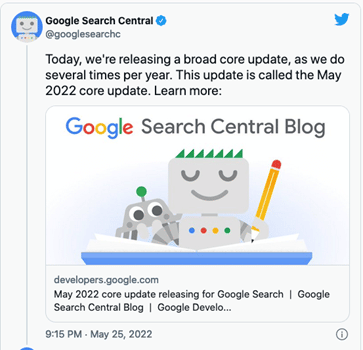
This core update was further explained on Google Search Central. According to this article, Google makes changes to the ranking process to increase the accuracy of the search results. These improvements are called core updates. The core updates are not specific to certain sites but will certainly generate notable effects. Some sites’ ranking may drop, while others may rank better.
Also, Google said that if any site does experience a drop in its ranking, they don’t have to fix anything. These updates are meant to improve the system, helping under-ranked sites to get better traffic.
So, if your ranking suddenly drops, there’s nothing to worry about. You have not violated any webmaster guidelines. You just have to sit back and wait for the next core update. One last thing you can do is observe the sites that have ranked higher and try to figure out the factors that helped them.
Still have any issues? You can get in touch with our experienced team for assistance.
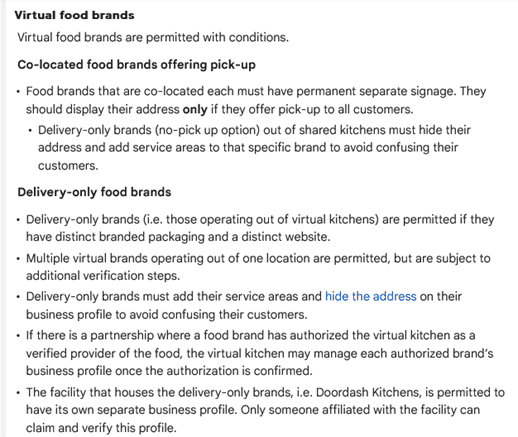
Last month Google laid out new, more specific guidelines to help the virtual food brands and delivery-only businesses with their Business Profiles on Google. These guidelines are meant for food businesses that don’t really have a physical location in an area, but they do re-package and deliver the local restaurants’ food.
The guidelines can be found in Google’s Guidelines for representing your business on Google, under the section Guidelines for chains, departments & individual practitioners.
Here’s a look at what these new guidelines have to say:
Final Takeaway
If you own a virtual food business, it is in your best interest to take a look at the new guidelines so that you can create a business profile on Google that isn’t suspended.
Recently Google’s Dikla Cohen gave a presentation on video indexing, which explains that video indexing does not rely on where and how you host your videos. You can host them yourself or choose from the most popular video hosting platforms and services.
With this, he announced Google is soon launching a new set of reports and tools in Search Console to make video indexing easier to track and diagnose.
With this new launch, the Video Page Indexing report will show a summary of all the pages that Google’s systems find with a video while crawling and indexing your website. At a glance, you can see how many video landing pages were indexed.
Issues will be grouped with a trend line and counts of the affected videos. For example, which videos are missing a thumbnail URL, with reasons – the largest impact ranked on top.
You can click on one of the rows to get more details, such as affected video page URLs. You can also download the list of examples and double-check them. So, you can narrow down the details and understand what is happening and how to resolve issues.
Once your website is updated; and you think you have resolved the issue you were facing, you can go back to the Video Indexing Report, go to that specific issue type, and then use the validate fix button to inform Google.
This way, you can initiate the recrawling of known URLs affected by the issue. And as the pages are being reprocessed, you will be notified if everything is resolved or if there are remaining issues.
But you will have to note that it can take some time to go through all the URLs.
If you wish to check the video indexing status, you can get there by entering the URL of the video landing page at the top of the search console. It will first show you the current status of that URL, as well as the video index status of the page. It will inform you whether Google detects a video on the page. And, if so, did they manage to index it. If a detected video is not indexed, it will list the reasons preventing it from being indexed.
Also, please note that Google indexes only one video per page, even when a page has multiple videos.
To summarize, with the new tools,
- You will be able to see how many video landing pages Google has discovered and how many of them were indexed.
- Examine reasons for unindexed videos on video landing pages.
- You can use the list of affected video page URLs to debug and fix issues.
- You can use the Validate Fix button to initiate recrawling of the known URLs affected by the issue.
- You will be able to check the video indexing status of a specific video using the URL inspection tool.
Are you getting the best return out of your digital marketing?
Need an extra pair of eyes to review your online game plan? Let our experts take a look at your current state and do a comprehensive
digital marketing analysis at no cost to you. Please call us at
(800) 379-2829 or
contact us today and we will get to work right away.




In a new move, Google has announced the use of the AI approach to update the operation hours for over 20 million businesses around the globe in the next six months. Also, Google’s AI algorithms are busy figuring out if your posted business hours are accurate.
Google said, “We developed a machine learning model that automatically identifies if business hours are likely wrong, then instantly updates them with AI-generated predictions.”
How Does It Work?
The AI considers multiple factors, such as:
- The last time you updated your hours
- What they know about other shops’ hours
- The Popular Times information for your shop determined by location trends
Then, the algorithm analyzes the business hours of other similar shops that are nearby, information from the shop’s website, and Street View images of the shop’s storefront. Also, they will look specifically for business hour signs to determine the most accurate business hour prediction.
Google will take the help of the Google Maps community — including Local Guides and even the business owners themselves through their Google Business Profile — to verify the information they have predicted.
What Do You Need To Do?
All the business owners located in Argentina, Australia, Chile, France, Japan, Mexico, New Zealand, Peru, or the United States, should prepare their staff to expect inquiry calls powered by Google’s conversational AI asking about their business hours.
Also, check Google Maps from time to time to ensure that Google has correctly listed the timings, in case they have been changed without your input.
Google performing random display testings are no longer surprising. This time around, it is Google Maps testing the position of local listing previews.
Recently, one of the users noticed that when a specific listing is clicked on from the Google Maps search results that appear on the left-hand side, the local listing pops up in a new position.
Instead of its original position on the left bar, the local listing preview now hovers in a new position, overlayed on top of the map. So far, this new position testing seems to be limited to the Google Maps interface for the desktop.
Here’s a look at the local listing overlay box:

Normally, there would be no overlay box hovering over the map, and the local listing details would appear in the left bar, pushing the search results to the bottom footer.
We have highlighted the main steps involved in setting up an e-commerce site & depending on the work required in each step you can determine the price of the project.
Step One –
- Calculate the time required to set up a WordPress site, install plugins, install a WordPress theme, and meet a client’s requirements.
Step Two –
- Calculate the time you need to finalize images. Mostly, it depends on whether you are –
- Using existing images
- Making new images
- Modifying manufacturer’s images
Step Three –
- Determine the number of products or SKUs included in the project.
- Also, make a note of whether you will take the content from an old site, create your own new content, or reword the manufacturer’s website content.
- Lastly, you need to know if you must create custom category pages and the amount of product information that will be provided.
Step Four –
- Customizing a plugin may need about 20-30 mins, so extra features like Shipping Plugins, Invoicing Plugins, & more should be noted down.
After you have a good idea of the level of work required, you can give an estimated price range for the project. If the estimate is approved by the client, you can charge by the hour to ensure you are paid for your work.
Have any questions? Get in touch with our experts for assistance.
Are you getting the best return out of your digital marketing?
Need an extra pair of eyes to review your online game plan? Let our experts take a look at your current state and do a comprehensive
digital marketing analysis at no cost to you. Please call us at
(800) 379-2829 or
contact us today and we will get to work right away.




Want to become an expert on how to use SEO when designing your website? Read on to discover top 12 guidelines for SEO-friendly website design.
- MAKE SURE YOUR SITE NAVIGATION IS SEARCH ENGINE FRIENDLY
Using Flash for navigation on your website can be bad news if you aren’t aware of how to make Flash objects accessible and web-crawler-friendly. Search engines have a really tough time crawling a website that uses Flash. CSS and unobtrusive JavaScript can provide almost any of the fancy effects you are looking for without sacrificing your search engine rankings.
- PLACE SCRIPTS OUTSIDE OF THE HTML DOCUMENT
When you are coding your website, make sure you externalize JavaScript and CSS. Search engines view a website through what’s contained in the HTML document. JavaScript and CSS, if not externalized, can add several additional lines of code in your HTML documents that, in most cases, will be ahead of the actual content and might make crawling them slower. Search engines like to get to the content of a website as quickly as possible.
- USE CONTENT THAT SEARCH ENGINE SPIDERS CAN READ
Content is the life force of a website, and it is what the search engines feed on. When designing a website, makes sure you take into account good structure for content (headings, paragraphs, and links). Sites with very little content tend to struggle in the search results and, in most cases, this can be avoided if there is proper planning in the design stages.
- DESIGN YOUR URLS FOR SEARCH FRIENDLINESS
Search friendly URLs are not URLs that are hard to crawl, such as query strings. The best URLs contain keywords that help describe the content of the page. For example, think about the following URLs for an HVAC website:
hvacompany.com/services/repairs/
hvacompany.com/services/residential-repairs/
hvacompany.com/services/commercial-repairs/
- BLOCK PAGES YOU DON’T WANT SEARCH ENGINES INDEX
There could be pages on your site that you don’t want search engines to index. These pages could be pages that add no value to your content, such as server-side scripts. These web pages could even be pages you are using to test your designs as you are building the new website. Don’t expose these web pages to web robots. You could run into duplicate content issues with search engines as well as dilute your real content’s density, and these things could have a negative effect on your website’s search positions.
- DON’T NEGLECT IMAGE ALT ATTRIBUTES
Make sure that all of your image alt attributes are descriptive. Search engines will read alt attributes and may take them into consideration when determining the relevancy of the page to the keywords a searcher queries.
- UPDATE PAGES WITH FRESH CONTENT
If your website has a blog, you may want to consider making room for some excerpts of the latest posts to be placed on all of your web pages. Search engines love to see content of web pages changing from time to time as it indicates that the site is still alive and well. With changing content, comes greater crawling frequency by search engines as well.
- USE UNIQUE META DATA
Page titles and descriptions should all be different. Many times, web designers will create a template for a website and forget to change out the meta data, and what ends up happening is that several pages will use the original placeholder information. The Best Web Design Companies know that every page should have its own set of meta data; it is just one of the things that helps search engines get a better grasp of how the structure of the website is constructed.
- USE HEADING TAGS PROPERLY
Make good use of heading tags in your web page content; they provide search engines with information on the structure of the HTML document, and they often place higher value on these tags relative to other text on the web page.
- INCREASE INTERNAL LINKING ON YOUR WEBSITE
Internal linking can boost the rankings of your website when used correctly. It helps Google understand your content better and also sets an informational hierarchy for your website. Websites with information are consistently correlated with each other. It is very helpful for people and search engine bots when relevant information leads them to further information on the subject.
- MAKE YOUR WEBSITE MOBILE-FRIENDLY
Whenever a query is entered in the search bar, Google will rank websites based on several different factors, but mobile-friendliness is be one of the primary factors. Thus, Google requires webmasters and businesses to create a mobile friendly website.
- IMPROVE YOUR PAGE SPEED
Nobody has the patience to tolerate a loading website nowadays. With so many options available at our fingertips, people swiftly switch from one site to another to look for the desired products or services. Thus, you’ll lose the potential rankings and leads if your site’s speed is low.
Need help with website design? Get in touch with our team for expert advice.
Website redesign is complicated. Here are some steps to take away before, during, and post-launch to avoid an SEO disaster when redesigning your site.
- Take inventory of your current site
Before changing anything, you need to take a snapshot of what your site and ranks look like currently. This will be a necessary reference point post-launch when evaluating if everything is indexing and ranking as it should.
Some areas to keep in mind while taking inventory of your site are:
- Current SEO rank: Check the current rankings of each of your website and also make note of the pages that currently rank in Google.
- Crawl your current site: This will let you see what your current site looks like and grab the structure, current URLs, meta description, and titles tags so you can match your new site up to the old.
- Blocked content: Verify any blocked content with your Robots.txt and/or Google Search Console. It is good to check this list so that you can make sure that these blocked pages continue to be blocked after the redesign.
- Keep content as close to the same as possible
We all know the saying, “If it ain’t broke, don’t fix it,” but that doesn’t mean you can’t change a page.
You just need to make sure your development and copy teams know when and what tags need to stay the same. Yes, during a redesign, you may need to make some changes to copy/content, but make sure the changes are small and deliberate.
In order to maintain your current rank, you should aim to keep the title tag, meta description, URL, and the H1 – H6 the same.
These areas are the most commonly crawled and are most important for pages that already rank on Google.
- Preserve some of the overall site architecture
Yes, some of the ways you organize your navigation and files may change based on your new website strategy and goals, but if possible, try to keep as much of the structure the same as you can.
Search engines already know your current site architecture, so by maintaining it, you give yourself a better chance of not affecting your rank.
Keep your existing visitors in mind as well, you don’t want to change your structure and confuse your existing audience when they revisit your website.
- Create 301 redirects
You also want to make sure you don’t want to remove any pages that are doing well. If you must, make sure you inform the search engines about this change by setting up a 301 redirect. If you don’t implement these 301 redirects you can drastically kill your traffic
Keeping an organized list of old page URLs vs new page URLs is extremely important and will help you with re-organizing the website.
- Block your new site from search engines during staging
Once you have a game plan of what your new site architecture is going to look like, it’s time to design and get the new site built.
Make sure your development team sets up the new site on a staging environment or a platform meant for testing that resembles the live environment without launching the pages.
It is important to have a staging environment so that you aren’t messing around with your live site and prematurely set pages live and having search engines index duplicate content.
A very IMPORTANT thing to do once your staging environment is set up and put a “No Index, No Follow” on it.
You don’t want Google finding your staging environment and marking it as duplicate content. This will create a bigger mess to clean up once you take your new site live.
- Double check everything in staging
When everything is built, run tests on the staging environment to make sure you aren’t missing or have duplicate H1 & H2 tags, title tags, and meta descriptions.
Once everything looks good and you have not only run some SEO tests but also did internal QA (Quality Assurance) to make sure the site is responsive and works in various browsers, it is time to take the site live.
What about post launch?
Even everything looks great in staging, once you set a site live, there are several things you need to do to ensure you maintain your SEO.
Here is a quick hit list:
- Remove “No Index, No Follow” – This is a very easy thing to forget to do it is the #1 item on our post-launch checklist when launching a site to make sure that is removed.
- Import your 301 redirects
- Check your 301 redirects to make sure if you did redo your highest-ranking pages that they are redirecting where they should go
- Make schema.org tags are still implemented
- Make sure tracking codes are all still up and running
- Re-run broken link checker
- Re-submit new submit to Google Search Console
You should be monitoring your new site regularly to spot any issues. Check Google Search Console to check on the number of pages indexed in Google to ensure no pages dropped, track impressions and clicks, and track your rankings.
It’s important to monitor these things so that if you did drop in SEO rank you can work on getting it back up quickly, rather than catching it too late.
Need help? Do get in touch with our professionals for assistance.
Instagram will open product tagging to every user in the U.S. The ability to tag products is starting to roll out now and will become available to everyone within the next few months.
Product tagging debuted on the platform in 2016 as its initial foray into e-commerce. Until now, only businesses and creators could tag products in video posts, stories and reels.
Of its 2 billion monthly active users, Instagram has an estimated 159 million users in the U.S., according to Statistia.
Why we care.
Instagram said that 1.6 million people are already tagging at least one product per week. By making product tagging available to everyone in the U.S., this number will likely skyrocket as users learn of and use this feature. This is yet another way for brands and businesses to be discovered organically on Instagram. So if your brand isn’t set up for Instagram Shopping, there’s no better time than now to test it.
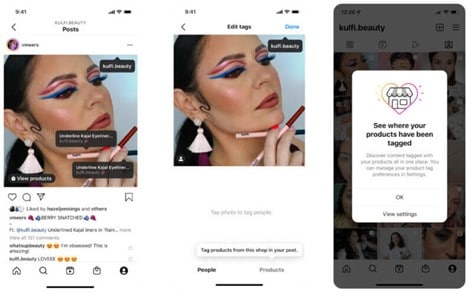
How to tag products?
After creating a post, users would tap the “Tag Products,” tap the product in the video or image, then search for the product from the shop to add a tag. Instagram users who see a product tag can tap it to buy the product within the app.
Control for brands and businesses
Whenever one of your products is tagged, Instagram will notify you on your profile. Want to turn off product tags? You can in your account settings. By default, it is set to “Allow all”.
Are you getting the best return out of your digital marketing?
Need an extra pair of eyes to review your online game plan? Let our experts take a look at your current state and do a comprehensive
digital marketing analysis at no cost to you. Please call us at
(800) 379-2829 or
contact us today and we will get to work right away.





On August 17, 2021, many people noticed Google using header tags (H1s & H2s) rather than meta title tags as titles. A number of people posted their questions and complaints related to this change on various forums and social media platforms.
Below are some of the public mentions & the answers from Google and other SEO professionals.

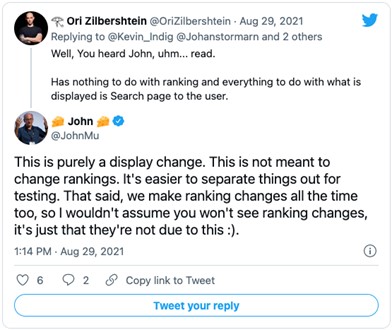
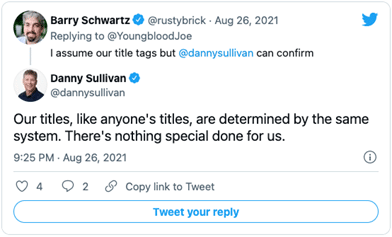
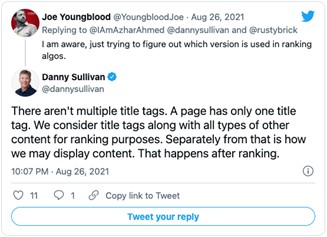
From the above posts, we can confirm that your rankings are definitely not affected by this update (at least for now)!! Its only purpose is to make your titles more readable and precisely describe your document’s content. This new system is preferred by the users, as they can connect with the page content easily.
Many people wanted Google to explain more about this update, so there were many comments related to this topic. Google’s staff answered their queries in this official post.
Points To Remember:
- Title tags are considered for rankings even now.
- Continue to focus on creating great title tags with focus on target keywords.
- Include H1 and H2 in your page content including your target keywords.
Analyze your site?

Google recently announced that the link spam update is complete. The update that initially began rolling out on July 26th, 2021, is now done rolling out as of August 24th, 2021. It took over a full month for this update to roll out and two weeks longer than Google had said.
Here’s Google’s announcement about the link spam update that is done rolling out.
Earlier, Google said, “This algorithm update, which will roll out across the next two weeks, is even more effective at identifying and nullifying link spam more broadly, across multiple languages.”
The update is finally fully live.
So how do you know if your site has been impacted by the update? Tough to say as of now! We had a bunch of unconfirmed updates after this announcement was made. Maybe they were related to the link spam update, maybe not.
All we know is that the Google link spam update didn’t have any negative effect on our client rankings.
If you’ve been affected by this update, you can get in touch with our team for professional help.
See How Here!
All You Need To Know About This New Feature!
- The Shop Tab of Instagram will now include ads.
- This feature is still under test in the U.S.
- Ads can either be a single photo or multiple photos.
- Only a few retailers such as Away, Boo Oh, Clare Paint, DEUX, Donni Davy, Fenty Beauty, and JNJ Gifts could participate in this test.
- An auction-based model will be used to launch Ads in Instagram Shop.
- The Instagram Shop tab is a mobile-only feature, so the ads will only appear on mobile.
- How many ads a single consumer sees will be determined by several factors, such as:
- Instagram, how do they use it?
- And, how many people are shopping in the tab?
- Instagram also plans to monitor consumer sentiment to balance ads and content.
Why This Feature Is Important
If this feature is approved, many retailers will be able to reach their target customers easily. Also, cross-app tracking and third-party cookies will not be an issue anymore.
Final Takeaway
There are no details available yet as to when other retailers would be able to join in. However, it is clear that this feature will surely be made available globally in the coming future.
For more information, check out this article.
Are you getting the best return out of your digital marketing?
Need an extra pair of eyes to review your online game plan?
Let our experts take a look at your current state and do a comprehensive digital marketing analysis at no cost to you.
Please call us at (800) 379-2829 or contact us today and we will get to work right away.
It’s no secret that social media has grown to become a necessity in any online marketing strategy. Whether a brand wants to drive attention to its company, product or professional services, social media is a well-known, cost-effective way of attracting positive attention (in most cases). On the other hand, without following the specific protocol of social media branding, the careless use of these platforms can damage a business in a matter of days.
Within the past few years, social networks like Facebook, Twitter, and LinkedIn have become widely recognized as powerful tools for communication, both in the B2C and B2B industries. And whether you are aware of it or not, your prospective employers, partners, customers and competitors could be viewing your posts at any moment. With this in mind, it’s important to maintain best practices so that your social media strategy effectively supports your business goals and best showcases your brand’s personality, and on multiple channels.
On these newly crowded channels, it can be difficult for consumers and brands alike to separate the wheat from the chaff. We’ve assembled two examples of brands who have their social media game on lock. Read on to find out how you can cut through the competition and reach your fans like never before:
Old Spice Makes the Comeback of All Comebacks

At the end of 2009, Old Spice was an aging brand. Their customers were old; their reputation was old…and they were in danger. Obviously, a reboot was in order. And what a reboot it was!
During the Super Bowl of 2010, Old Spice launched their “The Man Your Man Could Smell Like” campaign, featuring former NFL player Isaiah Mustafa. Mustafa talks to the “ladies of the audience,” trying to convince them to buy Old Spice for their man while staring directly into the camera. It was a hit, racking up 26 million views on YouTube.
If Old Spice had stopped there, it would have just been a great online commercial. But what followed five months later was pure social media genius: Mr. Old Spice, as Mustafa was now called, jumped onto Twitter to answer questions from fans—in real time, via YouTube.
When selecting who to answer, the Old Spice Social Media team had a novel and crucial approach: they selected fans not only on the potential of their questions, but also selected them based on their influence on social media. Thus, when they interacted with a fan, they could be sure that his or her response would get maximum coverage.
The influence-filtering approach, combined with the real-time nature of the campaign, left fans sitting at the edge of their seats. It was a recipe for success that boosted Old Spice to its status as the number-one branded channel on YouTube. Numbers later showed that it drove sales, too: Old Spice reported that sales doubled in the month following the campaign.
The bottom line: by responding to their fans according to influence, Old Spice was able to combine high production values with spontaneity and still count on having an impact.
We All Scream for Fourth Meal!
Of all the fast food restaurants, who knew that Taco Bell would be the one to conquer social media? It’s true! The company’s flippant, irreverent, yet ultimately best-friendy tone turned out to be perfectly suited to social media marketing, particularly for speaking to that ever-elusive generation: the coveted millennials.
Using a sassy mix of English and Spanish, Taco Bell encouraged its fans, followers, and subscribers to “Live Más” and “Think outside the bun.” But that was just the beginning. What really sets Taco Bell apart from their competition is their commitment to two-way, fun, and productive communication.

One 17-year-old fan posted a request to their Facebook wall: “will you send me a poster of my favorite burrito?” To her surprise, Taco Bell not only agreed, but one-upped her. They sent her a giant poster taller than she was, they liked and commented on her Instagram feed with the acronym “BFFAE,” Best Friends Forever And Ever.
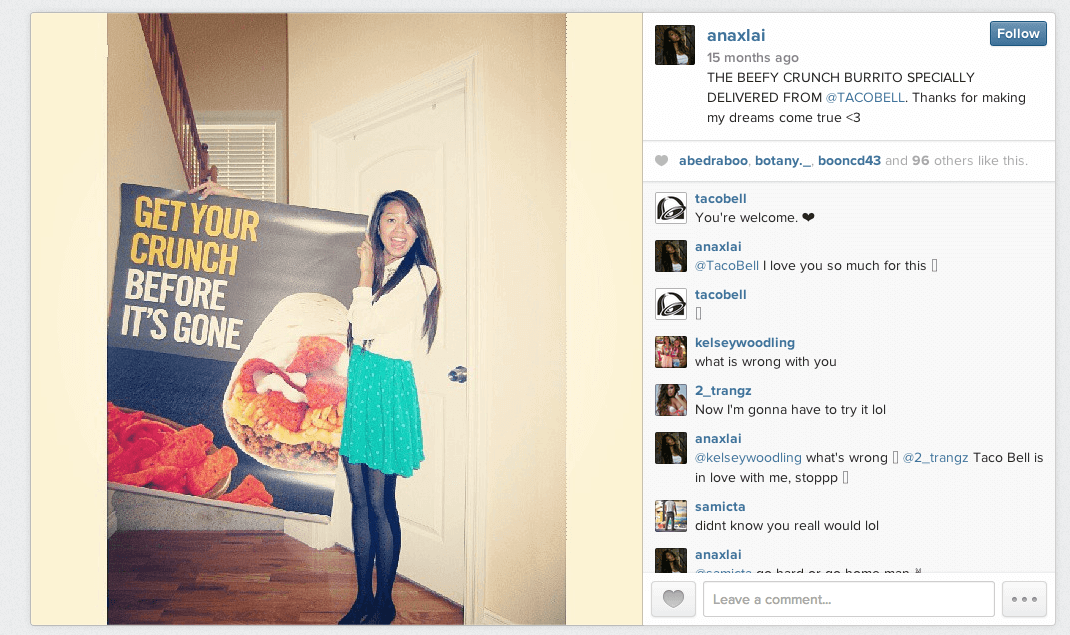
The bottom line: Taco Bell treats every interaction with a customer on social media as a chance to create a fan.
Thinking Outside the Box with Social Media
Consumers today crave honesty and authenticity from their brands. The definition of professionality is changing; it’s no longer enough to be polite and respectful. Today, brands are expected to be funny and candid as well. In their own ways, Taco Bell and Old Spice have each managed to mix humor, authenticity, and just the right amount of silliness to achieve a perfectly balance social media presence.
It’s been touted as the “Facebook for Teens,” where adorable cuddly kitten pictures get more likes than they should, but Instagram is by no means an exclusive platform for the tween audiences. In fact, with users climbing higher than Facebook, Instagram is becoming a great way for businesses to market themselves.
Visual content is becoming a staple in online marketing. These days, the sheer amount of information available on the Internet is enough to induce a sensory overload digital seizure. Companies like Google and YouTube are entering into the marketing world. Audiences and targeted clientele have substantially shorter attention spans, and so getting information out to them in a quick but catchy way has become the new way to market.
Instagram allows for your business to tell it’s personal narrative through an array of beautiful, eye-grabbing photos. It’s becoming increasingly popular for businesses to use because of how accessible it is – both for audiences and businesses. This infographic gives tips from the Instaguru on how to boost your content through Instagram.

It can seem kind of tedious right out of the gate with a brand spanking new Instagram account. You post all these fantastic selfies but no one is liking them, what gives?! Have no fear, if you’re in this situation, this blog will really help you.
Content is king

Just because you’re posting A LOT of content doesn’t mean you should be getting likes. Even though the latest selfie at the beach may be glamorous to you, does it really look great to others? Look at the composition of the shot, is it flowing or is your face the ONLY thing in the frame? A good reference when composing shots (yes, even for Instagram) is to follow the rule of thirds.
The other thing to consider in relations to content is make sure that the lighting is good. Yes, you have lots of filters and third-party apps you can use to correct the image but without a strong starting point, you won’t be able to succeed.
Short and eloquent description

Lets start by saying that every person has their own unique style of content writing. Some like short and direct while others like to tell stories. For the case of Instagram it is important to remember the saying “a picture says a thousand words.”
SEE MORE: Why blogging is still important in a world of micro-blogging.
With that being said don’t have the description describe the image. Individuals are looking for the users unique perspective on what this image invoked within them, pushing them to create a caption that holds the emotion behind what they saw before the lens.
Hashtags – Yay or Nay
There is a lot of debate about hashtags currently among social media marketers. To many and you’re pushing limits, to few and you’re breaking a rule. The typical agreed upon number of hashtags for a post now is between 2-3. With Instagram however, you can push that a bit. Don’t hashtag so much that your content disappears but between 5-10 hashtags are appropriate. If you can use less though, do so!
SEE MORE: Three things to KNOW about hashtags
When choosing hashtags pick ones that will add value to your content. For example, a photo of a cup of coffee from a local coffee shop in Santa Monica, CA, make sure to utilize #local or #santamonica. People search for hashtags all the time, which is how they will discover your posts and you.
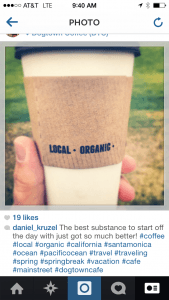
When it comes down to it, all these things will help you gain followers! However the other important factor here is to go out and discover others photos on Instagram. Yes, finding your friends and liking them is great, but search for hashtags of niche interests you may have and start liking photos from there you like and following repeat IG’ers that you like.
It is not a quick thing to grow your following organically but following these tips will certainly help get you going in the right direction.
Looking to grow your online presence with Instagram and other social networks but not sure where to start? Contact us today for a free consultation.
Have a question for the author or want to add your own tips, do so below in the comments.