In August, Google announced a new big search ranking algorithm update, named the helpful content update – probably its biggest update in a decade.
What We Know
The helpful content update will target websites with a relatively high amount of unsatisfying or unhelpful content, where the content has been written explicitly for search engines to leverage rankings.
Unlike many Google algorithms that get applied page-by-page, this new helpful content update will be sitewide. That means that if Google determines your site is producing a relatively high amount of unhelpful content, it will impact your whole site.
This reminds us of the early Panda and Penguin update days. Just as a quick reminder – or in case you weren’t working in SEO a decade ago – those updates did a lot of damage back then, and we made significant changes to our SEO strategies to recover and protect our client websites.
Which Sites Were Likely Impacted?
According to Google, this update impacted these types of content the most:
- Online educational materials.
- Arts and entertainment.
- Tech-related.
This is because content written in those areas has historically been written more for search engines than humans.
These are the folks that were hit the hardest:
- Publishers focused on a broad range of topics like CNET, Forbes, etc.
- Sites that collect and monetize organic search traffic without providing unique value.
- Sites that have content created with AI tools like Jasper or Copymatic.
- Sites with SEO doorway pages created for the sole purpose of boosting rankings.
- Sites with spammy content with a very high keyword density.
Our Observations:
We were quick to run a deep ranking audit of more than 3.5K websites, and we are happy to inform you that so far, this update did not have any significant negative impact on our client’s websites. In fact, we have seen good improvement in positions for the sites we are working on. This implies that our content strategy, in conjunction with our other SEO efforts like on-page optimization and link building, is working well and protecting our client’s websites.
Are your GBP posts getting rejected? Well, that’s because GBP has added more restrictions to its list of guidelines. As stated in their support document under the “Avoid Spam” header, Google warns business owners to avoid uploading duplicate photos, posts, videos, or logos.
Here’s a screenshot of the other guidelines that you should know.

So, using original images & relevant content is the only way to get your posts accepted.
Need help? Get in touch with our technical support team for assistance.
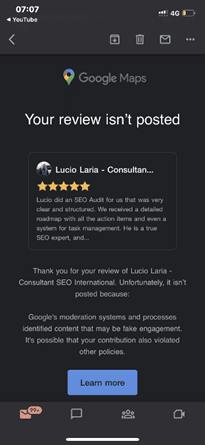
Recently, it has been discovered that Google Maps is emailing customers who have posted a review for any business when their review is flagged as fake and, therefore, not posted.
It came to light after Lucio Laria – Consultant SEO International raised this issue on the Google Business Profile community. When a help forum titled Legitimate review started getting flagged as “Fake Engagement”, he wrote:
Hello,
I just settled my Google profile and asked my client for a review. Google is filing this review as a fake engagement when this person is a legitimate client of mine.
I’m waiting for this to be fixed before asking other of my clients for their reviews.
Why is this happening, and how can I fix it?
Thanks,
Among the many conjectured reasons and suggestions put forth by knowledgeable forum members are the following:
- It may be related to the review content. See Prohibited and restricted content. Ask the reviewer to delete it and then write a new review.
- It may be due to a problem with the reviewer’s account.
- Because the provider is in France and the client is in Argentina, the distance between them could be the reason.
- Ask the reviewer to try again, leaving a 4-5 sentence review, and add specifics about the services provided and, if pertinent, the location at which they were provided. If that fails, ask them to leave a review from another account.
The reviewer received the email notification about 15 minutes after posting the review. As the forum community pointed out, the review was being “filtered by an algorithm that enforces Google’s content policies”.
Why You Should Pay Attention to This Issue:
As we all know, getting legitimate reviews is not an easy task. It takes a lot of effort to impress a client and even more to convince the client to post a good review. It is disappointing when our sometimes hard-to-get legitimate reviews get taken down for “algorithmic” reasons, as requesting the client to post it again can be a bit awkward.
So, it’s crucial to learn how to get our good reviews to stick the better we can prep our customers and clients to get it right the first time.
Are you getting the best return out of your digital marketing?
Need an extra pair of eyes to review your online game plan? Let our experts take a look at your current state and do a comprehensive
digital marketing analysis at no cost to you. Please call us at
(800) 379-2829 or
contact us today and we will get to work right away.




Google updates its algorithm frequently. At times, they announce the major updates beforehand, and at times they inform after initiating one. The last update was rolled out on May 25th, and to learn about such updates, we had to wait for tweets & official answers from the team.
Google thought of improving this process and has created a dedicated Google Search ranking updates page. With the help of this page, you can check all the latest and previous updates easily.

If you wish to learn how Google improves the search engine, there are several articles from Google to help you. Also, its blog page has more information related to the updates. This page is definitely important for all site owners and SEO experts.
Need more details? Reach out to our support team for assistance.
To help businesses grow their eCommerce site, Google developer advocate Alan Kent recently hosted a video that outlines “8 tips” for SEO-optimizing an eCommerce site.
Here are the 8 tips that Alan believes will help you:
Tip 1: Make sure you have the technical basics in place – You need to ensure your URLs and internal links are friendly to crawlers.
Check out Designing a URL structure for E-Commerce Websites on Google Search Central for advice on how to design URLs for your website.
Tip 2: Create content relevant to users at different stages in their shopping journey – To check the breadth and quality of your site, think about likely searches by shoppers at different stages in their shopping journey. Once you have a set of queries, try them out. Does your site come up well-positioned? What about your competitors?
Tip 3: Be sure to mark up your product variant pages correctly – Product variants are when you have multiple colors or sizes of the same product. Informing Google of the relationship between the product pages can help Google better understand your site content.
The URL Inspection tool can also be used to check the status of individual pages.
Tip 4: For sales events that occur regularly, use the same URL across all event occurrences – This can help Google understand and trust the purpose of such pages. To identify problems, check the URL for promotional event pages on your site.
Tip 5: The “performance” of your web pages matters – Performance is important to users as a page that takes too long to load may be abandoned by them. It is also an important Google ranking signal. It can be particularly important if you use the same supplier-provided product description as other sellers online. The PageSpeed Insights report is useful for checking the performance of the web page.
Tip 6: Wait for it – Be patient to see the results. SEO, unfortunately, is a long game. Some ranking signals may take months to change. Worse, there is no guarantee of success. While it may take months to reap the benefits of a content creation strategy, it does not mean there is nothing you can do until then.
Tip 7: Seek professional help for your website – If you have done your best to improve your site but are still not getting the results you want, we’re here to provide expert SEO advice.
Tip 8: It’s all about the user – The ultimate goal for Google Search is to put the best possible content in front of the users. Algorithms change over time, but the ultimate goal does not. It does not mean you should not measure your site’s performance. It is still recommended to use tools such as Google Search Console and Google Analytics to collect data on your site.
Here is just one of our success stories that shows the importance of SEO! Ready to be our next success story?
As known to most SEO experts out there, Google renamed Google My Business to Google Business Profile last year while also rolling out more support for managing a business profile.
Going a step further, the search engine giant has now launched another feature that is bound to give small businesses operating out of homes a reason to be happy.
Google Business Profile now features a toggle that will allow businesses to hide their business address from customers if they wish to do so.

The screenshot above shows the businesses can now toggle ‘Show business address to customers’ on and off.
Why Is This Important?
This recently launched support feature is perfect for entrepreneurs operating virtual businesses that aren’t tied to a physical location. It can also prove to be quite helpful for all those home-based service operators who wish to avoid customers visiting.
Are you getting the best return out of your digital marketing?
Need an extra pair of eyes to review your online game plan? Let our experts take a look at your current state and do a comprehensive
digital marketing analysis at no cost to you. Please call us at
(800) 379-2829 or
contact us today and we will get to work right away.




As we all know, Google launches core updates at least two to three times a year. These updates cause a hassle to all the web developers and SEO specialists because they have to monitor the rankings and make the required changes.
On May 25th, Google announced an update via a tweet.
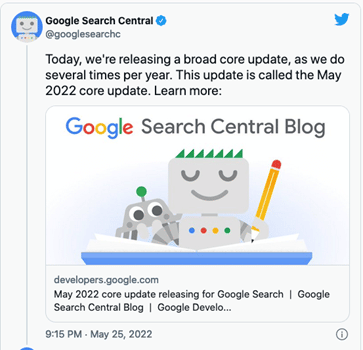
This core update was further explained on Google Search Central. According to this article, Google makes changes to the ranking process to increase the accuracy of the search results. These improvements are called core updates. The core updates are not specific to certain sites but will certainly generate notable effects. Some sites’ ranking may drop, while others may rank better.
Also, Google said that if any site does experience a drop in its ranking, they don’t have to fix anything. These updates are meant to improve the system, helping under-ranked sites to get better traffic.
So, if your ranking suddenly drops, there’s nothing to worry about. You have not violated any webmaster guidelines. You just have to sit back and wait for the next core update. One last thing you can do is observe the sites that have ranked higher and try to figure out the factors that helped them.
Still have any issues? You can get in touch with our experienced team for assistance.
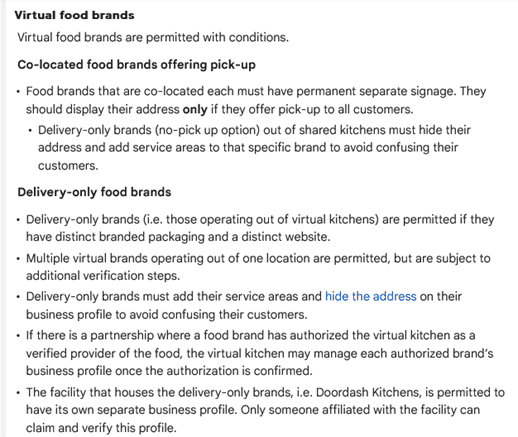
Last month Google laid out new, more specific guidelines to help the virtual food brands and delivery-only businesses with their Business Profiles on Google. These guidelines are meant for food businesses that don’t really have a physical location in an area, but they do re-package and deliver the local restaurants’ food.
The guidelines can be found in Google’s Guidelines for representing your business on Google, under the section Guidelines for chains, departments & individual practitioners.
Here’s a look at what these new guidelines have to say:
Final Takeaway
If you own a virtual food business, it is in your best interest to take a look at the new guidelines so that you can create a business profile on Google that isn’t suspended.
Recently Google’s Dikla Cohen gave a presentation on video indexing, which explains that video indexing does not rely on where and how you host your videos. You can host them yourself or choose from the most popular video hosting platforms and services.
With this, he announced Google is soon launching a new set of reports and tools in Search Console to make video indexing easier to track and diagnose.
With this new launch, the Video Page Indexing report will show a summary of all the pages that Google’s systems find with a video while crawling and indexing your website. At a glance, you can see how many video landing pages were indexed.
Issues will be grouped with a trend line and counts of the affected videos. For example, which videos are missing a thumbnail URL, with reasons – the largest impact ranked on top.
You can click on one of the rows to get more details, such as affected video page URLs. You can also download the list of examples and double-check them. So, you can narrow down the details and understand what is happening and how to resolve issues.
Once your website is updated; and you think you have resolved the issue you were facing, you can go back to the Video Indexing Report, go to that specific issue type, and then use the validate fix button to inform Google.
This way, you can initiate the recrawling of known URLs affected by the issue. And as the pages are being reprocessed, you will be notified if everything is resolved or if there are remaining issues.
But you will have to note that it can take some time to go through all the URLs.
If you wish to check the video indexing status, you can get there by entering the URL of the video landing page at the top of the search console. It will first show you the current status of that URL, as well as the video index status of the page. It will inform you whether Google detects a video on the page. And, if so, did they manage to index it. If a detected video is not indexed, it will list the reasons preventing it from being indexed.
Also, please note that Google indexes only one video per page, even when a page has multiple videos.
To summarize, with the new tools,
- You will be able to see how many video landing pages Google has discovered and how many of them were indexed.
- Examine reasons for unindexed videos on video landing pages.
- You can use the list of affected video page URLs to debug and fix issues.
- You can use the Validate Fix button to initiate recrawling of the known URLs affected by the issue.
- You will be able to check the video indexing status of a specific video using the URL inspection tool.
Are you getting the best return out of your digital marketing?
Need an extra pair of eyes to review your online game plan? Let our experts take a look at your current state and do a comprehensive
digital marketing analysis at no cost to you. Please call us at
(800) 379-2829 or
contact us today and we will get to work right away.




In a new move, Google has announced the use of the AI approach to update the operation hours for over 20 million businesses around the globe in the next six months. Also, Google’s AI algorithms are busy figuring out if your posted business hours are accurate.
Google said, “We developed a machine learning model that automatically identifies if business hours are likely wrong, then instantly updates them with AI-generated predictions.”
How Does It Work?
The AI considers multiple factors, such as:
- The last time you updated your hours
- What they know about other shops’ hours
- The Popular Times information for your shop determined by location trends
Then, the algorithm analyzes the business hours of other similar shops that are nearby, information from the shop’s website, and Street View images of the shop’s storefront. Also, they will look specifically for business hour signs to determine the most accurate business hour prediction.
Google will take the help of the Google Maps community — including Local Guides and even the business owners themselves through their Google Business Profile — to verify the information they have predicted.
What Do You Need To Do?
All the business owners located in Argentina, Australia, Chile, France, Japan, Mexico, New Zealand, Peru, or the United States, should prepare their staff to expect inquiry calls powered by Google’s conversational AI asking about their business hours.
Also, check Google Maps from time to time to ensure that Google has correctly listed the timings, in case they have been changed without your input.
Google performing random display testings are no longer surprising. This time around, it is Google Maps testing the position of local listing previews.
Recently, one of the users noticed that when a specific listing is clicked on from the Google Maps search results that appear on the left-hand side, the local listing pops up in a new position.
Instead of its original position on the left bar, the local listing preview now hovers in a new position, overlayed on top of the map. So far, this new position testing seems to be limited to the Google Maps interface for the desktop.
Here’s a look at the local listing overlay box:

Normally, there would be no overlay box hovering over the map, and the local listing details would appear in the left bar, pushing the search results to the bottom footer.
We have highlighted the main steps involved in setting up an e-commerce site & depending on the work required in each step you can determine the price of the project.
Step One –
- Calculate the time required to set up a WordPress site, install plugins, install a WordPress theme, and meet a client’s requirements.
Step Two –
- Calculate the time you need to finalize images. Mostly, it depends on whether you are –
- Using existing images
- Making new images
- Modifying manufacturer’s images
Step Three –
- Determine the number of products or SKUs included in the project.
- Also, make a note of whether you will take the content from an old site, create your own new content, or reword the manufacturer’s website content.
- Lastly, you need to know if you must create custom category pages and the amount of product information that will be provided.
Step Four –
- Customizing a plugin may need about 20-30 mins, so extra features like Shipping Plugins, Invoicing Plugins, & more should be noted down.
After you have a good idea of the level of work required, you can give an estimated price range for the project. If the estimate is approved by the client, you can charge by the hour to ensure you are paid for your work.
Have any questions? Get in touch with our experts for assistance.
Are you getting the best return out of your digital marketing?
Need an extra pair of eyes to review your online game plan? Let our experts take a look at your current state and do a comprehensive
digital marketing analysis at no cost to you. Please call us at
(800) 379-2829 or
contact us today and we will get to work right away.




Want to become an expert on how to use SEO when designing your website? Read on to discover top 12 guidelines for SEO-friendly website design.
- MAKE SURE YOUR SITE NAVIGATION IS SEARCH ENGINE FRIENDLY
Using Flash for navigation on your website can be bad news if you aren’t aware of how to make Flash objects accessible and web-crawler-friendly. Search engines have a really tough time crawling a website that uses Flash. CSS and unobtrusive JavaScript can provide almost any of the fancy effects you are looking for without sacrificing your search engine rankings.
- PLACE SCRIPTS OUTSIDE OF THE HTML DOCUMENT
When you are coding your website, make sure you externalize JavaScript and CSS. Search engines view a website through what’s contained in the HTML document. JavaScript and CSS, if not externalized, can add several additional lines of code in your HTML documents that, in most cases, will be ahead of the actual content and might make crawling them slower. Search engines like to get to the content of a website as quickly as possible.
- USE CONTENT THAT SEARCH ENGINE SPIDERS CAN READ
Content is the life force of a website, and it is what the search engines feed on. When designing a website, makes sure you take into account good structure for content (headings, paragraphs, and links). Sites with very little content tend to struggle in the search results and, in most cases, this can be avoided if there is proper planning in the design stages.
- DESIGN YOUR URLS FOR SEARCH FRIENDLINESS
Search friendly URLs are not URLs that are hard to crawl, such as query strings. The best URLs contain keywords that help describe the content of the page. For example, think about the following URLs for an HVAC website:
hvacompany.com/services/repairs/
hvacompany.com/services/residential-repairs/
hvacompany.com/services/commercial-repairs/
- BLOCK PAGES YOU DON’T WANT SEARCH ENGINES INDEX
There could be pages on your site that you don’t want search engines to index. These pages could be pages that add no value to your content, such as server-side scripts. These web pages could even be pages you are using to test your designs as you are building the new website. Don’t expose these web pages to web robots. You could run into duplicate content issues with search engines as well as dilute your real content’s density, and these things could have a negative effect on your website’s search positions.
- DON’T NEGLECT IMAGE ALT ATTRIBUTES
Make sure that all of your image alt attributes are descriptive. Search engines will read alt attributes and may take them into consideration when determining the relevancy of the page to the keywords a searcher queries.
- UPDATE PAGES WITH FRESH CONTENT
If your website has a blog, you may want to consider making room for some excerpts of the latest posts to be placed on all of your web pages. Search engines love to see content of web pages changing from time to time as it indicates that the site is still alive and well. With changing content, comes greater crawling frequency by search engines as well.
- USE UNIQUE META DATA
Page titles and descriptions should all be different. Many times, web designers will create a template for a website and forget to change out the meta data, and what ends up happening is that several pages will use the original placeholder information. The Best Web Design Companies know that every page should have its own set of meta data; it is just one of the things that helps search engines get a better grasp of how the structure of the website is constructed.
- USE HEADING TAGS PROPERLY
Make good use of heading tags in your web page content; they provide search engines with information on the structure of the HTML document, and they often place higher value on these tags relative to other text on the web page.
- INCREASE INTERNAL LINKING ON YOUR WEBSITE
Internal linking can boost the rankings of your website when used correctly. It helps Google understand your content better and also sets an informational hierarchy for your website. Websites with information are consistently correlated with each other. It is very helpful for people and search engine bots when relevant information leads them to further information on the subject.
- MAKE YOUR WEBSITE MOBILE-FRIENDLY
Whenever a query is entered in the search bar, Google will rank websites based on several different factors, but mobile-friendliness is be one of the primary factors. Thus, Google requires webmasters and businesses to create a mobile friendly website.
- IMPROVE YOUR PAGE SPEED
Nobody has the patience to tolerate a loading website nowadays. With so many options available at our fingertips, people swiftly switch from one site to another to look for the desired products or services. Thus, you’ll lose the potential rankings and leads if your site’s speed is low.
Need help with website design? Get in touch with our team for expert advice.
Website redesign is complicated. Here are some steps to take away before, during, and post-launch to avoid an SEO disaster when redesigning your site.
- Take inventory of your current site
Before changing anything, you need to take a snapshot of what your site and ranks look like currently. This will be a necessary reference point post-launch when evaluating if everything is indexing and ranking as it should.
Some areas to keep in mind while taking inventory of your site are:
- Current SEO rank: Check the current rankings of each of your website and also make note of the pages that currently rank in Google.
- Crawl your current site: This will let you see what your current site looks like and grab the structure, current URLs, meta description, and titles tags so you can match your new site up to the old.
- Blocked content: Verify any blocked content with your Robots.txt and/or Google Search Console. It is good to check this list so that you can make sure that these blocked pages continue to be blocked after the redesign.
- Keep content as close to the same as possible
We all know the saying, “If it ain’t broke, don’t fix it,” but that doesn’t mean you can’t change a page.
You just need to make sure your development and copy teams know when and what tags need to stay the same. Yes, during a redesign, you may need to make some changes to copy/content, but make sure the changes are small and deliberate.
In order to maintain your current rank, you should aim to keep the title tag, meta description, URL, and the H1 – H6 the same.
These areas are the most commonly crawled and are most important for pages that already rank on Google.
- Preserve some of the overall site architecture
Yes, some of the ways you organize your navigation and files may change based on your new website strategy and goals, but if possible, try to keep as much of the structure the same as you can.
Search engines already know your current site architecture, so by maintaining it, you give yourself a better chance of not affecting your rank.
Keep your existing visitors in mind as well, you don’t want to change your structure and confuse your existing audience when they revisit your website.
- Create 301 redirects
You also want to make sure you don’t want to remove any pages that are doing well. If you must, make sure you inform the search engines about this change by setting up a 301 redirect. If you don’t implement these 301 redirects you can drastically kill your traffic
Keeping an organized list of old page URLs vs new page URLs is extremely important and will help you with re-organizing the website.
- Block your new site from search engines during staging
Once you have a game plan of what your new site architecture is going to look like, it’s time to design and get the new site built.
Make sure your development team sets up the new site on a staging environment or a platform meant for testing that resembles the live environment without launching the pages.
It is important to have a staging environment so that you aren’t messing around with your live site and prematurely set pages live and having search engines index duplicate content.
A very IMPORTANT thing to do once your staging environment is set up and put a “No Index, No Follow” on it.
You don’t want Google finding your staging environment and marking it as duplicate content. This will create a bigger mess to clean up once you take your new site live.
- Double check everything in staging
When everything is built, run tests on the staging environment to make sure you aren’t missing or have duplicate H1 & H2 tags, title tags, and meta descriptions.
Once everything looks good and you have not only run some SEO tests but also did internal QA (Quality Assurance) to make sure the site is responsive and works in various browsers, it is time to take the site live.
What about post launch?
Even everything looks great in staging, once you set a site live, there are several things you need to do to ensure you maintain your SEO.
Here is a quick hit list:
- Remove “No Index, No Follow” – This is a very easy thing to forget to do it is the #1 item on our post-launch checklist when launching a site to make sure that is removed.
- Import your 301 redirects
- Check your 301 redirects to make sure if you did redo your highest-ranking pages that they are redirecting where they should go
- Make schema.org tags are still implemented
- Make sure tracking codes are all still up and running
- Re-run broken link checker
- Re-submit new submit to Google Search Console
You should be monitoring your new site regularly to spot any issues. Check Google Search Console to check on the number of pages indexed in Google to ensure no pages dropped, track impressions and clicks, and track your rankings.
It’s important to monitor these things so that if you did drop in SEO rank you can work on getting it back up quickly, rather than catching it too late.
Need help? Do get in touch with our professionals for assistance.
Instagram will open product tagging to every user in the U.S. The ability to tag products is starting to roll out now and will become available to everyone within the next few months.
Product tagging debuted on the platform in 2016 as its initial foray into e-commerce. Until now, only businesses and creators could tag products in video posts, stories and reels.
Of its 2 billion monthly active users, Instagram has an estimated 159 million users in the U.S., according to Statistia.
Why we care.
Instagram said that 1.6 million people are already tagging at least one product per week. By making product tagging available to everyone in the U.S., this number will likely skyrocket as users learn of and use this feature. This is yet another way for brands and businesses to be discovered organically on Instagram. So if your brand isn’t set up for Instagram Shopping, there’s no better time than now to test it.
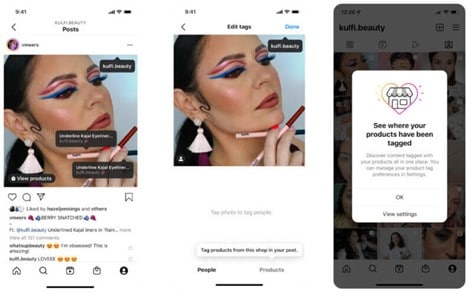
How to tag products?
After creating a post, users would tap the “Tag Products,” tap the product in the video or image, then search for the product from the shop to add a tag. Instagram users who see a product tag can tap it to buy the product within the app.
Control for brands and businesses
Whenever one of your products is tagged, Instagram will notify you on your profile. Want to turn off product tags? You can in your account settings. By default, it is set to “Allow all”.
Are you getting the best return out of your digital marketing?
Need an extra pair of eyes to review your online game plan? Let our experts take a look at your current state and do a comprehensive
digital marketing analysis at no cost to you. Please call us at
(800) 379-2829 or
contact us today and we will get to work right away.
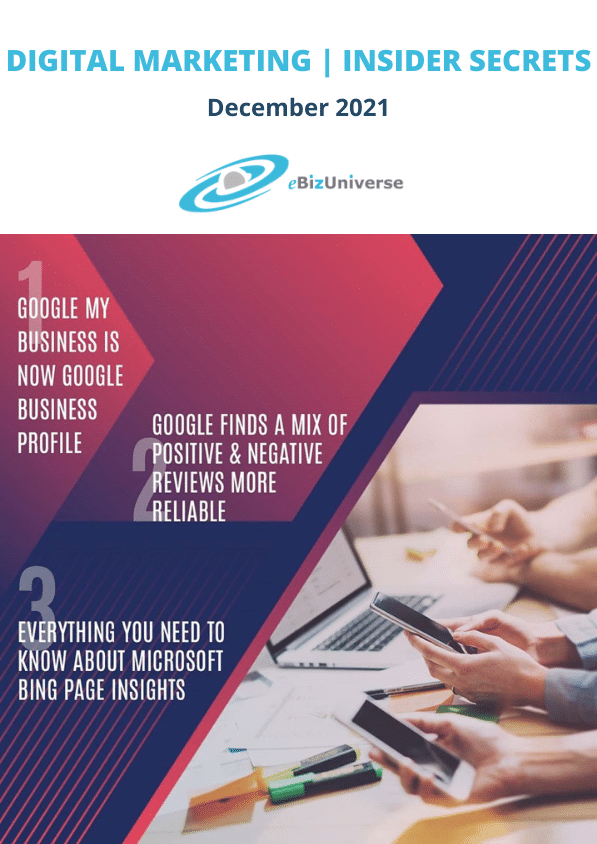



According to the latest announcement, Google has renamed “Google My Business” to “Google Business Profile”. The Google My Business app will mostly retire in the coming years.
Benefits of the latest update include:
- To get to your profile, you can search your business name on Google, go to Google Maps app, or search for ‘my business’ on Google Search.
- You can complete the verification, resolve any issues with your profile, and edit your details easily including address, store hours, photos, and more.
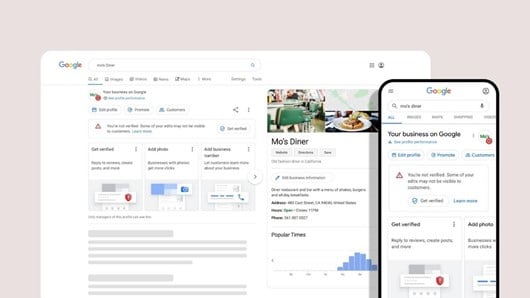
- In the coming months, merchants can complete their account setup directly on Google Search and Google Maps.
- You can see whether your profile is visible to the public. If not, the necessary steps will be included.
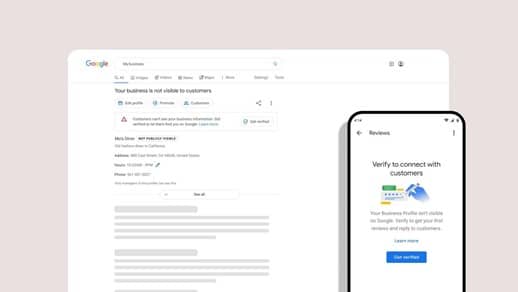
- Google Search and Google Maps now have additional tools to help you better manage your business profile.
- The changes in-line with this update will soon be evident on Google’s Help Center, Community & Support channels.
- The GMB website will be renamed to Business Profile Manager and will now support larger businesses having multiple profiles.
- Google expects smaller businesses to manage their profiles on Search & Maps.
- Google has shared some new ways to help you connect with your customers easily and increase your business.
After reading the above brief related to the latest update, we recommend you keep a track of the emails & videos from Google or follow Google Business Profile on Twitter so that you can get the best out of your business profile.
Analyze your site?
Customers prefer business accounts that have reviews on their profiles. Reviews next to your Business Profile in Maps and Search can drive traffic to your site & help you get more customers. Google has provided some tips to help you get more reviews.
Best practices listed by Google include:
- Verify your Google Business Profile
- Remind customers to leave reviews
- Reply to reviews to build customer trust
Many business owners have a mindset that only positive reviews can help improve their business, but it’s not true.
Google recently updated the guidelines page and added a new point, “Value All Reviews”. According to this point, honest & objective reviews are more helpful for new customers. A mix of positive & negative reviews is more reliable & trustworthy. The team at Google also suggests responding to customer reviews so that customers know that you care. In case the reviews don’t follow Google’s posting guidelines, the business owner can send a removal request.
Google thinks having 99% positive reviews is not natural, and the team may audit the reviews if such a case exists. So, it’s totally fine to have mixed reviews & this won’t even affect your rankings!
Finally, we think businesses can now share their review link to all customers without fail and stop worrying about negative reviews. However, make sure that you are responding to such reviews.
If you need help with review management, we are just an email away.
See How You Can Improve Your Review Management!
On 23rd November, Microsoft Bing announced the launch of a new feature, Page insights. Now users will see a lightbulb icon on the right-hand side of the search results that provides more details about the search result.
So, what does Page Insights do? Microsoft said, “it provides summarized insights from a page on your search results so you can find what you’re looking for faster.”
Here’s how it looks.

Adding more information, the company said, “Page Insights help you verify that the source is relevant to your needs, helps you get caught up to speed at a glance on top factoids you didn’t know about, and lets you jump straight to the relevant section of the page when you click ‘Read more’ for a specific question.”
If you wish for more details, there is a section to “explore more” that will help you find relevant search results.
But as of now, the feature is only available on desktop search results because of the screen size required to properly display the results.
Are you getting the best return out of your digital marketing?
Need an extra pair of eyes to review your online game plan? Let our experts take a look at your current state and do a comprehensive
digital marketing analysis at no cost to you. Please call us at
(800) 379-2829 or
contact us today and we will get to work right away.



SEO (Search Engine Optimization) can help you increase the visibility of your website when your target audience is searching for services or products related to your business. The process involves optimizing your website and content as well as staying well-informed about your competitors.
Reasons to design an SEO-friendly website…
a) Greatly improve customer experience
Good customer experience ensures that they will return to your site the next time. Also, the more time the customers spend on your site, the higher your rankings are.
b) Gain the favor of web crawlers
SEO helps you to update your site according to the latest search engine requirements, enhancing your rankings significantly.
c) Increase customer engagement
An effective SEO strategy can help you attract more customers and ensure that they spend more time on your site. This step is very important to improve your rankings.
d) Achieve a higher ranking
You must work on your website content, site design, and SEO strategy to rank higher. Higher rankings ensure that you have better sales and that you stay on par with your competitors.
e) Excellent returns
SEO activities are known to deliver the best return on investment. When you achieve a higher ranking and relevant site traffic, you can easily get the desired returns.
Points to consider while designing an SEO-friendly website.
a) Easier website navigation
Buyers prefer a website that has relevant, organized information. Don’t forget to incorporate a sitemap page so that users can easily find and visit the required link.
b) Select an SEO-friendly domain
Your domain name should have keywords related to your services or products. This helps your target customers to find your business easily. Also, the domain name should be unique yet relevant to your industry.
c) Optimal & easy-to-understand content
Your website content can affect its loading speed. It is important to keep your website light to ensure an excellent user experience.
d) Mobile-friendly site
Many people access various websites through their mobile. A mobile-responsive website ensures that your target customers can reach out to you via various gadgets.
e) Reach out through social media
Social media can help you drive traffic to your site, improve your online presence, and increase sales.
f) Add captions to your images & videos
Adding captions ensures that website crawlers can find your content. Insert appropriate keywords in your captions so that people can find the content easily.
g) Update your content
Creating new content is a must to increase the rankings of your pages. The best way is to remove old, low-ranking articles and add new, fresh information to attract new audiences.
h) Include internal and external links in your strategy
-
- Internal links can help a visitor to navigate your website easily. It aims to introduce other web pages of your site to visitors.
- When external links direct users to your website, search engines consider your site reliable and trusted.
- Link building does take time, but it can significantly boost your traffic.
Web design mistakes to avoid…
a) Repetitive heading tags
Adding appropriate & unique headers (H1 and H2 tags) at the right locations can help improve your rankings. Also, adding necessary keywords is a must.
b) Non-responsive website design
If your website is not mobile-friendly, you may lose a lot of customers. If your site is not compatible with mobile phones, you should get this issue fixed as soon as possible.
c) High-resolution images
Large size images can affect the loading speed of your website. The best way to upload images is to compress and resize them. Use Google PageSpeed Insights tools to check the loading speed of your pages.
d) Too short content
To optimize the page loading speed, many designers do not add much content to the site, forgetting that it is equally important to add good, informative content to your site.
e) Adding the infinite scrolling feature
It is one of the effective ways to hold your users on your site for a longer time. Splitting the content of a website can make it easier for web crawlers to crawl them.
Lastly…
Whether you are creating a new website or improving a current one, keep the target audience and search engine algorithm in mind. Talk to your SEO experts and follow the above guidelines to improve your rankings. If you need help, we are just a call away.
To come up with a successful marketing campaign, advertisers need to understand post-click user behavior and engagement on landing pages. This is precisely why Microsoft Advertising took it upon itself to introduce a new tool last month – Microsoft Clarity Insights!
An overview of the key benefits of this tool
- More Powerful Data – It helps you to understand the customer journey and enhance the signals to make optimization decisions on your website and advertising campaigns.
- Free Website Analytics – It enables you to gain a deeper understanding of user behavior, path to conversion, and engagement on the landing pages.
-
- Use Sessions Recordings to replay user sessions and better understand the customer journey
- Through Instant Heatmaps decode engagement on ad landing pages, including clicks, scrolls, and movement
- Make the most of the powerful Analysis Dashboard to analyze engagement by campaigns, channels, and browsers
- Seamless UET (Universal Event Tracking) Upgrade – Sign up using your existing MS Advertising credentials and your existing JavaScript UET tags will be updated on the back end.
Several companies have harnessed the power of Clarity Insights to:
- Increase the average time their customers spend on their blog
- Significantly improve their click-through rates
- Reveal any usability issues that they may be facing
- Provide insights into the average scroll depth of their blog readers
- Detect interesting user behavior patterns
- Boost their conversion rates
- Figure out the drop-offs and abandonments
Final takeaway
To get started with Microsoft Clarity Insights, you will have to reach out to your Microsoft account manager. However, it is important that you first ensure that your JavaScript UET tags are up to date. Ideally, you should place the tag across your website to attain all kinds of information on user behavior.
From November 2021, UET tag creation will be compatible with Clarity Insights by default. By mid-November, Microsoft will migrate all existing UET tags to include Clarity Insights, except websites that contain sensitive data. Once the UET tag has been updated, accessing Clarity through the MS Advertising account should be possible.
To learn more about the data collected through this tool, visit the following links:
We also recommend you go see a FREE live demo before signing up for this tool! If you have any questions, we are here to assist you.
On 28th Oct 2021, Mark Zuckerberg announced that Facebook is renaming itself to “Meta” to encompass its expanding technology and role in what it calls “the metaverse.” Facebook owns apps such as WhatsApp, Instagram, Oculus VR, and more. In July this year, Zuckerberg told The Verge that over the coming years Meta would “effectively transition from people seeing us as primarily being a social media company to being a metaverse company.”
So what’s the Metaverse?
Mark Zuckerberg explains in his founder’s letter: “You will be able to teleport instantly as a hologram to be at the office without a commute, at a concert with friends, or in your parent’s living room to catch up.”
“Our hope is that within the next decade, the metaverse will reach a billion people, host hundreds of billions of dollars of digital commerce, and support jobs for millions of creators and developers,”
He gave marketers a clue about the opportunities that lie ahead and how the company is invested in them. It is said that the company will spend $10 billion over the next year on technologies needed for building its metaverse.
The announcement said, “Starting with our results for the fourth quarter of 2021, we plan to report on two operating segments: Family of Apps and Reality Labs.”
“We also intend to start trading under the new stock ticker we have reserved, MVRS, on December 1. Today’s announcement does not affect how we use or share data.”
Controversy Post Rebranding
Post the rebrand, whistleblower Frances Haugen’s revelations have Facebook under fire for its practices, morals, and social impact.
Zuckerberg pointed out in his founder’s letter that Meta’s metaverse may offer exciting avenues, especially for the digital industry.
Facebook is already a destination to discover local businesses. But, from a branding standpoint, we simply can’t look away from a branding fail, and “Meta” just feels like one.
Are you getting the best return out of your digital marketing?
Need an extra pair of eyes to review your online game plan? Let our experts take a look at your current state and do a comprehensive
digital marketing analysis at no cost to you. Please call us at
(800) 379-2829 or
contact us today and we will get to work right away.





On August 17, 2021, many people noticed Google using header tags (H1s & H2s) rather than meta title tags as titles. A number of people posted their questions and complaints related to this change on various forums and social media platforms.
Below are some of the public mentions & the answers from Google and other SEO professionals.

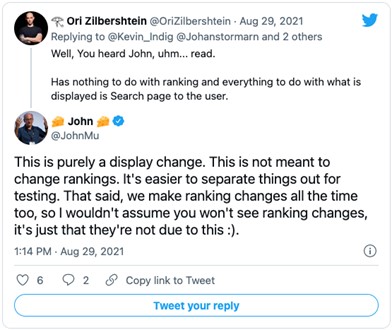
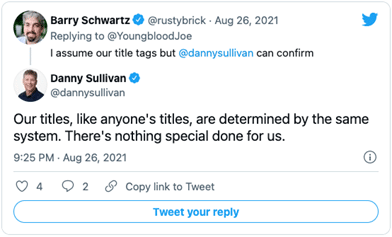
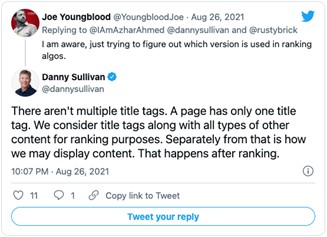
From the above posts, we can confirm that your rankings are definitely not affected by this update (at least for now)!! Its only purpose is to make your titles more readable and precisely describe your document’s content. This new system is preferred by the users, as they can connect with the page content easily.
Many people wanted Google to explain more about this update, so there were many comments related to this topic. Google’s staff answered their queries in this official post.
Points To Remember:
- Title tags are considered for rankings even now.
- Continue to focus on creating great title tags with focus on target keywords.
- Include H1 and H2 in your page content including your target keywords.
Analyze your site?

Google recently announced that the link spam update is complete. The update that initially began rolling out on July 26th, 2021, is now done rolling out as of August 24th, 2021. It took over a full month for this update to roll out and two weeks longer than Google had said.
Here’s Google’s announcement about the link spam update that is done rolling out.
Earlier, Google said, “This algorithm update, which will roll out across the next two weeks, is even more effective at identifying and nullifying link spam more broadly, across multiple languages.”
The update is finally fully live.
So how do you know if your site has been impacted by the update? Tough to say as of now! We had a bunch of unconfirmed updates after this announcement was made. Maybe they were related to the link spam update, maybe not.
All we know is that the Google link spam update didn’t have any negative effect on our client rankings.
If you’ve been affected by this update, you can get in touch with our team for professional help.
See How Here!
All You Need To Know About This New Feature!
- The Shop Tab of Instagram will now include ads.
- This feature is still under test in the U.S.
- Ads can either be a single photo or multiple photos.
- Only a few retailers such as Away, Boo Oh, Clare Paint, DEUX, Donni Davy, Fenty Beauty, and JNJ Gifts could participate in this test.
- An auction-based model will be used to launch Ads in Instagram Shop.
- The Instagram Shop tab is a mobile-only feature, so the ads will only appear on mobile.
- How many ads a single consumer sees will be determined by several factors, such as:
- Instagram, how do they use it?
- And, how many people are shopping in the tab?
- Instagram also plans to monitor consumer sentiment to balance ads and content.
Why This Feature Is Important
If this feature is approved, many retailers will be able to reach their target customers easily. Also, cross-app tracking and third-party cookies will not be an issue anymore.
Final Takeaway
There are no details available yet as to when other retailers would be able to join in. However, it is clear that this feature will surely be made available globally in the coming future.
For more information, check out this article.
Are you getting the best return out of your digital marketing?
Need an extra pair of eyes to review your online game plan?
Let our experts take a look at your current state and do a comprehensive digital marketing analysis at no cost to you.
Please call us at (800) 379-2829 or contact us today and we will get to work right away.



Google recently said that the new algorithm update for Google search “is even more effective at identifying and nullifying link spam more broadly, across multiple languages.” Named the link spam update, it started from July 26th.
Also, Google posted this lengthy blog post named “A reminder on qualifying links and our link spam update.” The blog post is a reminder of the type of links that work against Google’s webmaster guidelines.
The Google blog post concluded by announcing the link spam update:
“In our continued efforts to improve the quality of the search results, we’re launching a new link spam-fighting change today — which we call the “link spam update.” This algorithm update, which will roll out across the next two weeks, is even more effective at identifying and nullifying link spam more broadly, across multiple languages. Sites taking part in link spam will see changes in Search as those links are re-assessed by our algorithms.”
Key Takeaways From The Link Spam Update
- The name of the update is Link Spam Update and not Link Spam Update July 2021.
- Google used the word “nullifying,” which does not necessarily mean “penalize,” but to ignore or not count spammy links.
- It is a global and multilingual update.
- Google did not post anything about how much this will impact the search results.
So if you notice a drop in your rankings over the coming weeks, it could be due to this update.
We did a deep analysis of our client’s websites to check if this update affected our rankings and we’re happy to say that there has been no major ranking drop as far as our clients are concerned. Our campaigns continue to enjoy stable rankings that we’ve achieved through ethical SEO methods. However, we will continue to keep an eye on the rankings as it is a global update and will inform you of any major changes in results.
Analyze your site?
Do you wish to know about the latest core update from Google? If yes, then this article is a must-read for you. Here, we will brief you about this update so you can make well-informed decisions about your website.
Quick facts about this update:
- On July 12th Google announced that the core update rollout was complete. Below is the official post:

- This update is not specific to any language, region, or website category.
- The main aim of any update is to provide better or improved search results. If you are a site owner, read this article related to Google’s core updates.
- Due to the pandemic, there is a significant shift in users’ search behavior. Google is striving hard to understand this behavior to show relevant results.
- A lot of websites are experiencing huge changes in their organic ranking positions.
- Various industries, such as Beauty & Fitness, Real Estate, Shopping, Health, Pets & Animals, & Travel & Tourism, saw the steepest increase in rank volatility.
- Industries such as Arts & Entertainment, Finance, Games, Sports, Jobs & Education, Food & Drink, and News industries saw the least dramatic increase in rank volatility.What you can do:
- Try fixing your site according to Google’s guidelines.
- Focus on quality content & include content that is helpful to users.
- Write your content with search engines and users in mind.
- Fix or avoid any SEO mistakes.
Read the guidelines and follow the above steps to tackle any changes that this update has brought to your site. If you need help, we’re just a call away!
See How You Can Improve Your SEO!
You must have received a ton of SEO advice from all kinds of sources. While some of them sound cool and trendy, they do absolutely nothing for your business. On the other hand, some SEO tactics actually do work, but they take a long time to deliver expected results. Hence, we bring to you 101 proven, actionable SEO tips that will get you results in real-time.
Basic SEO
- Videos are highly effective! Do not shy away from using and optimizing them.
- Make sure you pay close attention to user intent search queries when you are conducting keyword research.
- Work on building authority & trust. Start creating original content that clearly signifies your expertise and business goals.
- Create user-friendly content. Learn about the latest user trends and human behaviour before creating content.
- Get those customer reviews! Build a strategy wherein your customers can provide their reviews or feedback easily.
- It is best to bring in an SEO professional right from the beginning, so that the web design, especially the mobile version, is SEO-friendly.
- Strive to meet client expectations. Not being able to meet their expectations may cost your business its credibility.
- Using ‘exact match’ keywords isn’t necessary as Google is quite capable of associating topical keyword search terms.
- You may want to try personalizing your call to actions based on a referral, location, or keyword search query.
- Keep the domain name short. Make sure the one you choose contains less than 15 characters so that it’s easy to remember for the users.
- Remember to look for all variations of your site in the search engine. For example:
- http://xyz.com
- http://www.xyz.com
- https://xyz.com
- https://www.xyz.com
Mobile SEO
- Mobile-first is the way to go. With Google switching to mobile-first indexing, it is wise to check how the search engine ranks your mobile site using the Mobile-Friendly Test Tool in Google Search Console (GSC).
- See if AMP & PWA work for you. If you do not have a mobile site, your Accelerated Mobile Pages (AMP) or Progressive Web Apps (PWA) will be served up in the mobile-first index.
- Get rid of those pop-ups and interstitials as they can be annoying on a mobile site unless they serve as a warning for age restrictions or data privacy.
- Scroll tracking on Google AMP can be very useful and implemented easily through Google Tag Manager.
- Add forms to your AMP to attract leads.
- Consider investing in PWA. As PWAs are expected to replace 50% of consumer-facing apps, investing in them is highly recommended for B2C businesses.
- Boost your click-through rates with breadcrumbs. Creating a clear path to follow with the help of breadcrumbs will help you increase the click-through rate on your mobile site.
Technical SEO
- Migrate your site to HTTPS. While you do that, be sure not to make any additional changes, as Google may not acknowledge these changes.
- As search engines crawl even duplicate URLs, it is important to use canonical tags.
- Keep the loading speed down to 2-3 seconds. Use the Core Web Vital report along with your developer to figure out how you can improve your site loading speed.
- Aim for Google’s Top Stories Carousel. The best way to make it there is by creating AMP pages, publishing legitimate news, and submitting the site to Google News.
- Remember to Use rel=canonical tags. Any page that can be reached through different URLs should have the rel=canonical tag to avoid any confusion about duplicate content.
- Always remember to check whether your pages are indexed with ‘site:domain’ search and that none of them is double-indexed.
- Ensure that you do not use more than one H1 tag per page.
- Use Image Alt Attributes. As Google is now moving towards visual search, this is one important aspect you should not ignore.
- Creating separate sitemaps for sections like images, videos, blogs, etc. will help Google to focus its crawl.
- If your site has dynamic URLs, adjust the URL parameters in GSC.
- Remember to change all the internal links from HTTP to HTTPS before you migrate your site.
- In order to improve your user experience and SEO, always add breadcrumbs to your site.
- Avoid long redirects. By avoiding chain redirects you can help the search engines to crawl your website more quickly.
- Opt for Vector Format image files. Using vector files will allow you to have better image quality on different devices.
- Consider using a Content Delivery Network (CDN) to host your images as it helps to speed up your website considerably.
- Ensure that you optimize all your images for page speed and user-friendliness.
- When you have products with similar names and descriptions, it is better to create canonical tags instead of redirecting them.
- Opt for private hosting. While this will have no effect on your search rankings, sites having shared hosting get indexed less.
- Consider investing in visual search. Incorporating visual search in the marketing strategy can be highly effective for retailers and e-commerce businesses.
- Use Structured Data to improve ranking. While it isn’t easy for a site to get on the first page of the SERPs, using structured data can improve the chances significantly.
Link Building
- Make sure you use the disavow tool to get rid of those spammy links.
- Paid links can cost you! Google webmaster guidelines clearly state that the search engine is not in favor of paid links.
- Stay away from bad links. If Google comes across any risky link-building tactics, it could backfire big time.
- Stick to high-quality directories. Building links on high-quality directories will add relevance to your business.
- Build a clear linking structure. Plan your internal linking strategy carefully so that Google can navigate your site easily.
- Make sure your link profile is healthy. A healthy link profile helps to establish the overall quality and authority of your site.
- Focus on quality instead of quantity. Even with link building, authenticity is what matters most.
- Manual outreach can work wonders. Proactive link-building efforts allow you to control the quality of links.
- Create nofollow outbound links. In case you end up linking to a low-quality website, you can use them for external links.
- See to it that your internal links are logically placed. It is best to ensure that when you link internally, the content around the link is related to the keywords.
Content Optimization
- Don’t just focus on the keywords. Instead, create content based on important topics.
- Avoid creating thin content. As compared to thin content, long-form content can get you much better results in search rankings.
- It is important that you clean up all the scraped or duplicate content from your site.
- Revisit old content. See if any of your old content is still driving traffic and try creating new posts along similar lines with more relevant content.
- Add FAQ pages. Creating these pages will not only help your readers but also your site’s search rankings.
- Make the most of syndicated content. While you do this, ensure that the other sites place rel=canonical tags.
- Remember, content can be repurposed. It is recommended that you think of all the ways you can repurpose your content into videos, Slideshare, etc.
- Editing is a must! It is important to check all your content for errors so that nothing hampers your user experience.
- There are tools available for content ideas. Make the most of tools like BuzzSumo to get an idea about what kind of content ranks high.
- Old content may do more harm than good. Check on your old posts regularly to see if any of them is hurting your rankings.
- Do a cache check; see when a website’s pages were last cached. If it’s over a month, avoid the site.
- Try using a conversational tone when creating content. It may help your site rank for voice search queries.
- Instead of pasting the manufacturer’s content, take the time to write original product descriptions.
- Avoid keyword cannibalization. Instead of having multiple pages trying to rank for similar keywords, try combining their content to form one long-form content piece.
- Analyze your keywords. Conduct an analysis of your content to see if you can add to it and boost your page ranking.
- Try creating personalized UX. See if you can offer different pieces of content for new visitors and the returning ones.
Local SEO
- Create content focused on local facts and guides. It can help your business appear higher in search rankings.
- Take advantage of Trip Planning. Use this feature in Knowledge Graph to create local travel guides.
- Make use of the Local Inventory Ads program. It will allow your customers to browse the local store through Google.
- Try and find new, creative ways to encourage your customers to give reviews.
- Optimize for user location. You can do this by using the Google Ads distance and store visit reports.
- Optimizing for multiple locations is also very important. Make sure the NAP details are consistent for every location across all platforms.
- Add Regional Pages. If your business locations cover multiple states, regional pages are a must.
- Put up photos on your local pages. Photos of the local office give the business more credibility and make it more appealing to the local audience.
- Add ‘near me’ in your content! With the steady growth of voice search queries, optimizing for these searches has becomes all the more important.
Analytics & Tools
- Analyze your exit pages. Find out which pages the users are leaving most frequently and revise them.
- Don’t forget to add your IP address! It is important that you add your IP address to Google Analytics.
- Keep an eye out for a sudden drop in traffic. It may be due to an algorithm update or a manual action.
- Pay close attention to your competitors. Check whether their sites are ranking for the same keywords through new content.
- Try using Google Visits Conversions. If your business is eligible, you must definitely give Google Visit Conversions in Google Ads a try.
- When you first set up GSC, remember to add both the www & non-www versions of your site.
- Add your subdomains to GSC as new property so you can get all necessary data.
- Consider rewriting your meta descriptions. You may want to rewrite your meta descriptions if you see low click-through rates in your GSC Search Analytics report.
- Check out Google Analytics Segments. This particular feature allows you to gain more insight into your traffic data.
- Create custom dashboards in Google Analytics and Google Data Studio so the first thing you see when you log in is exactly what you need.
- Insights is as important as data. Before you try optimizing, gain insights into the latest trends and behaviour by using the content analytics tools.
- Answer those questions! See what questions are most commonly asked related to your keyword terms and provide the answers to them in your content.
- Add Bing Webmaster Tools to your toolkit. You will find that there are some useful tools that are not available in GSC.
Social Media SEO
- Go for Twitter Cards instead of Twitter URLs. Using Twitter Cards will allow you to make your URLs appear more clickable.
- Add Open Graph Markup. Using Facebook Open Graph Tags is one of the best ways to optimize your posts on the platform.
- Ensure your company profile on LinkedIn is complete. Complete company profiles get more views.
- Get active on Instagram. It’s high time that e-commerce businesses start taking Instagram seriously, especially now that it will allow you to buy directly from the app.
- Offer Customer Service on Facebook. This can prove to be one very powerful tool for your customer support staff.
- Try getting more conversions with LinkedIn Ads. Test and experiment to figure out what kind of sponsored content and ads can lead to more conversions.
- Try out Facebook Playlists. The addition of new features has made using Facebook Playlists easier.
- Shop the Look Ads can lead to more conversions. Give Pinterest’s Shop the Look Ads a go-to to convert more mobile searches.
- Realize the power of Reddit. Take all possible measures to ensure your brand appears on the 7th most visited website in the United States.
- Geotarget your Facebook Live Posts. This will help your local business target customers in specific locations.
- Never forget to sign a contract with the influencers. It is important to make it clear from the get-go what the business and the influencer will get from each other.
- Engage on social bookmarking platforms. Just as you engage on social media, engage on these platforms to earn links.
Final Takeaway
It is best to use the above tips and tricks to get your business in a good position before you launch your audit.
Are you getting the best return out of your digital marketing?
Need an extra pair of eyes to review your online game plan? Let our experts take a look at your current state and do a comprehensive digital marketing analysis at no cost to you. Please call us at (800) 379-2829 or contact us today and we will get to work right away.





Google has always placed a great deal of importance on User Experience (UX). In fact, every Google algorithm update has been about ensuring the users can gain access to user-friendly, relevant results quickly.
Now, with the introduction of Core Web Vitals, UX will play a vital role in increasing organic traffic. Hence, it is important that we understand all that we can about these Core Web Vitals.
What Exactly are Core Web Vitals
For the past few years, Google has been pushing website owners to go mobile-first. Building a mobile-friendly website is now crucial to SEO success.
Taking it a step further, Google is now ready to focus on mobile performance, also known as Core Web Vitals.
This summer, we will see algorithm updates that will focus on a new ranking factor, which happens to be page experience. Google will be measuring page experience using Web Vitals metrics. Largest Contentful Paint (LCP), First Input Delay (FID) and Cumulative Layout Shift (CLS) are the core metrics within Web Vitals.
How Will the Core Web Vitals Impact SEOs
Search engine algorithms work on helping users find the information they need while collecting data that throws light on user behaviour, which then helps them provide more relevant results.
Websites that meet searchers’ needs naturally rank higher in the search engine results and enjoy increased organic traffic. With Google focusing on improving UX, paying mind to Core Web Vitals will mean the difference between SEO success or failure.
By optimizing for the new ranking factor, one can see a drastic rise in their organic traffic. The Core Vitals report in Google Search Console will tell you exactly which pages on your website need improvements in terms of UX.
What’s Important
While it may all seem very technical, it is important to understand what exactly is being measured by the Core Web Vitals. To put it simply, Core Web Vitals focus on three aspects of a good UX:
- Loading Performance
- Responsiveness
- Visual Stability
These aspects are measured based on the user data from Chrome’s user experience report. You can check out the data for your website using the Google Data Studio report. This report offers detailed data on the important aspects of Core Web Vitals, along with information about usage on different devices.
The Three Main Elements of Core Web Vitals
- Largest Contentful Paint (LCP)
LCP is a metric used to measure how long it takes for the largest element of a webpage to load. This metric applies to the loading of the above-the-fold content; anything beyond a user’s screen is not taken into consideration.
Overall, LCP measures images, video poster images, block-level text elements, as well as elements that come with a background image. You can measure your website’s LCP with the help of lab scoring tools like PageSpeed Insights and Lighthouse.
Ways to Optimize for LCP
Google suggests that the LCP should happen within 2.5 seconds of page loading. Anything that takes beyond 2.5 seconds to load needs improvement.
Ideally, you should be able to reduce the LCP time by doing the following:
- Optimize the images – Ensure you choose the right format, incorporate width and height attributes and use compressed images whenever necessary.
- Optimize your server – You may want to look into upgrading the hosting plan and using a CDN to improve the server performance.
- Add caching – Make sure you use URLs consistently and that caches store images.
- Fix render-blocking CSS and JavaScript – See if you can implement Critical CSS, deliver smaller payloads and compress the code file.
- First Input Delay (FID)
FID is a metric used to measure a user’s first interaction, meaning the delay between the time when a person clicks on something and the time it takes for the site to respond to the action and process it. However, it only measures finite user interactions, like clicks, taps and key presses, and not continuous interactions like scrolling and zooming.
Ways to Optimize for FID
Monitoring and optimizing your site’s UX is the only way you can do well with this metric. Ideally, your site’s FID score should be no more than 100 ms. If it goes beyond that, your site’s UX needs improvement.
Try the following to improve your site’s FID score:
- Optimize the JavaScript code – Try breaking up long tasks, minimizing unnecessary polyfills and deferring or a-syncing unused JavaScript.
- Optimize the CSS code – See if you can remove the unused CSS code and try compressing your files.
- Cumulative Layout Shift (CLS)
CLS is a metric used to measure the visual stability of your site. It checks whether there is any unexpected shifting of any of your page elements and how often it occurs.
Ways to Optimize for CLS
Generally, you should be able to avoid the unexpected items shifting by doing the following:
- Opt for transform animations with context and continuity.
- Avoid inserting any content above your existing content.
- Incorporate size attributes, such as width and height, on your image and video elements.
To understand which elements on your site are keeping you from getting a good CLS score, check out the Layout Shift GIF Generator tool.
Final Takeaway
It is a known fact that users now expect and tolerate nothing less than a seamless web experience. In order to ensure that your site delivers just that, it is essential to invest in LCP, FID and CLS improvements. After all, an improved user experience is key to higher rankings and increased organic traffic.
For help with Core Web Vitals, do get in touch with our expert team for assistance.
Analyze your site?
To understand how a user will perceive the experience of a specific web page, Google will evaluate a set of signals. This includes existing Google Search signals such as mobile-friendliness, safe-browsing, HTTPS, and intrusive interstitial guidelines. It also includes metrics in Google’s Web Vitals to do with a site’s loading speed, interactivity, and visual stability.
How to prepare for the Page Experience update?
For site owners and others, understanding these signals and making the necessary changes should be a priority. Among the steps to take are optimizing for mobile, improving page speeds, CTAs, and alt text for images.
You can start preparing now for user experience to become a ranking factor now. The Core Web Vitals report in Google Search Console is an excellent place to start getting a sense of how your site is performing in these areas. Alternatively, you can also make use of the PageSpeed Insights tool by Google (which is a part of our SEO Audit) to understand how your site stacks up.
How are we helping our clients with the Page Experience update?
To cope up with the update, we are already doing the below things for our clients:
- Implement search-friendly alt texts for images while doing on-page optimization of your website.
- Implement relevant schema tags on the website.
We have also updated our SEO Audit Reports to bring back the Mobile and Desktop Page Speed Insights sections which are a critical part in improving the Page Speed experience for users. In addition, our Audit also shows the Website HTTPS (secure website) status which is a critical ranking factor in relation to this update.
By showing this to your clients, it presents a lucrative opportunity for you to upsell add-on services like “mobile friendly optimization”, “improving page load speed”, “making website secure”, “CTA optimization”, “landing page optimization”, etc. If you’re interested, our team can discuss this further how to best provide these services to your clients at a minimal cost.
For more information, do get in touch with our reps.
Google’s “Page Experience” algorithm update is expected this month, June 2021. But what you need to know is that you shouldn’t expect a major fluctuation in the rankings, as of now!
We believe that Google will be rolling out the update carefully, as suddenly shaking up the ranking scene will draw unwanted attention to their powerful monopoly on search. Keeping this in mind, you can expect them to implement gradual changes over time. For now, relevancy will rule the ranking game!
Here are a few important tips on how to respond to the Core Web Vitals ranking signal going LIVE.
Reduce JavaScript (JS) Execution – If your report shows a poor FID score, consider reducing and optimizing your JS execution. As per Google, one of the ways to reduce the execution is by deferring unused JS. Start by cutting down unused JS, which can be done using code splitting.
Implement Lazy Loading – Implementing lazy loading is essential if you display images on your site. With lazy loading, your site’s UX and core web vitals score will remain unharmed. For sites with heavy elements, such as images, animations or videos, lazy loading is considered a must. It allows the loading of images at the exact same time when users scroll down through the page, without compromising on the overall website loading speed. Lazy loading offers a bunch of other benefits.
- Improves site performance
- Limits bandwidth usage
- Improves your site’s SEO
- Reduces bounce rate by keeping visitors on the page
Optimize & Compress Images – For some websites, the largest element is images. Optimizing images will make your page significantly lighter, thus improving several factors.
- Loading speed
- LCP score
- UX
- Search engine rankings
There are a lot of free tools available, using which you can compress your images. If you think that compression will affect the quality of the images, well, it isn’t true. Always ensure to save landscape images in .jpg format and the graphics in .png format.
Provide Proper Dimensions For Images & Embeds – CLS score below 0.1 is considered to be poor. To improve your CLS score, you need to have your dimensions in place. Setting proper width and height helps the browser allocate the correct amount of space on the page while the element is loading.
Also, make sure to set proper dimensions for embeds, like when inserting videos from YouTube into your site. At times, the video might look proper on the backend, but it may end up looking way too big or messy on the front end. See to it that the video you insert goes well with the interface of your site.
Improve Your Server Response Time – Google says, “The longer it takes a browser to receive content from the server, the longer it takes to render anything on the screen. A faster server response time directly improves every single page-load metric, including LCP.”
Most importantly, a long server response time can negatively affect your SEO and UX. Google suggests your server response time to be lower than 600 milliseconds. To measure server response time, use Time to First Byte (TTFB). But before you begin, note down the details on your server’s current performance so you can compare the results later on.
To Summarize It All
What you really need to do is pay very close attention to your competitors. You do not necessarily have to meet or exceed Google’s Core Web Vitals guideline scores, but rather meet or exceed your competitors’ scores. Next, you should focus on the content quality of your site and its relevance in terms of the search terms that you’re looking to rank for.
Are you getting the best return out of your digital marketing?
Need an extra pair of eyes to review your online game plan?
Let our experts take a look at your current state and do a comprehensive digital marketing analysis at no cost to you.
Please call us at (800) 379-2829 or contact us today and we will get to work right away.