
DIGITAL MARKETING INSIDER SECRETS JULY 2019: GOOGLE MAPS CUSTOM URLS FOR YOUR BIZ & MEDICAL PRACTITIONER LISTINGS + GOOGLE AD STRATEGIES


Earlier in April this year, Google rolled out a Google My Business (GMB) feature that enables users to create short names to define their GMB listing URLs.
With these short brandable names, customers can find you better. Here’s how you can set up a ‘short name’ for your business.
- Sign in to Google My Business.
- Open the location for which you want to create a short name.
- Click on Info from the menu, then on Add profile short name.
- Enter your short name (should be up to 32 characters). Names that have already been taken cannot be reused so try using new words or a combination of words that can best describe your brand.
- Click on Apply. (Your short name will show as pending for a while before it reflects on your business profile).
Final Takeaway: If your business is Google My Business verified, then go ahead and create your custom ‘short name’ without wasting any time as it could give your business the exposure it’s worth.
Follow this Guide for more information on how to use the custom short names feature and the policies and terms of service.
Questions About Google My Business? Contact Us!


In true Google fashion, the company recently announced that Google My Business support has now come up with a new way of handling the entire Practitioner Listings process.
Where Practitioner Listings Come into the Picture
When a number of professionals, such as doctors, lawyers, etc. operate from the same office location but have different clients, Practitioner Listings are used. One has to create multiple Google My Business listings to support such practitioners.
However, this process has now undergone a few changes. Here’s a quick look at the said changes
- When a Practitioner Retires
Previously, when a practitioner retired, Google My Business by default marked the listing as ‘Closed’, which often lead the customers to believe that the entire business has shut shop. However, now you can request Google to entirely remove the said listing from Google Maps.
- When a Practitioner Dies
Somewhat similar to the above scenario, Google My Business used to by default mark a listing as ‘Permanently Closed’ when a practitioner died. Again, you can send out a request to Google to completely remove the listing from Maps instead of displaying the rather distasteful messaging.
- When a Practitioner Starts Working Elsewhere
In such cases, you follow the same protocol as before. You are expected to update the practitioner’s listing to display their new business location because Google believes that the listing belongs to the professionals and not the business.
These updates are still new, so chances are you might run into some problems when trying to make changes to Practitioner Listings. In case you face any issues, you are most likely to receive a quick solution by reaching out to @GoogleMyBiz on Twitter.
Have Questions About Your Google Listing? Contact Us!

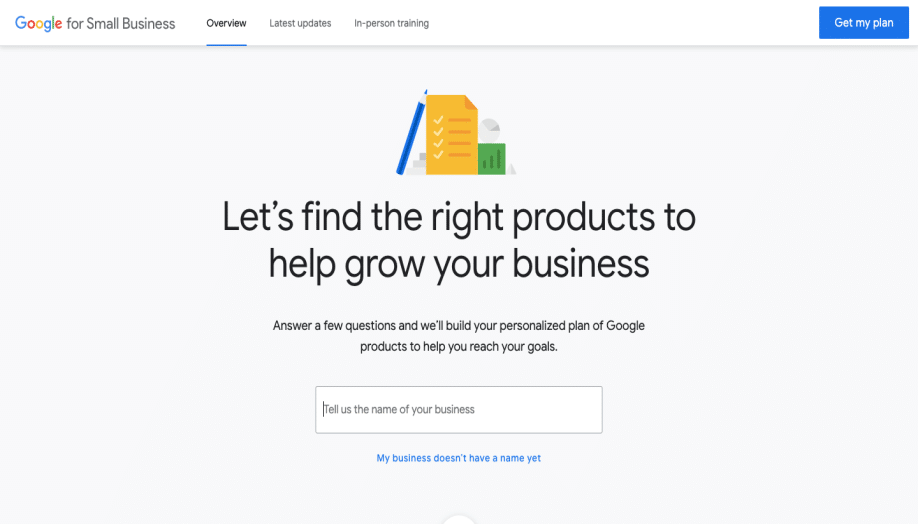
On June 17, to celebrate the International Small Business Day, Google announced the launch of its new website which has been built with an aim to help small businesses grow. The site is designed to match local businesses with Google products and services.
During the announcement, Google explained how businesses can take advantage of the three main actions the site offers.
- Personalized Plans: Where businesses need to provide their name, answer a few questions about their business and mention their primary goal. On the basis of the given information, the business will receive a step-by-step, plan of recommendation customized as per their needs. Although the plan includes products to help businesses stand out online, reach more customers, and work more efficiently, it lays more emphasis on the goal that’s most important to a business.
- In-person workshops: The in-person workshops will assist the business owners looking for personalized help. Businesses can locate free Grow with Google workshops happening near them.
- Latest News: With the latest news, businesses can stay updated about Google’s small business-focused tools and services.
If you are a new business, looking for an opportunity to grow your online presence, this website is the right platform for you.
They provide a mix of free and paid service recommendations, that can help you grow your business. You can analyze which of these could be most helpful for your business and take a trial.
Is your online listing up to date? Find out your visibility score today!


You already know that Google introduced the new Search Console in January. Google has now announced that the new Search Console will NOT support the Preferred Domain Setting.

Google stated that the reason for removing the Preferred Domain Setting is that often websites have the same content on multiple URLs, and to make things easier Google will now recognize and pick the one “canonical” URL for you.
You can still let google know your preferences.
Google is not really taking everything out of your hands; you can still let them know which is your preferred domain. Here are some of the ways in which you can accomplish this:
- Use “canonical” link tag on HTML pages
- Use “canonical” HTTP header
- Use a sitemap
- Use 301 redirects for retired URLs
For more details on ways in which you can communicate your preferences to Google, take a look at its help center article – Consolidate Duplicate URLs.
How this update affects you
Google has made it very clear that they will no longer use any of the existing Search Console preferred domain configuration and setting. Hence, it is important that you check your Google search results to ensure that the canonical URL you listed in Google has not changed with this update.


- Sort your campaigns in 6 different ways with just 1 click. This Google Ads feature also lets you keep a track of the campaigns spending your money the fastest by sorting the cost from high to low.
- Invest in Fred Vallaeys’ book “Digital Marketing in an AI World”. The book claims to turn PPC professionals into ‘PPC Rockstars’ by letting them explore the impact of artificial intelligence and machine learning. Digital Marketing in an AI World is available on Amazon and is a must-have for PPC pros at agencies and in-house alike.
- Create an omnichannel campaign with Local Inventory Ads. Local Inventory Ads help direct customers to the retailer’s omnichannel storefront, where they can find more information like the store location, availability of a product and much more.
- Set up conversion tracking to see what actions users are taking after interacting with your ads. With conversion tracking, you no longer have to create multiple accounts for campaigns with different goals.
- Use Facebook’s Interest Targeting Expansion option. This feature will save you from having to manually add more interests and improve the performance of your ad campaigns at lower costs.
- Integrate Responsive Search Ads (RSAs). Google’s RSAs simplify the ad copy creation process by allowing machine learning to manipulate a single ad, containing multiple headlines and description assets, to serve the best possible combination for each user in each individual auction.
- Increase brand awareness with Google Display advertising. Boosting brand value is known to increase the CTR and lower the CPAs of non-branded campaigns.
- Simplify bid strategies. Daily budgets are far more useful and straightforward in comparison, as reported by many PPC professionals. Google to convert the Enhanced CPC portfolios into individual Enhanced CPC campaigns, later this year.
- Know what works best when it comes to location-based marketing. Marketers estimated to spend over $26 billion in 2019 on geotargeted campaigns.
- Exclude placements in Google Smart Shopping campaigns. Use this helpful walk-through to know how it’s done.
- Try YouTube Lead Form Ads. As reported by Google, YouTube has nearly 2 billion monthly logged in users, thus providing limitless opportunities to advertisers.
- Avoid using smart bidding and last-click attribution in combination. When fed with bad data, smart bidding strategies may lack the human intuition for understanding how to deal with problem areas.
- Manage your locations and creatives with the all new local campaign features. Creating location groups can make it easier to promote a subset of business locations.
Are you getting the best return out of your digital marketing? Need an extra pair of eyes to review your online game plan? Let our experts take a look at your current state and do a comprehensive digital marketing analysis at no cost to you. Please call us at (800) 379-2829 or contact us today and we will get to work right away.
SUBMIT FOR Online Marketing Analysis
Get an Online Marketing Analysis For Your Business
NAVIGATION
CONTACT US
CORPORATE OFFICE
SCHAUMBURG LOCATION
COMMUNITY