Three New Types Of Google Searches On Its Way





Google released a core algorithm update in August. Some industries were hit harder than others. Basically, the health and medical industry, and “Your Money Your Life (YMYL)” sites were affected the most. Webmasters were quick to call it the “Medic update”. In case you don’t know about “Your Money Your Life (YMYL)” sites, Google defines them as sites that can potentially impact the future health, happiness and financial stability or safety of the users.
Google also released a statement after the update launch and gave a generic answer which was along the lines of — “There’s no specific fix for this update or any update. If you notice that your site has been affected, just work on providing the best possible user experience and you will start seeing improvements, because ultimately, our every update is for the same purpose.”
Google did take the time to announce the algorithm update via Twitter:

Google has also updated the Search Quality Rater Guidelines, and has put a lot of emphasis on Reputation. The guideline is rather comprehensive, and it’s worth the read. It tells you about how Google views the websites, pages, and content, so you can use this valuable information to your advantage. Here are some highlights:
- Build strong links with the influencers & experts of your industry. And then persuade them to write content for your site or write content promoting your business on a reputed website.
- Find out how your brand looks like on the search engine result pages and is this how you want your business to appear? If not, then you can make changes.
- It’s important that you have a well drawn out plan to promote your business.
- Reputation is everything when it comes to business, be it online or offline. Getting positive reviews for your business is vital to manage your online reputation. Our dashboard helps you manage your reputation as well as get more positive reviews in Google and Yelp.
- When it comes to content, quality beat quantity by a large margin. Don’t post content just for the sake of it. You are not fooling anyone.
- Have you put efforts to define your brand? What your brands stand for?
- Interview the business owners for ideas and insights into what makes their business unique over other businesses. We do this as a part of our SEO deliverables.
- Your About Us page is very important. Use it to show your achievements, what makes you stand out and why people should consider your business over others. However, make sure that you don’t exaggerate, because Google double checks it with reliable independent sources. And if what you have to say about your company doesn’t match with independent sources, then Google will take words of the independent sources for obvious reasons.

Google is soon going to roll out three new types of Google Searches: Q&A, FAQ & How To content. It will be pulled directly from the pages & will appear on the search engine result page for enquires that falls under the above mentioned three categories.
Here’s a snapshot of Google’s developer manager, Stacey Chan unveiling the new search types at Google Dance in Singapore.

The sites that are using structured data properly can expect to benefit from it. The three categories are as follows:
- Q&A Schema — Use this to markup a page with Q&A or FAQs
- Questions Schema — It works in conjunction with the above schema
- How To Schema — Use this to markup step by step instructions (How to)
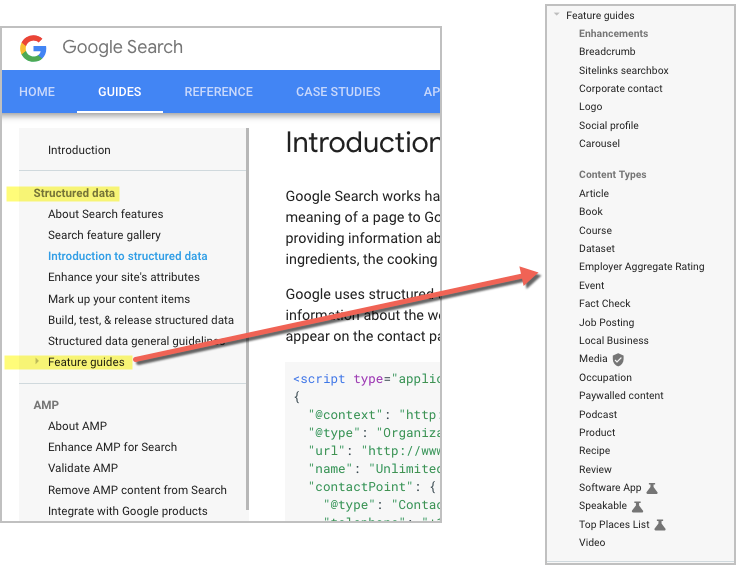
As of now, the above schema types are not included in their featured schema guides. In order to locate it, go to Google Developer’s page, click on the Left menu > Structured data > Feature guides.
If you want to see the Q&A structured data in action then head straight to StackOverflow.com. They are appearing on the top of the Google search results for the Q&A from quite some time. The best answers are displayed first, which is really convenient for the users.
Some people might argue that this is good for the users and Google but bad for the site, since users will get the entire answer in the SERP itself and they will not bother to enter the website. Most of the Q&A, FAQS & How To answers are short. So displaying the entire answer will not do any good. But, it will give you exposure and will also send visitors to the site since most of them would like to know more about it, but before entering into the website, they would want to confirm that the site is worth their time and actually offers genuine answers.
To stay on top of latest structured data, one can not rely on plugins since they are not up to date and often take time to catch up to the latest version. But there are some plugins that can help you leverage structured data. If you are using WordPress, the SOGO & Kansas City SEO’s plugin will come in handy.


Google has shifted some popular reports to new search console with upgrades. Here’s a look:
The new links report combines the functionality of “Links to your site” & “Internal link” reports & now provides the following information:
- Top linking domains (Which sites link to me the most?)
- Top linked pages (Which are my top linked pages from other sites?)
- Which are my top linked pages from a specific site?
- Top linking text (What link text points to my site?)
- What are the links from a specific site to my page?
- What are the top sites linking to my page?
- Top linked pages (Which of my pages is linked the most from within my own site?)
- Which of my pages links to my page?
Now you can not only see the issues but can also fix it by submitting a reindexing request. Google said that they know how important mobile usability is for the site owners and allowing them to request a fix directly from the report will be super convenient.Be informed that the features are the same, the upgrade is that you can now select the error and click “Validate Fix button” & Google will promptly Re-crawl the error.
You can now add & verify new sites, and manage your property’s users & permissions using the newly added settings page. Although we encountered some bugs while using it, we are sure that Google will fix it very soon.

Takeaway: All the new features and upgrades provide invaluable data. Take your time to explore the new search console and you will be able to figure out what feature and tools are most useful for you and how to use them to your benefit.

The main aim of having and maintaining your Google My Business listing is to spread awareness about your business. But in case you forget to fill the Service area then you will face something that’s rather strange.
Many users have reported that, when they forgot to fill the service area, a third party lead generation company’s link called “singleplatform.com” appeared in front of the service section.

Upon clicking on the link, it takes you to a page that is dedicated to the business. And the weirdest part is, it doesn’t open in a new window, but rather navigate you out of Google.

Sometimes it shows “Get a Quote” option, not from the business that you have searched for, but from the businesses that have paid on singleplatform.com to get listed.
When you click on the “Claim this Menu”, it will show you a service cost that ranges from $99 to $149 a month. Although we didn’t investigate further, Google forcing business owners to opt for a paid option is a wakeup call for those who think that they “OWN” their Google My Business listing.
Although the above encounters were mostly from the home service industry & were limited to the cities which have Google local services active.
The only way we can see to protect yourself from this is to fill our your services menu within Google My Business. We recommend you do this regardless of your industry. Just because Google is focused on the home services industry doesn’t mean they won’t turn to your industry next.

- Here’s how you can improve your Google Display Network campaigns.
- Somewhat similar to the relevance score in Facebook ads, Google has released “ad strength indicator” for responsive ads.
- Give your prospected customers a solid reason to click on your ads & increase the CTR. Here’s how.
- GoogleAds impression share data are now available in real time. Earlier, you would have to wait for 2 days to have them.
- Google Ads Automatically Updating Eligible Campaigns to Enhanced CPC Bidding.
- Google has yet again expanded the search ads. Here’s what you need to know.
- Bing Ads has released two new automated bidding options which you may be familiar with if you are using Google Ads: Target CPA and Maximize Conversions.
- Find out how Google automated ad suggestions are performing and if is it really helpful?
- Here’s a great article on landing pages. It’s sheds light on the importance of having a good landing page. Give it a read.
- Google Ads MCC Gets An Updated Look. It’s really a bliss for the agencies since they have to switch between multiple accounts. The new look has a drop down menu and other minor changes. But overall it sports a clean interface and is really easy to navigate.
- Google Text ads get Bigger.
- Starting October 31st, 2018, Bing Ads will no longer be supporting the ability to edit or create destination URLs at the keyword level.
- Starting from September adsenseformobileapps.com exclusion will not prevent Google Ads from appearing on mobile apps. But there are other ways.
SUBMIT FOR Online Marketing Analysis
Get an Online Marketing Analysis For Your Business
NAVIGATION
CONTACT US
CORPORATE OFFICE
SCHAUMBURG LOCATION
COMMUNITY